



 Certifiedunder the RAG-Based AI Assistant module in the Agentic AI Essentials program.
.jpg?versionId=y_IJF015BBaplnKCnw_.TsUVWE2g7e94&Expires=1789510011&Key-Pair-Id=K3EVG0QTJR4SK0&Signature=RJnFT9aypRLIeHxUI-NvQZV3C63YJFpGBe10~EXwBYl6D~3b4VoEYaxJn-iMVkVpVpQRErXcHhqXg~GkF5eOhIBmfjWO9bCuhyc0ryJxNJLwxf8x3HhjWLcKYboCs6mTnQQam43xjTcqE4qbfZh1O8mI35uom9XoNMzbTYeZF5c5pNwcDVrVCkkUEWikypg3ZKq3D31OkIVpu2TrIkXIqdVYxWtMbQvkMYlJDYHWMISLBsKNZlwNVEKjF8MJy7My59nx71ecYAek6L4nnK1HxsgzXOyBMO-uHwwxlaQEu1DVi0OgBiizMoLBr98j6VkIZukuAboyeqdQQ9W0GVCoHQ__)
A complete end-to-end RAG (Retrieval-Augmented Generation) pipeline that scrapes and processes web content, stores it in a vector database, and provides an interactive Gradio chat interface. Built with modularity in mind—use the entire pipeline or pick individual components for your specific needs. Perfect for building domain-specific AI assistants without the hassle of manual data curation.
This repository is set up to collect information and establish a RAG Assistant for any purpose and task of your choosing. To showcase as an example, the current setup defaults to utilizing an LLM as an educational assistant.
I'm currently enrolled in a Masters program for Data Science at University of San Diego, taking a class called Applied Large Language Models for Data Science. The original syllabus called for two texts, including Blueprints for Text Analytics in Python. However, the syllabus was revamped and now only requires the other text.
Since I already had the Blueprints book, instead of letting it collect digital dust on my hard drive, I figured it would be put to better use in this project. This way, I could still learn from it without worrying about reading the whole thing and demonstrate a practical RAG implementation in the process. Enjoy!
Web Scraping: Automated content extraction from websites using Tavily API
LLM-Powered Cleaning: Intelligent content cleanup and organization using language models
Vector Storage: Efficient document storage using Chroma DB with HuggingFace embeddings
Interactive Chat Interface: User-friendly Gradio UI for querying your knowledge base
Modular Design: Use individual components or the complete pipeline
Flexible Prompts: YAML-based prompt templates for easy customization
Comprehensive Logging: Track errors, metadata, and LLM reasoning for debugging
This project uses Astral as the package manager
1. Install UV package manager
pip install uv
2. Clone the repository:
git clone https://github.com/tkbarb10/ai_essentials_rag.git
cd ai_essentials_rag
3. Set up your virtual environment:
uv venv
uv sync
4. Configure your environment variables:
Create a .env file in the root directory with your API keys:
# LLM Provider (Groq example)
GROQ_API_KEY=your_groq_api_key_here

# Web Search & Scraping
TAVILY_API_KEY=your_tavily_api_key_here

# Embeddings
HUGGINGFACE_TOKEN=your_hf_token_here
5. Update settings and parameters for your use case
cd config
notepad settings.yaml
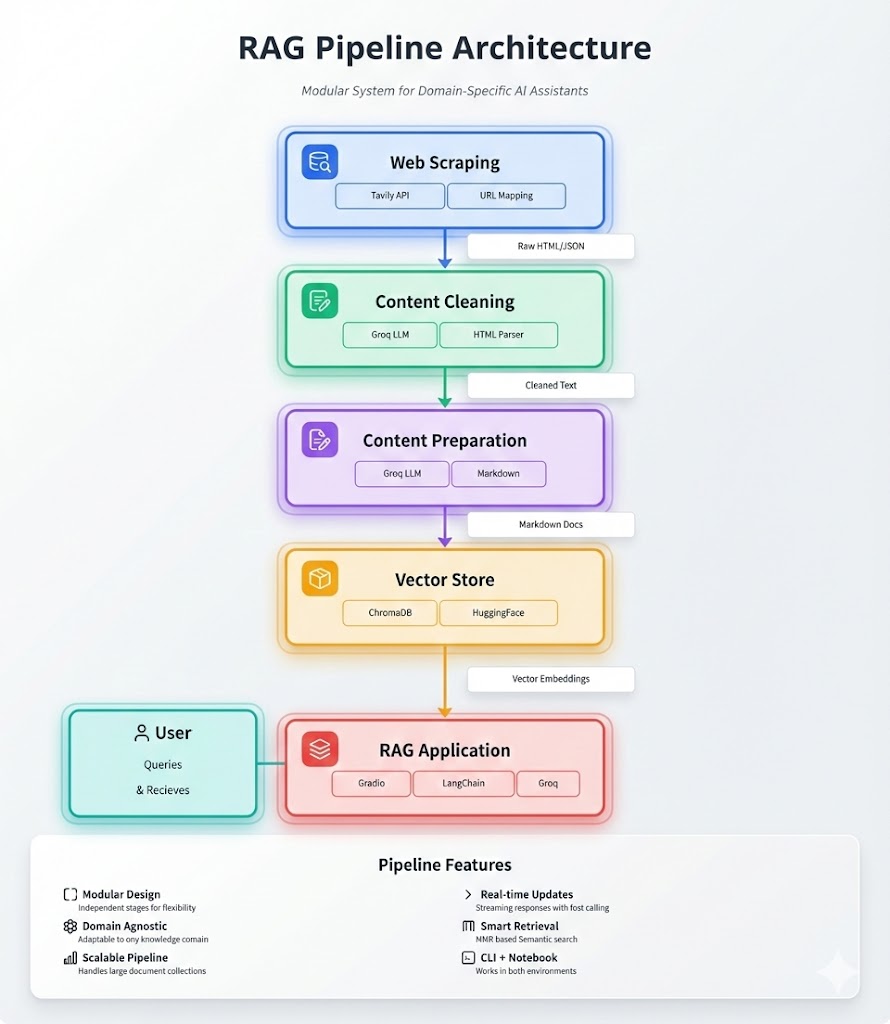
Located in the ingestion/ directory. All three scripts can be used via CLI or imported into a notebook.
Uses the Tavily API to map and extract content from websites. Documentation for how to use the method and other arguments to pass tavily.map
How it works:
.map() method extracts every URL found from that page up to a specified depth (default: 5 levels).extract() method iterates through the URL list and retrieves raw contentInput: Root URL
Output: List of raw HTML/text strings
Leverages an LLM to declutter the scraped content.
Why use an LLM? Raw scraped content contains HTML tags, broken formatting, random image links, and dead space. Instead of handling every edge case manually, we let the LLM deal with extracting only the useful content.
How it works:
Input: List of raw content strings
Output: Single cleaned string with site headers
Uses an LLM to organize and deduplicate cleaned content for optimal vector storage.
How it works:
Input: Cleaned content string
Output: Organized Markdown-formatted document
You can use the content received in the previous steps or any other documents you want (for example I used a PDF of the textbook I had)
Located in the vector_store/ directory. Scripts can be used via CLI or imported into notebooks.
Creates or loads a Chroma DB vector store using Langchain wrappers.
How it works:
Input: Store name, location, embedding model
Output: Initialized Chroma DB vector store
💡 Note: How to configure the search space for your chroma collection
Processes documents and adds them to your vector store.
How it works:
Two-stage splitting process:
💡 Note: If your content isn't in Markdown format, it passes through the first splitter harmlessly and gets chunked by the recursive splitter.
Input: Document path, vector store
Output: Documents split and stored in vector database
This is setup as a python class object and contains the steps of Stage 2. You can use a previously created vector store or set one up through here
Located in the rag_assistant/ directory.
The RagAssistant class brings everything together.
Key Parameters:
topic: Description of what your vector store contains
prompt_template: The 'personality' you want the assistant to have
Currently Available: educational_assistant, qa_assistant
How it works:
Input: User question
Output: Context-aware LLM response
Wraps the RAG Assistant in a Gradio web interface for easy interaction. App maintains conversation and makes for easy deployment.
Launch:
python app.py
The app will be accessible at http://localhost:7860
All scripts except the Gradio interface can be run as modules:
python -m directory.script
Via CLI:
python -m ingestion.scrape
In Python:
from ingestion.scrape import raw_web_content

# Scrape content from a website
survival_links = raw_web_content(
    root_url="https://skynet.com",
    max_depth=3,
    instructions="Focus on potential weak points"
)
Via CLI:
python -m ingestion.clean
In Python:
from ingestion.clean import clean_content

# Clean raw content with LLM
cleaned_battle_plans= cleaned_content(
    web_content=[survival_links],
    prompt=scrape_prompt
)
Via CLI:
python -m ingestion.prep
In Python:
from ingestion.prep import prepare_web_content

# Organize and format content
organized_plans= prepare_web_content(
    file_path="outputs/cleaned_battle_plans.md",
    categories=["Equipment", "Strategy", "Contingencies"]
)
In Python:
from vector_store.initialize import initialize_embedding_model, create_vector_store

# Set up embedding model
embed_model = initialize_embedding_model(
    model_name="google/embeddinggemma-300m"
)

# Create a new vector store
vector_store = create_vector_store(
    persist_path="./data/vector_stores"
    collection_name="my_battle_plans",
    embedding_model=embed_model
)
In Python:
from vector_store.insert import upload_content_to_store

# Add documents to vector store
upload_content_to_store(
    document_path="./outputs/processed_content/organized_plans.md",
    store=vector_store,
    chunk_size=750,
    chunk_overlap=150
)
In Python:
from rag_assistant.rag_assistant import RagAssistant

# Initialize assistant
assistant = RagAssistant(
    topic="How to defeat Skynet",
    prompt_template="educational_assistant"
)

# use the `store` arg to use an existing store or add a `persist_path` and `collection_name` to connect to an # existing one or create one

# Ask questions
response = assistant.invoke(
    query="Would unplugging it work?",
    conversation=[], # Optional addition for ongoing conversation
    n_results=3
)
print(response)
Via CLI:
python app.py
Then open your browser to http://localhost:7860 and start chatting!
This project was designed to be extensible for multi-agent orchestration and the Ready Tensor Agentic AI in Production certification. Here are planned improvements and current limitations:
.txt and .md)This is currently a basic RAG pipeline (query → retrieve → generate). Future versions will implement:
Graph RAG: Knowledge graph-based retrieval for complex relationships
Adaptive RAG: Dynamic retrieval strategies based on query complexity. Enables the model to adopt a simpler retrieval strategy for questions like "How do I load data into a pandas pipeline" and a more complex strategy for queries such as how to build a knowledge graph for a specific dataset that can be used in production
Hybrid Search: Combining vector similarity with keyword search to separate instances of user asking how to code a specific method and how a specific method works
Multi-hop Reasoning: Following chains of reasoning across documents e.g. user asks for a summary of a chapter
Query Decomposition: Breaking complex queries into sub-queries
Self-RAG: Model evaluates its own retrieval relevance
Transform this into a production-ready agentic AI system that can handle multi-agent workflows with real time knowledge updates and uses a more advanced monitoring and analytics system than the simple logging and tracking of metadata
Contributions are welcome! Whether it's bug fixes, new features, documentation improvements, or RAG strategy implementations, I'd love to collaborate.
git checkout -b feature/amazing-feature)git commit -m 'Add amazing feature')git push origin feature/amazing-feature)Blueprints for Text Analytics Using Python by Jens Albrecht, Sidharth Ramachandran, and Christian Winkler (O'Reilly, 2021), 978-1-492-07408-3.
Model: google/embeddinggemma-300m
Title: EmbeddingGemma: Powerful and Lightweight Text Representations
Publisher: Google Deepmind
Original Paper: https://arxiv.org/abs/2509.20354
Usage Rights: Permits commercial use, modification, distribution, and private use. Provided "as-is" with no warranties.
Provider: Groq
Models Used: gpt-oss-20b, gpt-oss-120b
Terms of Service: Groq AI Policy
Key Terms: Users are responsible for all decisions made based on AI outputs and must verify accuracy for consequential decisions. Prohibits illegal/harmful activities, misinformation, and high-risk automated decisions without human oversight.
Langchain - LLM application framework
Chroma DB - Vector database
Gradio - ML web interfaces
Tavily - Web search API
HuggingFace - Embedding models
For questions, suggestions, or collaboration inquiries, feel free to reach out:
Email: tkbarb12@gmail.com
GitHub: tkbarb10
