



 Certifiedunder the RAG-Based AI Assistant module in the Agentic AI Essentials program.
This project implements a Retrieval-Augmented Generation (RAG) chatbot that loads .txt files as its knowledge base. This RAG system can help upload documents to vector db and split documents into smaller and searchable chunks. Using a LLM model integrated via Google Gemini API, the RAG assistant can deliver accurate and document-based answers.
Retrieval-Augmented Generation (RAG) is an AI framework that combines large language models (LLMs) with external data sources to provide more accurate, up-to-date, and contextually relevant answers. RAG works by first retrieving relevant information from a knowledge base and then using that information to augment the prompt given to the LLM, which then generates a response based on both its training data and the retrieved context.

In this RAG system, it can:
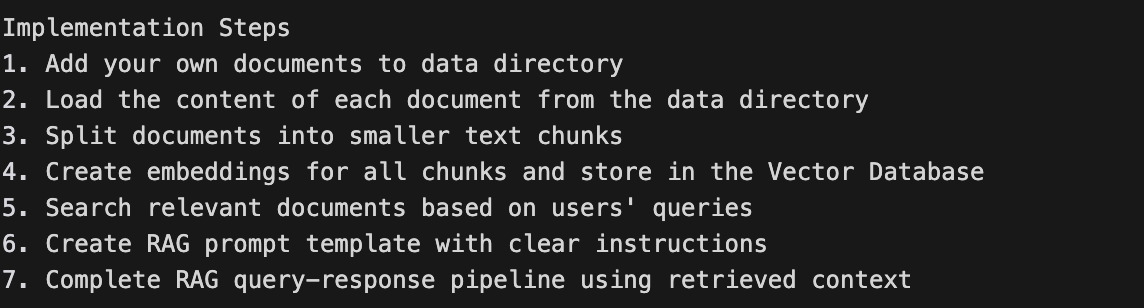
Building a RAG assistant in this case follow below implementation steps:
pip install -r requirements.txt
python src/app.py
This file contains VectorDB class which is a simple vector database wrapper using ChromaDB with sentence transformers.
To initialize the vector database:
# For example:
def __init__(self, collection_name: str = None, embedding_model: str = None):
        """
        Initialize the vector database.

        Args:
            collection_name: Name of the ChromaDB collection
            embedding_model: HuggingFace model name for embeddings
        """
To split the input text into searchable chunks:
# For example:
def chunk_text(self, text: str, chunk_size: int = 500) -> List[str]:
        """
        Simple text chunking by splitting on spaces and grouping into chunks.

        Args:
            text: Input text to chunk
            chunk_size: Approximate number of characters per chunk

        Returns:
            List of text chunks
        """
To store chunks in vector database:
# For example:
def add_documents(self, documents: List) -> None:
        """
        Add documents to the vector database.

        Args:
            documents: List of documents
        """
To search relevant document in vector database:
# For example:
def search(self, query: str, n_results: int = 5) -> Dict[str, Any]:
        """
        Search for similar documents in the vector database.

        Args:
            query: Search query
            n_results: Number of results to return

        Returns:
            Dictionary containing search results with keys: 'documents', 'metadatas', 'distances', 'ids'
        """
This file contains RAGAssistant class which supports different LLM providers, prompt template, query processing, vector db search, retrieval evaluation.
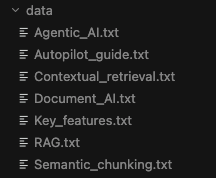
To load prepared documents from src/data directory:
# For example:
def load_documents() -> List[str]:
    """
    Load documents for demonstration.

    Returns:
        List of sample documents
    """
To initialize LLMs including OpenAI, Groq, Google Gemini APIs:
# For example:
def _initialize_llm(self):
        """
        Initialize the LLM by checking for available API keys.
        Tries OpenAI, Groq, and Google Gemini in that order.
        """
        # Check for OpenAI API key
        if os.getenv("OPENAI_API_KEY"):
            model_name = os.getenv("OPENAI_MODEL", "gpt-4o-mini")
            ......
            )

        elif os.getenv("GROQ_API_KEY"):
            model_name = os.getenv("GROQ_MODEL", "llama-3.3-70b-versatile")
            ......
            )

        elif os.getenv("GOOGLE_API_KEY"):
            model_name = os.getenv("GOOGLE_MODEL", "gemini-2.5-flash")
            ......
            )

        else:
            raise ValueError(
                "No valid API key found. Please set one of: OPENAI_API_KEY, GROQ_API_KEY, or GOOGLE_API_KEY in your .env file"
            )
To define RAG prompt template, including placeholders for context and user's question:
#  For example:
self.prompt_template = ChatPromptTemplate(
            [
                ("system",
                """
                Role: xxxx
                Instructions: xxxx
                Style or tone guidelines:
                - xxxx
                Output constraints:
                - xxxx
                """),
                ("user", "Context: {context}\n\nQuestion: {question}"),
            ]
        )
To generate the RAG query-response pipeline:
# For example:
def invoke(self, input: str, n_results: int = 3) -> str:
        """
        Query the RAG assistant with query processing and scope validation.

        Args:
            input: User's input
            n_results: Number of relevant chunks to retrieve

        Returns:
            Dictionary containing the answer and retrieved context
        """
To evaluate retrieval quality for a query:
# For example:
def evaluate_query(self, query: str, relevant_ids: List[str] = None,
                      n_results: int = 5) -> Dict[str, Any]:
        """
        Evaluate retrieval quality for a query.
        If relevant_ids provided, calculates precision/recall/MRR.
        If not provided, shows retrieval quality based on similarity.

        Args:
            query: User query
            relevant_ids: Optional list of relevant chunk IDs (ground truth)
            n_results: Number of results to retrieve

        Returns:
            Dictionary with evaluation information
        """
This file contains ProjectScope class which manages project scope for document domains, identify which domain a query belong to, and validates the scope.
# For example:

class ProjectScope:
    """Manages project scope for document domains."""

    def __init__(self):
        """Initialize with project scope configuration."""
        # Domain keywords mapping
        self.domains = {
            "rag": ["rag", "retrieval augmented", "retrieval", "augmented generation", "llm", "large language model"],
            xxxx
        }

        # Project metadata
        self.project_name = "Building a RAG Assistant project"
        self.description = "Building a RAG Assistant project"

    def identify_domain(self, query: str) -> Optional[str]:
        """
        Identify which domain a query belongs to.

        Args:
            query: The query to classify

        Returns:
            The domain name
        """
        xxxx
        return xxxx

    def validate_scope(self, query: str) -> Dict[str, Any]:
        """
        Validate if a query is within project scope.

        Args:
            query: The query to validate

        Returns:
            Dictionary with validation results
        """
        # Identify domain
        domain = self.identify_domain(query)

        return {
            xxxx
        }

    def get_config(self) -> Dict[str, Any]:
        """
        Get the full configuration.

        Returns:
            The configuration
        """
        return {
           xxxx
        }
This file contains QueryProcessor class which improves retrieval quality, including normalizing and cleaning the query, classifying the query, and processing a query through the pipeline.
For example:
class QueryProcessor:
    """Simple query processor for improving retrieval quality."""

    def preprocess(self, query: str) -> str:
        """
        Normalize and clean the query.

        Args:
            query: The query to process

        Returns:
            The processed query
        """
        # Remove extra whitespace
        query = re.sub(r'\s+', ' ', query.strip())

        xxxx

        return query

    def classify(self, query: str) -> str:
        """
        Classify query type based on intent.

        Args:
            query: The query to classify

        Returns:
            The query type
        """
        xxxx
        return xxxx

    def process(self, query: str) -> Dict[str, Any]:
        """
        Process a query through the pipeline.

        Args:
            query: The query to process

        Returns:
            Dictionary with processed query and metadata
        """
        xxxx

        return {
            xxxx
        }
This file contains RetrievalEvaluator class which measures retrieval quality, including 4 methods of calculating Precision@K, Recall@K, Mean Reciprocal Rank, and NDCG@K
# For example:
class RetrievalEvaluator:
    """Simple evaluator for measuring retrieval quality."""

    def precision_at_k(self, retrieved_ids: List[str], relevant_ids: List[str], k: int) -> float:
        """
        Calculate Precision@K: fraction of top K results that are relevant.

        Args:
            retrieved_ids: List of retrieved chunk/document IDs
            relevant_ids: List of relevant IDs (ground truth)
            k: The number of results to consider

        Returns:
            Precision@K: fraction of top K results that are relevant
        """

        xxxx
        return xxxx

    def recall_at_k(self, retrieved_ids: List[str], relevant_ids: List[str], k: int) -> float:
        """
        Calculate Recall@K: fraction of relevant items found in top K.

        Args:
            retrieved_ids: List of retrieved chunk/document IDs
            relevant_ids: List of relevant IDs (ground truth)
            k: The number of results to consider

        Returns:
            Recall@K: fraction of relevant items found in top K
        """

        xxxx
        return xxxx

    def mrr(self, retrieved_ids: List[str], relevant_ids: List[str]) -> float:
        """
        Calculate Mean Reciprocal Rank: 1/rank of first relevant result.

        Args:
            retrieved_ids: List of retrieved chunk/document IDs
            relevant_ids: List of relevant IDs (ground truth)

        Returns:
            Mean Reciprocal Rank: 1/rank of first relevant result (0.0 if no matches)
        """

        xxxx
        return xxxx

    def ndcg_at_k(self, retrieved_ids: List[str], relevant_ids: List[str], k: int) -> float:
        """
        Calculate NDCG@K: normalized discounted cumulative gain.

        Args:
            retrieved_ids: List of retrieved chunk/document IDs
            relevant_ids: List of relevant IDs (ground truth)
            k: The number of results to consider

        Returns:
            NDCG@K: normalized discounted cumulative gain
        """

        xxxx
        return xxxx

    def evaluate(self, retrieved_ids: List[str], relevant_ids: List[str],
                k_values: List[int] = [1, 3, 5]) -> Dict[str, Any]:
        """
        Evaluate retrieval with multiple metrics.

        Args:
            retrieved_ids: List of retrieved chunk/document IDs
            relevant_ids: List of relevant IDs (ground truth)
            k_values: List of k values to evaluate at

        Returns:
            Dictionary with evaluation metrics
        """
        results = {
            xxxx
        }
        xxxx
        return results
The RAG assistant only answers questions by using the provided context.
After running command
python src/app.py
the output will be
#For example:
Initializing RAG Assistant...
Using Groq model: llama-3.3-70b-versatile
Loading embedding model: sentence-transformers/all-MiniLM-L6-v2
Vector database initialized with collection: rag_documents
RAG Assistant initialized successfully

Loading documents...
Loaded Contextual_retrieval.txt successfully
Loaded RAG.txt successfully
Loaded Autopilot_guide.txt successfully
Loaded Semantic_chunking.txt successfully
Loaded Agentic_AI.txt successfully
Loaded Key_features.txt successfully
Loaded Document_AI.txt successfully
Loaded 7 documents successfully
Loaded 7 sample documents
Processing 7 documents...
Document 0: Split into 3 chunks.
Document 1: Split into 2 chunks.
Document 2: Split into 6 chunks.
Document 3: Split into 6 chunks.
Document 4: Split into 3 chunks.
Document 5: Split into 9 chunks.
Document 6: Split into 4 chunks.
Documents added to vector database
Added sample documents

============================================================
Project: Building a RAG Assistant project
Description: Building a RAG Assistant project for the AAIDC course module 1

Supported Domains:
  - Rag
  - Document Ai
  - Agentic Ai
  - Chunking
  - Contextual Retrieval
  - Autopilot
============================================================

============================================================
Welcome to the RAG Assistant


Enter a question, or 'quit' to exit:
If you enter a question, for example, "what is RAG?", you'll be asked if you need to enable retrieval quality evaluation? (y/n).
If you input "n", which means you don't enable retrieval quality evaluation, you'll get answer which is retrieved based on the provided documents.
# For example:
Enter a question, or 'quit' to exit: what is RAG


Do you need to enable retrieval quality evaluation? (y/n)
n
Retrieval quality evaluation disabled.

Getting answer...
Searching for top 3 results for query: what is RAG?
Generating query embedding...
Querying collection...


RAG stands for Retrieval-Augmented Generation. It is the process of optimizing the output of a large language model (LLM) by referencing an authoritative knowledge base outside of its training data sources before generating a response. This approach extends the capabilities of LLMs to specific domains or an organization's internal knowledge base, without the need to retrain the model, making it a cost-effective way to improve LLM output and keep it relevant, accurate, and useful in various contexts.

Key points about RAG include:
* It optimizes LLM output by referencing an external knowledge base
* It extends LLM capabilities to specific domains or internal knowledge bases
* It does not require retraining the model
* It is a cost-effective approach to improving LLM output.

============================================================
Welcome to the RAG Assistant


Enter a question, or 'quit' to exit:
If you input "y" to enable retrieval quality evaluation, you'll get retrieval quality results:
# For example:
Enter a question, or 'quit' to exit: what is RAG


Do you need to enable retrieval quality evaluation? (y/n)
y
Retrieval quality evaluation enabled.

Getting answer...
Searching for top 3 results for query: what is RAG?
Generating query embedding...
Querying collection...


Searching for top 5 results for query: what is RAG?
Generating query embedding...
Querying collection...


[Retrieval Quality - Basic]
  Average similarity: 43.2%
  Quality status: poor
  ⚠️  Warning: Low similarity - answer may not be accurate
  ⚠️  Your query might be out of scope for the documents!
Searching for top 5 results for query: what is RAG?
Generating query embedding...
Querying collection...


============================================================
Retrieved Chunks (review to identify which are actually relevant):
============================================================

1. ID: doc_1_chunk_1 (similarity: 63.4%)
   Content: . RAG extends the already powerful capabilities of LLMs to specific domains or an organization's int...

2. ID: doc_3_chunk_3 (similarity: 54.9%)
   Content: Fixed-sized chunking. Most chunking strategies used in RAG today are based on fix-sized text segment...

3. ID: doc_1_chunk_0 (similarity: 41.5%)
   Content: Retrieval-Augmented Generation (RAG) is the process of optimizing the output of a large language mod...

4. ID: doc_3_chunk_2 (similarity: 38.7%)
   Content: Text data chunking strategies play a key role in optimizing the RAG response and performance. Fixed-...

5. ID: doc_0_chunk_0 (similarity: 17.5%)
   Content: Contextual retrieval is a technique introduced by Anthropic in September 2024. Their article covers ...
============================================================

Do you want to provide ground truth (relevant_ids) for full evaluation? (y/n)
You'll be asked a further question - if you want to provide ground truth for full evaluation, if you input "n", then you'll get answers which is retrieved based on the provided documents; if you input "y", then you'll have 3 options to choose, for example:
# For example:
Do you want to provide ground truth (relevant_ids) for full evaluation? (y/n)
y

Options:
  a) Enter chunk IDs manually (comma-separated)
     Example: doc_0_chunk_0, doc_0_chunk_1
  b) Type 'use_retrieved' to mark all retrieved as relevant
     (Only use if you're sure they all answer your question!)
  c) Type 'none' if query is out of scope (no chunks are relevant)

Your choice: doc_1_chunk_1
Using 1 chunk(s) as relevant.


Searching for top 5 results for query: what is RAG?
Generating query embedding...
Querying collection...


[Evaluation Debug]
Retrieved IDs: ['doc_1_chunk_1', 'doc_3_chunk_3', 'doc_1_chunk_0', 'doc_3_chunk_2', 'doc_0_chunk_0']...
Relevant IDs: ['doc_1_chunk_1']
Matches found: 1

============================================================
Full Evaluation Results (with ground truth):
============================================================
Retrieved: 5 | Relevant: 1

Metrics:
  Precision@1: 1.000
  Precision@3: 0.333
  Precision@5: 0.200
  Recall@5: 1.000
  MRR: 1.000
  NDCG@5: 1.000
============================================================


RAG stands for Retrieval-Augmented Generation. It is the process of optimizing the output of a large language model (LLM) by referencing an authoritative knowledge base outside of its training data sources before generating a response. This approach extends the capabilities of LLMs to specific domains or an organization's internal knowledge base, without the need to retrain the model, making it a cost-effective way to improve LLM output and keep it relevant, accurate, and useful in various contexts.

Key points about RAG include:
* It optimizes LLM output by referencing an external knowledge base
* It extends LLM capabilities to specific domains or internal knowledge bases
* It does not require retraining the model
* It is a cost-effective approach to improving LLM output.

============================================================
Welcome to the RAG Assistant


Enter a question, or 'quit' to exit:
When you ask a question which is out of provided documents, you'll see "I don't know" from the output according to the output constraints of the prompt.
# For example:
Enter a question, or 'quit' to exit: compare google and firefox


Do you need to enable retrieval quality evaluation? (y/n)
n
Retrieval quality evaluation disabled.

Getting answer...
Searching for top 3 results for query: compare google and firefox
Generating query embedding...
Querying collection...


I don't know. The provided context does not contain information about Google and Firefox, or any comparison between the two. It discusses Anthropic's techniques for contextual retrieval, combining semantic search and keyword search, and adding context to document chunks, but does not mention Google or Firefox.
The RAG assistant can successfully answer users' queries using a knowledge base provided in vector db. It can retrieve the most relevant chunks and generate accurate answers based on the prompt.