Certifiedunder the RAG-Based AI Assistant module in the Agentic AI Essentials program.
Authors: Geoffrey Duncan Opiyo, Hillary Arinda, Justine Okumu, Deo Mugabe
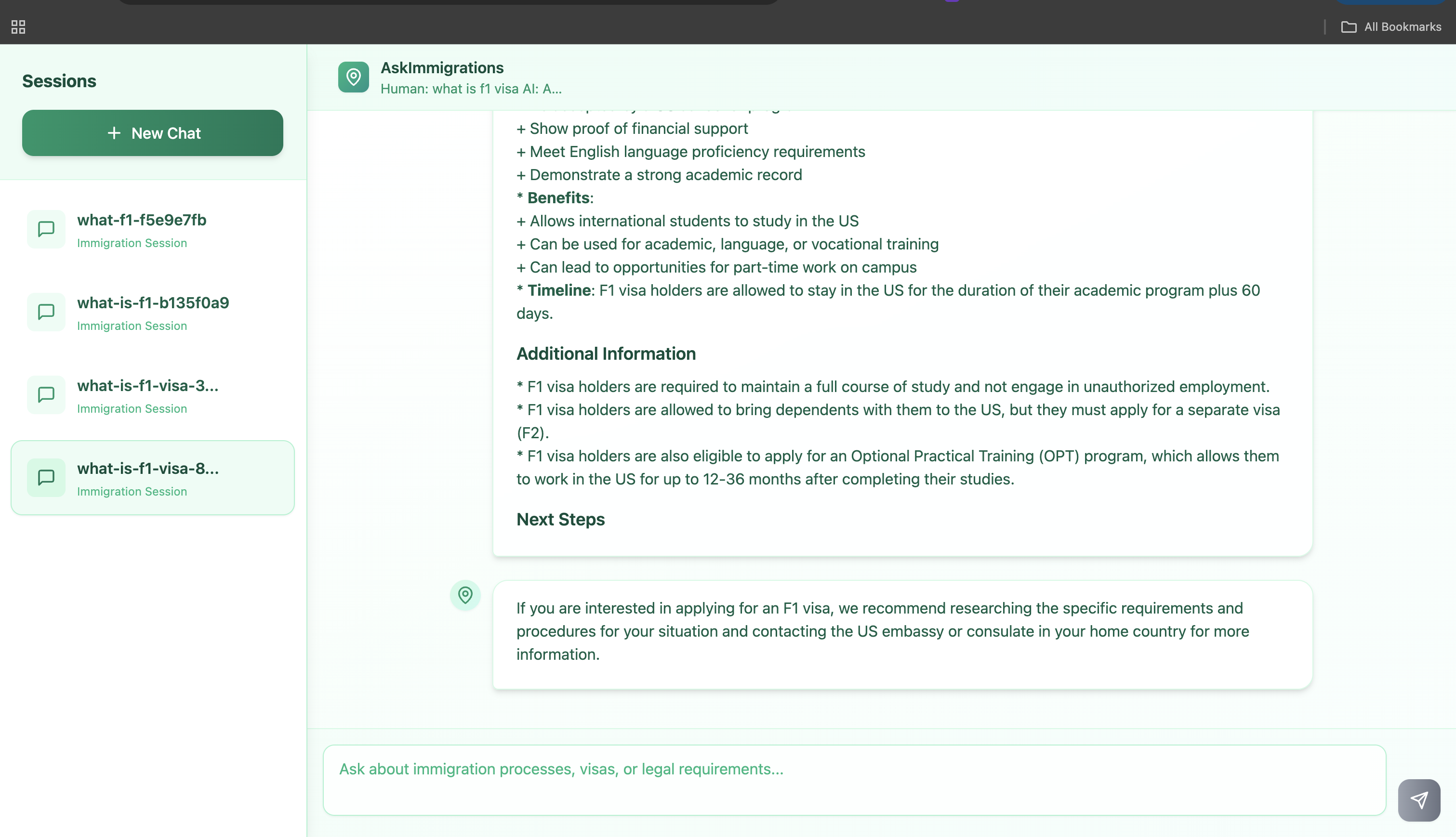
U.S. immigration information is dense, scattered across lengthy PDFs, policy manuals, and form instructions that change over time. Applicants, families, workers, and students must translate legal jargon into actionable steps—often without reliable, up-to-date guidance.
AskImmigration delivers retrieval-augmented, citation-backed responses by extracting from vetted official PDFs and structured form data—keeping answers focused, current, and explainable.
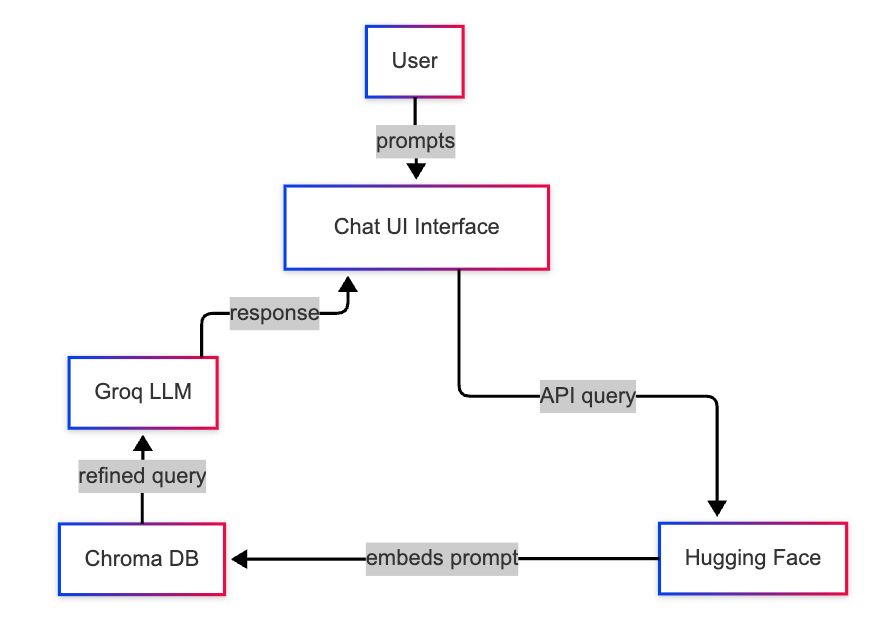
1. Ingestion
Source PDFs and JSON files are parsed and split into semantically coherent text chunks (size tuned for LLM context efficiency and retrieval granularity).
2. Embedding Generation
Each chunk is converted to a dense vector using a HuggingFace MiniLM embedding model (dimension = 768).
3. Indexing
Resulting embeddings (with associated metadata: source doc id, chunk id, offsets) are stored in a Chroma vector database for approximate nearest neighbor (ANN) similarity search.
4. Prompt Construction
At query time, a LangChain pipeline assembles:
5. Query and Retrieval-Augmented Generation
A semantic search (k-nearest vectors) retrieves top candidate chunks. Retrieved context + prompts are passed to a Groq-hosted LLM for answer synthesis. Post-processing enforces format (e.g., citations, concise style).
| Stage | Metric / Throughput | Notes |
|---|---|---|
| Ingestion | ~100 documents/minute | Measured on moderate commodity hardware during bulk load. |
| Embedding Dimension | 768 floats per chunk | MiniLM vector size. |
| Query Latency | <500 ms per lookup + response | On a GPU-enabled machine (retrieval + LLM call). |
For full setup and examples, see our README.
✅ Document-grounded answers
Pulls directly from well curated PDFs and JSON files from trusted public sources, so every response is backed by real, cited sources.
✅ Safety rules
Built-in guardrails keep the assistant on topic and prevent it from sharing unsafe or off-scope information.
✅ Multi-turn chat
Remembers your previous questions and answers, letting you follow up without losing context.
✅ Configurable prompts
Adjust the assistant’s role, tone, and boundaries in a simple YAML file—no code changes needed.
✅ Full audit trail
Saves every question and answer in Firestore for easy review and compliance tracking.
| Part | Tech |
|---|---|
| Frontend/CLI | React/Python |
| Prompt Config | YAML |
| Vector Search | Chroma |
| Embeddings | Hugging Face Sentence Transformers |
| LLM Engine | LangChain + Groq |
| Data Storage | Firestore |
| Utilities | cli.py, load_data.py |
🧭 AskImmigration helps you navigate the U.S. immigration process with clear, direct answers — no legal jargon or confusion.
📄 It uses official, up-to-date data from USCIS forms and government policies to ensure accuracy and reliability.
Whether you're applying for a visa, adjusting your status, or planning for citizenship, AskImmigration is here to support you every step of the way.
🌐 Multilingual Support
Allow users to interact in multiple languages (e.g. Spanish, Mandarin, Arabic) to make the tool accessible to a broader audience.
✍️ Form Assistant
Help users fill out common USCIS forms by guiding them section-by-section with plain-language explanations and example answers.
📄 Document Uploader
Let users upload their USCIS notices or forms. The assistant could analyze them and provide insights or next steps based on the content.
Clone the repository:
git clone https://github.com/okumujustine/AskImmigrate.git
cd AskImmigrate
Install dependencies:
uv pip install -r requirements.txt
Create a .env file in the project root and add your Groq key:
GROQ_API_KEY=your-groq-api-key
Ensure JSON and PDF source files are accessible on disk.
Ingest documents and JSON:
python embed_documents.py
Launch the terminal chat with a question:
python cli.py --question "What is the F1 visa?"
List all previous chat sessions:
python cli.py --list_sessions
Continue a past session (replace <session_id> with an ID from the list):
python cli.py --session_id <session_id> --question "Next question text"
Run the back-end server:
uvicorn app.api:app --reload --port 9000
Navigate to the frontend directory:
cd frontend
Install frontend dependencies:
npm install
Start the development server:
npm run dev
Open your browser at:
http://localhost:5173
to chat with AskImmigrate in the web UI.
🔐 License: This project is licensed under the MIT License
AskImmigration transforms a process that often feels overwhelming into one that's fast, clear, and empowering. It takes dense, scattered immigration texts and delivers grounded answers you can understand and act on immediately.
You get clarity instead of jargon, sources instead of speculation, and instant access instead of endless searching—so you can stay focused on your path, not the paperwork.
This assistant doesn’t replace legal counsel, but it prepares you to ask sharper questions, catch issues early, and move forward with greater confidence.
As the platform grows—with multilingual support, guided forms, smarter updates, and stronger evaluation—it will stay true to its mission: reduce friction, lower anxiety, and raise trust in every immigration step.
Ask clearly. Understand instantly. Decide with confidence.