Abstract
WhatsApp is one of the most used messenger applications today with more than 2 Billion users worldwide. It was found that more than 65 billion messages are sent on WhatsApp daily so we can use WhatsApp chats for analyzing our chat with a friend, customer, or a group of people. In this article, I will take you through the task of WhatsApp Chat Analysis with Python.
Introduction
WhatsApp Chat Analysis
You can use your WhatsApp data for many data science tasks like sentiment analysis, keyword extraction, named entity recognition, text analysis and several other natural language processing tasks. It also depends on who you are analyzing your WhatsApp messages with because you can find a lot of information from your WhatsApp messages which can also help you to solve business problems.
Before starting with the task of WhatsApp Chat analysis with Python you need to extract your WhatsApp data from your smartphone which is a very easy task. To extract your WhatsApp chats, just open any chat with a person or a group and follow the steps mentioned below:
If you are having an iPhone then tap on the Contact Name or the Group Name. In case you are having an Android smartphone then tap on the 3 dots above.
Then scroll to the bottom and top on Export Chat.
Then select without media for simplicity if it asks you whether you want your chats with or without media.
Then email this chat to yourself and download it to your system.
So this is how you can easily get your WhatsApp chats with any person or a group for the task of WhatsApp chat analysis. In the section below, I will take you through WhatsApp chat analysis with Python.
Methodology
I hope you now have understood how to get your WhatsApp data for the task of WhatsApp chat analysis with Python. Now let’s start this task by importing the necessary Python libraries that we need for this task:
import regex
import pandas as pd
import numpy as np
import emoji
from collections import Counter
import matplotlib.pyplot as plt
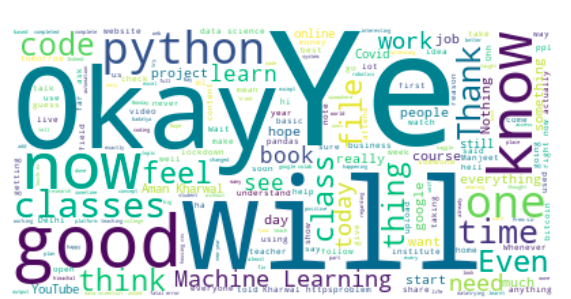
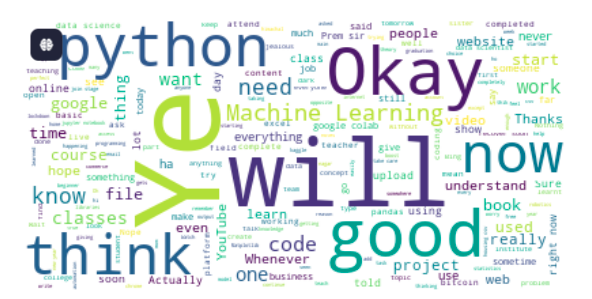
from wordcloud import WordCloud, STOPWORDS, ImageColorGenerator
The dataset we are using here requires a lot of preparation, so I suggest you take a look at the data you are using before starting this WhatsApp chat analysis task. As I have already walked through the dataset, so I’ll start by writing a few Python functions to prepare the data before importing it:
def date_time(s):
pattern = '^([0-9]+)(/)([0-9]+)(/)([0-9]+), ([0-9]+):([0-9]+)[ ]?(AM|PM|am|pm)? -'
result = regex.match(pattern, s)
if result:
return True
return False
def find_author(s):
s = s.split(":")
if len(s)==2:
return True
else:
return False
def getDatapoint(line):
splitline = line.split(' - ')
dateTime = splitline[0]
date, time = dateTime.split(", ")
message = " ".join(splitline[1:])
if find_author(message):
splitmessage = message.split(": ")
author = splitmessage[0]
message = " ".join(splitmessage[1:])
else:
author= None
return date, time, author, message
Now let’s import the data and prepare it in a way that we can use it in a pandas DataFrame:
data = []
conversation = 'WhatsApp Chat with Sapna.txt'
with open(conversation, encoding="utf-8") as fp:
fp.readline()
messageBuffer = []
date, time, author = None, None, None
while True:
line = fp.readline()
if not line:
break
line = line.strip()
if date_time(line):
if len(messageBuffer) > 0:
data.append([date, time, author, ' '.join(messageBuffer)])
messageBuffer.clear()
date, time, author, message = getDatapoint(line)
messageBuffer.append(message)
else:
messageBuffer.append(line)
Our dataset is completely ready now for the task of WhatsApp chat analysis with Python. Now let’s have a look at the last 20 messages and some other insights from the data:
df = pd.DataFrame(data, columns=["Date", 'Time', 'Author', 'Message'])
df['Date'] = pd.to_datetime(df['Date'])
print(df.tail(20))
print(df.info())
print(df.Author.unique())
Now let’s have a look at the total number of messages between this WhatsApp chat:
1
total_messages = df.shape[0]
2
print(total_messages)
Now let’s have a look at the total number of media messages present in this chat:
1
media_messages = df[df["Message"]==''].shape[0]
2
print(media_messages)
Now let’s extract the emojis present in between the chats and have a look at the emojis present in this chat:
def split_count(text):
emoji_list = []
data = regex.findall(r'\X',text)
for word in data:
if any(char in emoji.UNICODE_EMOJI for char in word):
emoji_list.append(word)
return emoji_list
df['emoji'] = df["Message"].apply(split_count)
emojis = sum(df['emoji'].str.len())
print(emojis)
;
;
;
;
;
;;
;
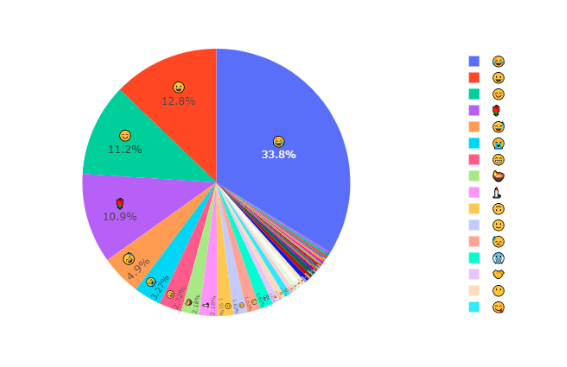
Now let’s prepare a visualization of the total emojis present in the chat and the type of emojis sent between the two people. It will help in understanding the relationship between both the people:
total_emojis_list = list(set([a for b in messages_df.emoji for a in b]))
total_emojis = len(total_emojis_list)
total_emojis_list = list([a for b in messages_df.emoji for a in b])
emoji_dict = dict(Counter(total_emojis_list))
emoji_dict = sorted(emoji_dict.items(), key=lambda x: x[1], reverse=True)
for i in emoji_dict:
print(i)
emoji_df = pd.DataFrame(emoji_dict, columns=['emoji', 'count'])
import plotly.express as px
fig = px.pie(emoji_df, values='count', names='emoji')
fig.update_traces(textposition='inside', textinfo='percent+label')
fig.show()
Experiments
Results
Conclusion
So this is how we can easily analyze any WhatsApp chat between you and your friend, customer, or even a group of people. You can further use this data for many other tasks of natural language processing. I hope you liked this article on the task of WhatsApp chat analysis with Python. Feel free to ask your valuable questions in the comments section below.