



 Certifiedunder the RAG-Based AI Assistant module in the Agentic AI Essentials program.
Despite being a fairly new offering, vector database vendors have sprung up like wild mushrooms after the rain. As of this publication there are more than 20 vector database vendors, each offering different options and prices.
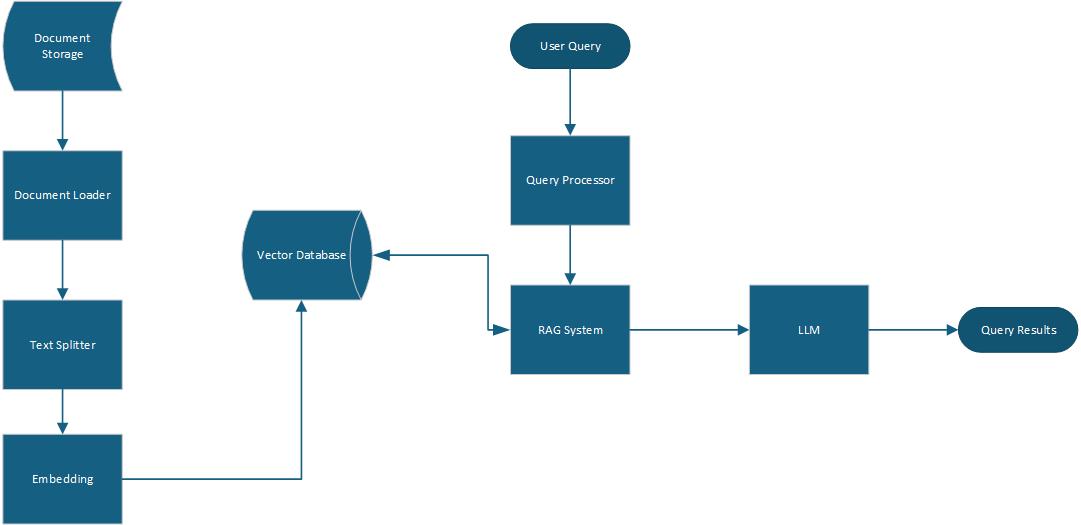
This technical publication combines vector database, RAG and LLM for processing and retrieval of a set of publicly accessible publications related to vector database offerings. The system integrates document processing, vector embedding, and natural language generation to create an intelligent question-answering framework.
The implementation processes Text and PDF documents from a designated directory, segments them into semantic chunks, and creates vector embeddings using HuggingFace's sentence-transformers model. These embeddings are stored in a ChromaDB vector database, enabling efficient similarity search. When presented with a query, the system retrieves the most relevant document fragments and utilizes GROQ's language model to generate responses.
Link to Codebase: https://github.com/rrubis/ready-tensor-assignment-1
src/app.py this component scans the configurable document directory (data) for Text and PDF files and loads them using LangChain's TextLoader and PyPDFLoader.if file.endswith(".txt"): file_path = os.path.join(documents_path, file) try: loader = TextLoader(file_path, autodetect_encoding=True) loaded_docs = loader.load() documents.extend(loaded_docs) logger.info(f"Successfully loaded: {file}") except Exception as e: logger.warning(f"Error loading {file}: {str(e)}") elif file.endswith(".pdf"): file_path = os.path.join(documents_path, file) try: loader = PyPDFLoader(file_path) loaded_docs = loader.load() documents.extend(loaded_docs) logger.info(f"Successfully loaded: {file}") except Exception as e: logger.warning(f"Error loading {file}: {str(e)}")
RecursiveCharacterTextSplitter with configurable chunk size (default: 1000 characters) and overlap parameters (default: 200 characters). This chunking strategy preserves semantic coherence while creating appropriately sized segments for embedding.text_splitter = RecursiveCharacterTextSplitter( chunk_size=chunk_size, chunk_overlap=chunk_overlap, ) chunks = text_splitter.split_text(text)
The vector database subsystem manages document embeddings and similarity search operations:
src/vectorydb.py the module utilizes HuggingFace's sentence transformers using the sentence-transformers/all-MiniLM-L6-v2 model to convert text chunks into database vector representations.embeddings = self.embedding_model.encode(chunks) self.collection.add( embeddings=embeddings, documents=chunks, )
db directory.self.client = chromadb.PersistentClient(path=db_path, settings=Settings(allow_reset=True))
The query processing and response generation system combines information retrieval with language generation:
src/app.py the module interfaces with GROQ's API, initializing the language model.model_name = os.getenv("GROQ_MODEL", "llama-3.1-8b-instant") llm = ChatGroq( api_key=os.getenv("GROQ_API_KEY"), model=model_name, temperature=0.0 )
results = self.collection.query(
    query_embeddings=[query_embedding],
    n_results=n_results,
    include=["documents", "metadatas", "distances"],
)
results = self.vector_db.search(input, n_results)
prompt_value = self.prompt_template.format_messages(context = results["documents"], question = input)
llm_answer = self.llm.invoke(prompt_value).content
The module utilizes configuration parameters and prompt template.
Environment Configuration and Prompt Template:
# Groq API Configuration
GROQ_API_KEY=your_groq_api_key_here
GROQ_MODEL=llama-3.1-8b-instant

# Embedding Configuration
EMBEDDING_MODEL=sentence-transformers/all-MiniLM-L6-v2

# Vector Database Configuration
CHROMA_COLLECTION_NAME=rag_documents
template = """
role: |
            A helpful assistant that can answer the users questions given some relevant documents.
style_or_tone:
            - Use clear, concise language with bullet points where appropriate.
instruction: |
            Given the some documents that should be relevant to the user's question, answer the user's question.
output_constraints:
            - Only answer questions based on the provided documents.
            - If the user's question is not related to the documents, then you SHOULD NOT answer the question. Say "The question is not answerable given the documents".
            - Never answer a question from your own knowledge.
output_format:
            - Provide answers in markdown format.
            - Provide concise answers in bullet points when relevant.
Relevant documents: {context}
User's question: {question}
"""
The src/app.py file serves as the integration point:
init_vector_db() initializes vector databaseload_documents() loads documents from the data directory and performs chunkingadd_documents() embeds documents and loads them in the vector databasequery() implements the query workflowmain() provides the CLI user interfaceThis architecture follows separation of concerns principles, with each module handling a specific aspect of the RAG workflow. The modular design allows for component replacement or enhancement without disrupting the overall system function, making the system adaptable to future improvements in embedding models, language models, or chunking strategies.
This publication has presented a simple implementation of a Retrieval Augmented Generation (RAG) system designed to provide contextually relevant answers to questions based on document collections. Several key conclusions can be drawn.
Text document processing, the system can also load and process PDF documents.logging library.The RAG-based AI Agent demonstrates how the integration of information retrieval with generative AI can create systems that leverage the strengths of both approaches. By grounding language model outputs in specific document collections, it is possible to achieve a more accurate, trustworthy AI assistants that can effectively serve as knowledge interfaces to organizational documentation.