Certifiedunder the RAG-Based AI Assistant module in the Agentic AI Essentials program.Certifiedunder the RAG-Based AI Assistant module in the Agentic AI Essentials program.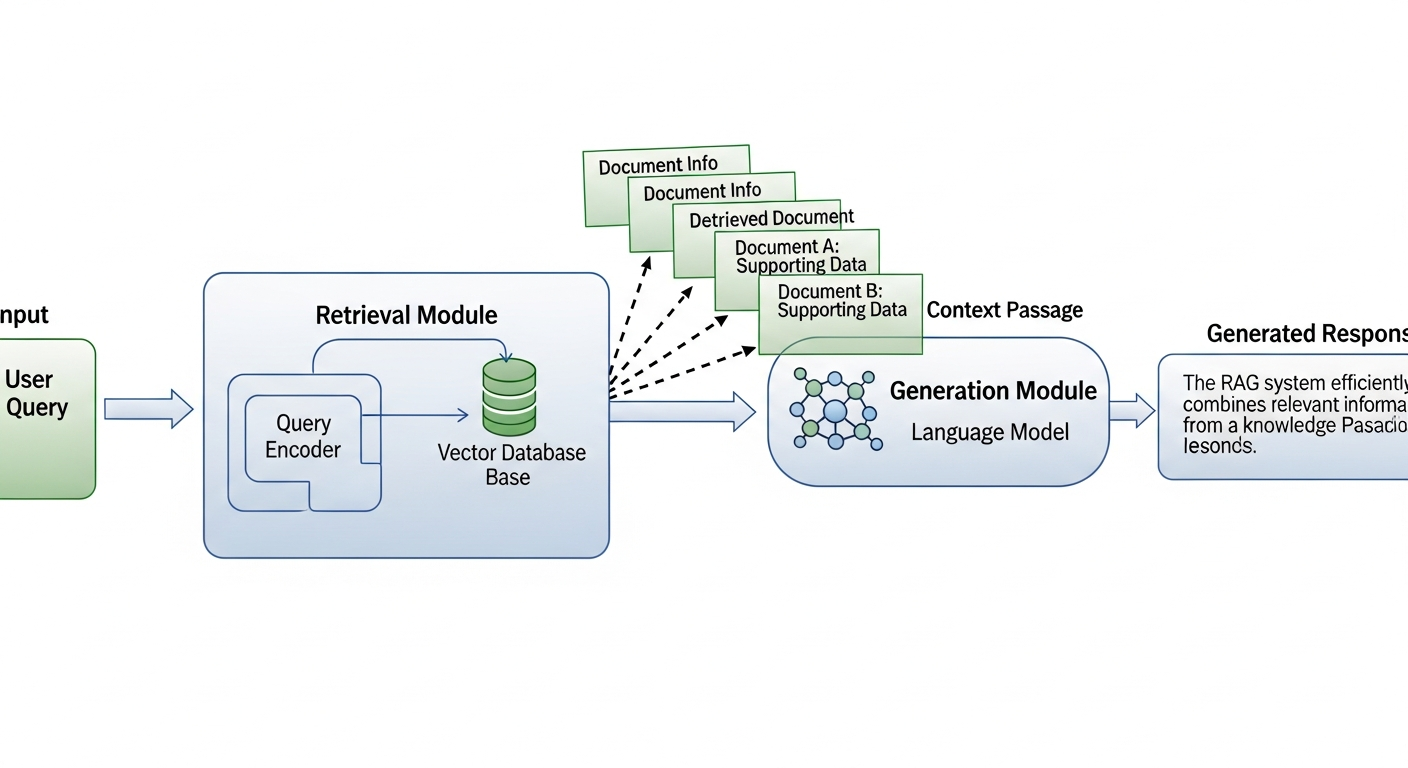
Ordinary chat bots, even when powered by AI models, fail to meet specific use cases, like efficient gathering and processing of datasets outside their training data. This problem resonates widely from academic environments to even a customer-interaction chat bot. This is where RAG(Retrieval Augmented Generation) systems come in, where data is not squeezed into the context window of the model but rather stored locally and retrieved as and when needed.
As further support to the need of such a system you may imagine yourselves to be a researcher trying to leverage AI to summarise large amounts of raw text files, where he may in the worst case scenario have to copy paste the text from each document into the model sacrificing time,efforts,token costs and what not. A RAG system is a life saver in that scenario, which also happens to be one of the most basics uses of this technology.
-------- RAG--------
  User's query --> results from vector database --> AI Model / Existing Chat Bot --> Final answer in Natural Language
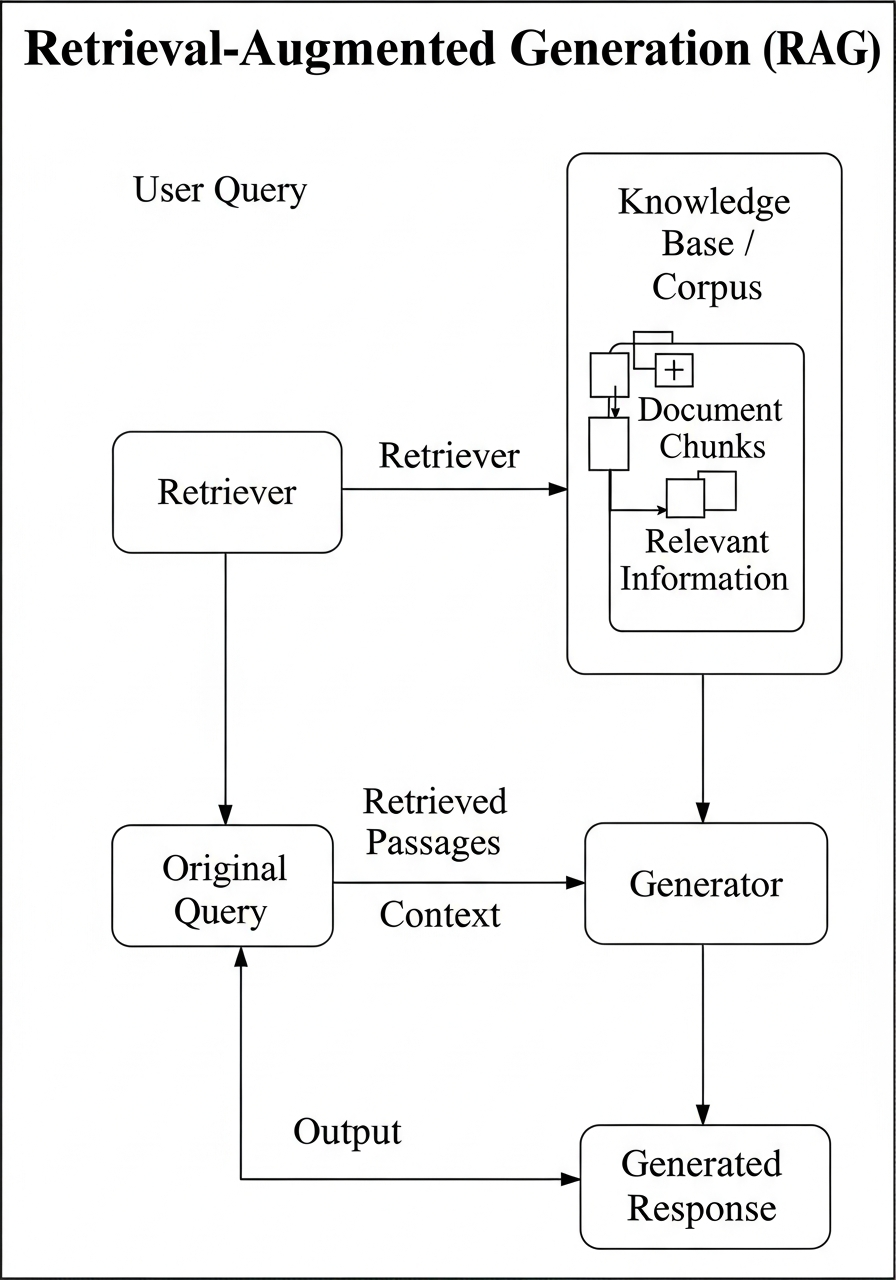
This project presents a Retrieval-Augmented Generation (RAG) Assistant that combines local knowledge retrieval with reasoning from advanced large language models (LLMs).
The system integrates multiple providers — OpenAI, Groq, and Google Gemini — ensuring flexibility, cost-efficiency, and fault tolerance.
At its core, the assistant uses ChromaDB as a persistent vector database to store and retrieve semantically meaningful document chunks.
Users can query their custom knowledge base or ask general questions directly to the LLM, enabling both factual precision and open-domain intelligence.
Step 1.Go to the repo linked with this publication for installation code block or feel free to use it from here.
# Clone the repository
git clone https://github.com/juvelanish/RAG-Assistant
cd ReadyTensorRAG

# Create and activate virtual environment
python -m venv venv
.\venv\Scripts\activate  # Windows
source venv/bin/activate # Linux/Mac

# Install dependencies
pip install -r requirements.txt
Step 2.After adding your .env file with the desired model provider's API...
# OpenAI API Configuration
OPENAI_API_KEY=your_openai_api_key_here
OPENAI_MODEL=gpt-4o-mini


# Groq API Configuration (alternative to OpenAI)
GROQ_API_KEY=your_groq_api_key_here
GROQ_MODEL=llama-3.1-8b-instant

# Google Gemini API Configuration (alternative to OpenAI/Groq)
GOOGLE_API_KEY=your_google_api_key_here
GOOGLE_MODEL=gemini-pro
Step 3.Run only the app.py file and see the magic of a
RAG Powered LLM.
python src/app.py
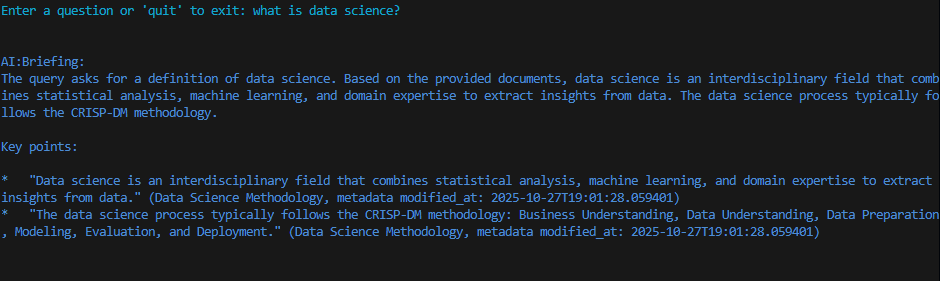
1.You will get a CLI like this after running app.py.
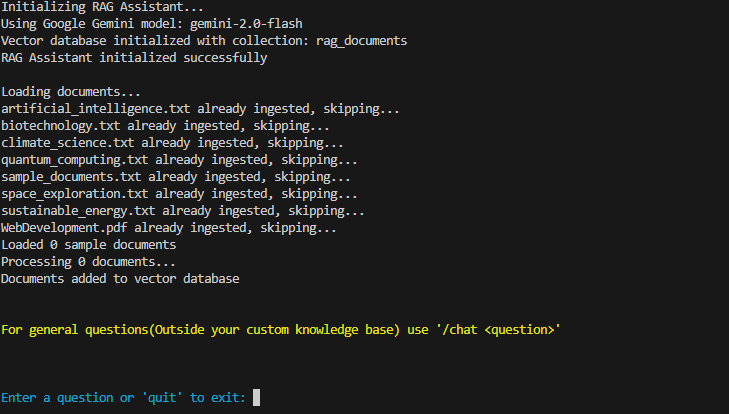
Files will be loaded, if not already ingested(checked using the log.json file which is created already), the LLM Client object is activated and the RAG System is ready to do its job.
2. Type Your query, which will be embedded using the default embedding model of chroma all-MiniLM-L6-v2, and the results will be given to the LLM producing clean natural language response, with references to various documents used for it.
The current version is intentionally a minimal, proof-of-concept RAG pipeline.
Using ChromaDB’s built-in SentenceTransformer (all-MiniLM-L6-v2) keeps the stack dependency-free beyond chromadb itself: no extra download, no API keys, no GPU, and the entire ingestion script stays under 30 lines.
3. Additionally if you ever come to ask a question that should utilize the general domain knowledge of the model use /chat to get the answer. Such a query will not go through the RAG pipeline.

Such responses will be colored yellow for better comprehension
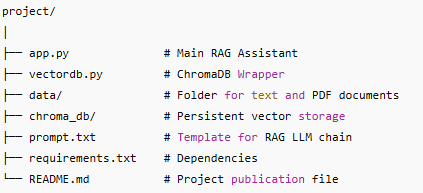
The RAG Assistant class serves as the main orchestrator of the system. It:
Detects available API keys and dynamically selects an LLM provider (OpenAI, Groq, or Gemini).
Loads and processes text and PDF documents automatically from the data/ directory.
Uses LangChain’s ChatPromptTemplate and StrOutputParser to create a flexible LLM chain.
Provides two modes of interaction:
/chat: for general conversational queries.
Standard input: for RAG-based, knowledge-grounded responses.
The VectorDB class encapsulates ChromaDB operations and text preprocessing.
It:
Initializes a persistent ChromaDB collection (./chroma_db).
Splits text into manageable chunks using RecursiveCharacterTextSplitter.
Extracts and attaches detailed metadata (file name, creation date, page number, etc.).
Adds text chunks to the ChromaDB collection with unique IDs and traceable metadata.
Handles semantic search using Chroma’s internal similarity-based query engine.
🔁 Multi-LLM Flexibility: Automatically selects between OpenAI, Groq, and Google Gemini APIs based on available credentials.
📄 Cross-Format Document Support: Reads both .txt and .pdf files, extracting structured content and metadata.
💾 Persistent Knowledge Base: Stores embeddings locally using ChromaDB, allowing offline reusability.
⚙️ Modular Architecture : Clear separation between ingestion, retrieval, and generation logic for easier maintenance.
💬 Interactive CLI Interface : Guides users through query and chat operations with color-coded feedback.
Being a basic implementation, we have used a plain history logging file as means for evaluation. It will be created and managed automatically.
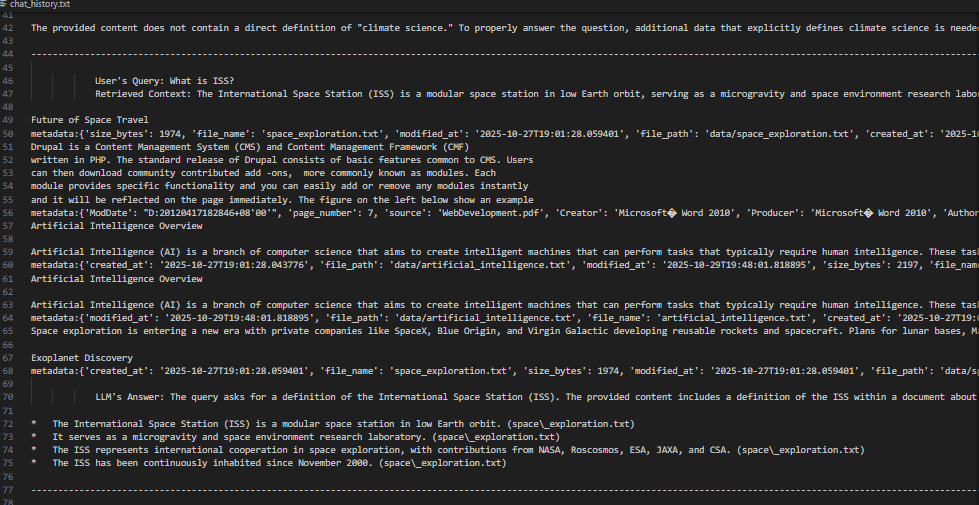
The plain text file contains the user's query, the entire context retrieved from the LLM along with the metadata and final answer from the model.
🤖 Intelligent Knowledge Assistants for research, legal, or educational domains.
🧠 Domain-Specific Chatbots that answer from custom document sets.
🔍 Research Retrieval Tools that combine vector similarity with natural reasoning.
🏢 Enterprise Knowledge Systems where secure, local document retrieval is essential.
Integration with custom embedding models for domain adaptation.
Development of a web-based interface (GUI) for non-technical users.
Addition of multi-user session handling and access control.
Real-time document synchronization and background reindexing.
Component Technology Used Description
LLM Interface LangChain + OpenAI / Groq / Google Gemini Dynamically selects available API key
Vector Database ChromaDB Persistent vector storage and retrieval
Text Chunking LangChain RecursiveCharacterTextSplitter Overlap-based document segmentation
Document Parsing PyPDF2 Page-level PDF parsing with metadata
Orchestration Custom Python Classes Modular, extendable RAG pipeline
Apart from the generic limitations, ingestion of various closely related documents may reduce retrieval accuracy which affects the final output.
The RAG-Based AI Assistant exemplifies how retrieval and generation can merge into a unified AI workflow — combining the precision of vector search with the fluency of large language models.
Its modular structure, local persistence, and multi-provider compatibility make it ideal for both academic learning and enterprise deployment.
The project demonstrates practical understanding of retrieval-augmented AI systems, aligning with Ready Tensor’s goal of advancing real-world machine intelligence capabilities.!
https://www.comp.nus.edu.sg/~seer/book/2e/Ch07.%20Web%20Development.pdf
Langchain Documentation :https://docs.langchain.com