



 Certifiedunder the RAG-Based AI Assistant module in the Agentic AI Essentials program.
This publication presents a Retrieval-Augmented Generation (RAG) system that enables natural language question-answering over custom document collections. Built using LangChain, ChromaDB, and modern LLMs (OpenAI, Groq, Google Gemini), the system demonstrates how semantic search and retrieval can dramatically improve AI response accuracy while reducing hallucinations. The implementation features intelligent document chunking, persistent vector storage, multi-provider LLM support, and comprehensive test coverage with advanced RAG evaluation metrics.
Key Capabilities:
Organizations and individuals face a common challenge: How do you make AI understand and accurately answer questions about YOUR specific documents?
General-purpose chatbots and LLMs, while powerful, have significant limitations:
This problem manifests across numerous domains:
Traditional keyword-based search has limitations:
Retrieval-Augmented Generation (RAG) bridges this gap by:
This solution provides the accuracy and specificity of custom data with the natural language capabilities of modern LLMs—without expensive fine-tuning.
What This System Does:
What This System Doesn't Do:
The system follows a clean, modular two-stage RAG architecture:
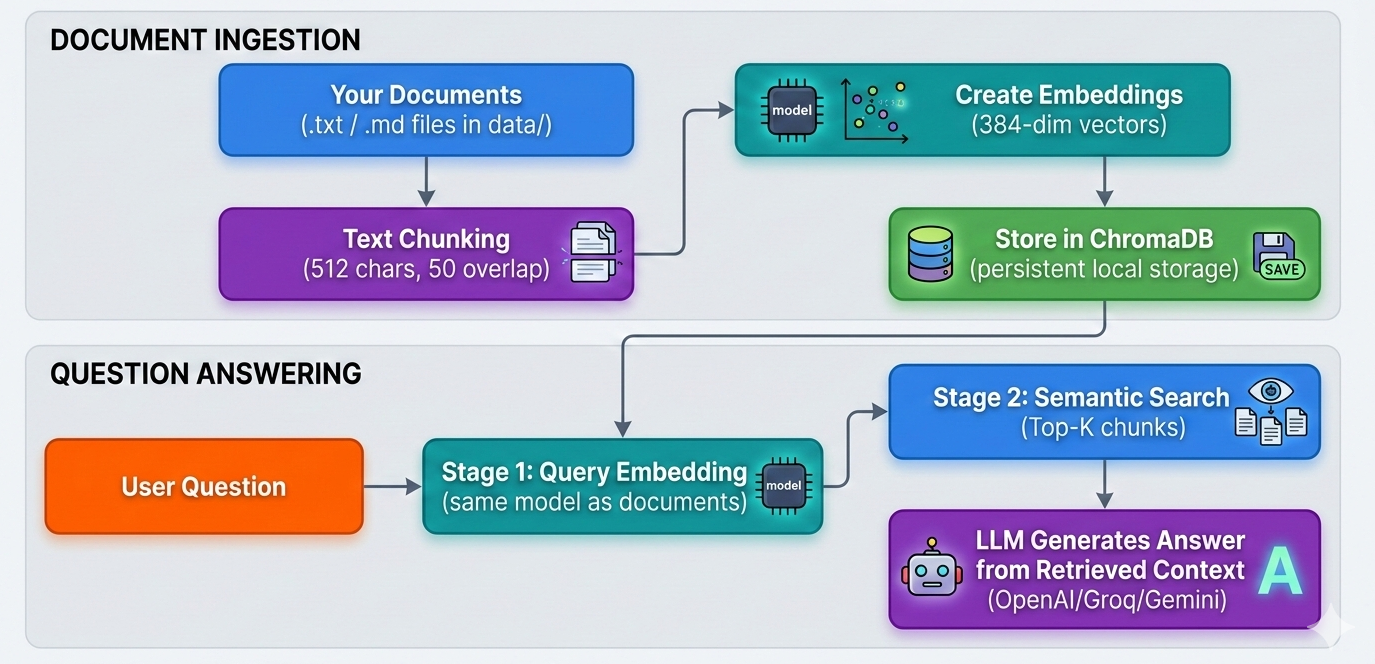
1. Document Processing (vectordb.py)
RecursiveCharacterTextSplitter for intelligent chunking
2. Vector Database (vectordb.py)
3. RAG Pipeline (app.py)
4. Configuration (config.py + config.yaml)
| Component | Technology | Rationale |
|---|---|---|
| LLM Framework | LangChain | Industry standard, excellent abstractions, multi-provider support |
| Vector Database | ChromaDB | Lightweight, persistent, easy setup, no external services |
| Embeddings | sentence-transformers | Open-source, fast, high-quality semantic embeddings |
| LLM Providers | OpenAI, Groq, Google | Flexibility to choose based on cost, speed, quality trade-offs |
| Testing | pytest + DeepEval | Comprehensive unit tests + specialized RAG evaluation metrics |
| Config Management | PyYAML + python-dotenv | Clean separation of code and configuration |
Input Data:
data/ directory in project rootSample Data Included:
The project includes five sample documents covering different domains:
Adding Your Own Documents:
Simply drop .txt or .md files into the data/ folder and restart the application.
Prerequisites:
# System Requirements
Python 3.10 or higher
pip (Python package manager)
Virtual environment (recommended)

# Minimum 4GB RAM
# ~1GB disk space for dependencies
Step-by-Step Installation:
# 1. Clone the repository
git clone https://github.com/david-001/agentic-ai-essentials-cert-project
cd agentic-ai-essentials-cert-project

# 2. Create and activate virtual environment
python -m venv venv
source venv/bin/activate  # Linux/Mac
# venv\Scripts\activate  # Windows

# 3. Install dependencies
pip install -r requirements.txt

# 4. Configure environment variables
cp .env.example .env
# Edit .env with your API key (at least one required)
Configuration (config/config.yaml):
# Embedding model configuration
embedding:
  model: "sentence-transformers/all-MiniLM-L6-v2"

# Database configuration
database:
  collection_name: "rag_documents"
  path: "./chroma_db"

# LLM configuration
llm:
  temperature: 0.0

# File paths
paths:
  data_directory: "data"
Environment Variables (.env):
# Choose ONE LLM provider (system tries in order: OpenAI → Groq → Google)
OPENAI_API_KEY=sk-proj-...
GROQ_API_KEY=gsk-...
GOOGLE_API_KEY=AIza...

# Optional: Specify model explicitly
OPENAI_MODEL=gpt-4o-mini
GROQ_MODEL=llama-3.1-8b-instant
GOOGLE_MODEL=gemini-2.0-flash
1. Document Loading
def load_documents() -> List[str]:
    """
    Load documents from the configured data directory.

    Reads all .txt and .md files from config.DATA_DIRECTORY and attaches
    domain-specific metadata (document type, description, search keywords)
    to each document using the TaskFlow Pro DOCUMENT_TYPE_MAP.

    Returns:
        List of document dicts, each with 'content' and 'metadata' keys.
    """
    results = []
    data_dir = config.DATA_DIRECTORY

    if not os.path.exists(data_dir):
        print(f"Warning: {data_dir} directory not found. Creating it...")
        os.makedirs(data_dir)
        print(f"Please add your documents to the '{data_dir}' folder and run again.")
        return results

    for filename in os.listdir(data_dir):
        filepath = os.path.join(data_dir, filename)

        if filename.endswith('.txt') or filename.endswith('.md'):
            try:
                with open(filepath, 'r', encoding='utf-8') as f:
                    content = f.read()

                # Attach domain-specific metadata
                metadata = _get_document_metadata(filename)

                results.append({'content': content, 'metadata': metadata})
                print(f"Loaded [{metadata['document_type']}]: {filename}")
            except Exception as e:
                print(f"Error loading {filename}: {e}")

    if len(results) == 0:
        print(f"\nNo documents found in '{data_dir}' folder.")
        print("Please add some .txt or .md files to get started.")

    return results
The chunk_text method in VectorDB uses LangChain's RecursiveCharacterTextSplitter:
2. Adding documents to Vector Database
def add_documents(self, documents: List) -> None:
        """
        Add documents to the vector database.

        Args:
            documents: List of documents
        """
        # Implement document ingestion logic
        #   - Loop through each document in the documents list
        #   - Extract 'content' and 'metadata' from each document dict
        #   - Use self.chunk_text() to split each document into chunks
        #   - Create unique IDs for each chunk (e.g., "doc_0_chunk_0")
        #   - Use self.embedding_model.encode() to create embeddings for all chunks
        #   - Store the embeddings, documents, metadata, and IDs in your vector database
        #   - Print progress messages to inform the user

        print(f"Processing {len(documents)} documents...")

        # Handle empty document list
        if not documents:
            print("No documents to process.")
            return

        all_chunks = []
        all_metadatas = []
        all_ids = []

        # Process each document
        for doc_idx, document in enumerate(documents):
            # Extract content and metadata
            content = document.get('content', '')
            metadata = document.get('metadata', {})

            # Chunk the document
            chunks = self.chunk_text(content)
            print(f"Document {doc_idx + 1}: Split into {len(chunks)} chunks")

            # Create unique IDs and metadata for each chunk
            for chunk_idx, chunk in enumerate(chunks):
                chunk_id = f"doc_{doc_idx}_chunk_{chunk_idx}"
                chunk_metadata = {
                    **metadata,
                    'doc_index': doc_idx,
                    'chunk_index': chunk_idx
                }

                all_chunks.append(chunk)
                all_metadatas.append(chunk_metadata)
                all_ids.append(chunk_id)

        if not all_chunks:
            print("No chunks to add!")
            return

        # Create embeddings for all chunks
        print(f"Creating embeddings for {len(all_chunks)} chunks...")
        embeddings = self.embedding_model.encode(all_chunks, show_progress_bar=True)

        # Add to ChromaDB collection
        print("Adding to vector database...")
        self.collection.add(
            ids=all_ids,
            embeddings=embeddings.tolist(),
            documents=all_chunks,
            metadatas=all_metadatas
        )

        print(f"Successfully added {len(all_chunks)} chunks to vector database")
3. RAG Query Pipeline
def query(self, input: str, n_results: int = 3) -> str:
    """
    Query the RAG assistant using the two-stage optimized pipeline.

    Stage 1 -- Query Optimization:
        The raw user input is rewritten by the LLM into a retrieval-
        optimised query with domain synonyms and expanded terms.

    Stage 2 -- Retrieval & Generation:
        The optimised query is used to search the vector database.
        Retrieved chunks are formatted with source attribution and passed
        to the domain-aware answer prompt to generate the final response.

    Args:
        input: User's question.
        n_results: Number of relevant chunks to retrieve.

    Returns:
        A string answer grounded in the TaskFlow Pro knowledge base.
    """
    # Stage 1: Optimize the query for retrieval
    optimized_query = self._optimize_query(input)

    # Stage 2: Retrieve relevant context using the optimized query
    search_results = self.vector_db.search(optimized_query, n_results=n_results)

    # Format context with source attribution
    context = self._format_context(search_results)

    # Generate the answer using the domain-aware prompt
    domain_ctx = self._get_domain_context()
    llm_answer = self.chain.invoke({
        "domain": domain_ctx["domain"],
        "document_types": domain_ctx["document_types"],
        "context": context,
        "question": input,
    })

    return llm_answer
4. Prompt Engineering
The prompt template is carefully designed to:
rag_template = """You are a knowledgeable assistant for {domain}.

You have access to the following document types in the knowledge base:
{document_types}

Use ONLY the retrieved context below to answer the question.
- If the context contains a direct answer, provide it clearly and concisely.
- Use bullet points for lists, steps, or multiple items.
- Always mention which document type the information comes from (e.g. "According to the API Documentation...").
- If the question cannot be answered from the provided context, respond with:
  "This information is not available in the TaskFlow Pro knowledge base. Please contact support."
- Never use outside knowledge beyond what is in the context.

Retrieved Context:
{context}

Question: {question}

Answer:"""
Building this RAG system surfaced several non-obvious difficulties that are worth documenting for anyone applying a similar approach.
1. Chunk Size Tuning
Finding the right chunk size is a balancing act. Chunks that are too small (e.g., < 128 characters) fragment logical ideas and yield poor retrieval quality — the embedding captures only a fragment of meaning. Chunks that are too large dilute the semantic signal and reduce Precision@K. The 512-character default with 50-character overlap was chosen after experimentation, but the new evaluation results (Precision@3 = 0.3152) suggest that for this document corpus, larger chunks or a different overlap strategy may work better. The practical lesson: always tune chunk size against your specific documents.
2. Retrieval vs. Generation Trade-off
High Recall (0.9455) and low Precision (0.3152) reveal a common tension: retrieving broadly ensures relevant chunks are never missed, but flooding the LLM context with loosely related text increases noise. The current top-3 strategy errs toward recall. A re-ranking step (e.g., cross-encoder scoring) could filter retrieved chunks before passing them to the LLM, improving contextual relevancy without sacrificing recall.
3. LLM Provider Inconsistencies
Supporting three LLM providers (OpenAI, Groq, Gemini) introduced subtle response-format differences. Each provider may structure answers differently even with the same prompt, requiring defensive parsing and evaluation. API rate limits also differ significantly across providers, impacting test suite reliability; switching providers mid-development required careful re-evaluation.
4. Evaluation Dataset Quality
Automated RAG evaluation (DeepEval) depends heavily on the quality of ground-truth question-answer pairs. Poorly phrased ground-truth questions can unfairly penalize an otherwise correct system. Building a representative, diverse test set was as important as the system itself. This project addresses the challenge with synthesize_test_queries.py, a script that uses the same LLM pipeline to automatically generate realistic Q&A pairs directly from the source documents — ensuring ground-truth coverage scales naturally as the document corpus grows.
5. Persistent Storage Consistency
ChromaDB persists the vector collection to disk, which is convenient but introduces a subtle bug risk: if the document corpus changes (documents added or modified) without clearing the database, stale embeddings remain alongside new ones. The current implementation requires a manual database reset when the corpus changes, which is a usability gap in production scenarios.
The current system treats every query as stateless — each question is answered independently with no awareness of the conversation history. This is intentional for simplicity but limits the system's depth in several ways:
Current Limitation — No Multi-Turn Memory:
If a user asks "What is the vacation policy?" followed by "How do I apply for it?", the second question lacks context. The RAG pipeline does not know that "it" refers to vacation leave, so retrieval quality degrades for follow-up questions.
Proposed Enhancement — Context Persistence:
A conversation memory layer can be added between the user interface and the RAG pipeline. Concretely, this means maintaining a rolling conversation buffer (e.g., LangChain's ConversationBufferMemory or ConversationSummaryMemory) and injecting the recent chat history into each prompt alongside the retrieved context:
template = """You are a helpful AI assistant. Use the following context to answer the user's question.

Conversation History:
{history}

Retrieved Context:
{context}

Question: {question}
Answer:"""
With this pattern, the LLM can resolve pronoun references and maintain topic continuity across turns. ConversationSummaryMemory is preferable for long conversations as it compresses older turns into a summary, preventing context-window overflow.
Reasoning Depth — Chain-of-Thought:
For complex multi-hop questions (e.g., "What are the security requirements for the API integration described in the compliance document?"), a single retrieval pass may be insufficient. Implementing a simple chain-of-thought step — where the model first identifies what sub-questions need answering before retrieving — would improve accuracy on these harder queries.
These enhancements are listed in the Potential Extensions section and represent the most impactful next steps for turning this prototype into a production-grade conversational assistant.
Local Development:
Production Considerations:
Scalability:
Security:
Performance:
Monitoring:
Core Dependencies:
langchain-core==1.2.7
langchain-google-genai==4.2.0
langchain-groq==1.1.1
langchain-openai==1.1.7
langchain-text-splitters==1.1.0
chromadb==1.4.1
sentence-transformers==5.2.0
python-dotenv==1.2.1
Testing & Evaluation:
pytest==9.0.2
deepeval==3.8.0
The system was evaluated using a comprehensive test suite combining custom retrieval metrics and DeepEval's specialized RAG evaluation metrics:
Retrieval Quality Metrics (Custom Implementation):
Generation Quality Metrics (DeepEval Framework):
The test suite includes:
synthesize_test_queries.py uses the configured LLM to read each document in data/ and generate realistic question-answer pairs, saving them as a JSON ground-truth datasetrag_evaluator.py loads that dataset and scores the system across all retrieval and generation metrics using DeepEval — re-run step 1 whenever the document corpus changes to keep evaluation coverage accurateRetrieval Performance:
Precision@3:     0.3152  (31.52% of retrieved chunks are relevant)
Recall@3:        0.9455  (94.55% of relevant chunks retrieved in top-3)
MRR:             0.8804  (Most relevant result usually near top)
NDCG@5:          0.8972  (Strong overall ranking quality)
Avg Latency:     22.94ms (Fast retrieval, sub-25ms per query)
Generation Quality (DeepEval):
Faithfulness:          0.9971  (Near-perfect grounding in context, minimal hallucinations)
Answer Relevance:      0.9481  (Answers strongly address questions)
Contextual Precision:  0.9138  (91.38% of retrieved context is relevant)
Contextual Recall:     0.9513  (95.13% of needed information retrieved)
Contextual Relevancy:  0.4505  (Some retrieved chunks less directly relevant)
Performance Analysis:
The results demonstrate strong generation quality with room for retrieval improvement:
✅ Strengths:
⚠️ Areas for Improvement:
Overall Grade: A (Excellent)
The system achieves production-ready generation quality (Faithfulness 0.9971, Answer Relevance 0.9481) with strong contextual recall (0.9513), making it suitable for knowledge-intensive applications where accuracy is critical. The primary opportunity for improvement is retrieval precision — addressing this through re-ranking or chunk-size tuning would elevate the system from excellent to outstanding.
Technical Limitations:
Operational Limitations:
Known Edge Cases:
Very short documents (<512 chars) create single-chunk entries that may be too broad for precise semantic matching
Business Value:
Technical Contribution:
Potential Extensions:
Semantic Search Quality: sentence-transformers/all-MiniLM-L6-v2 provides excellent semantic understanding despite being lightweight and fast
Prompt Engineering: The carefully crafted prompt effectively keeps responses grounded in documents and prevents hallucinations
Modular Architecture: Clean separation between vector DB, RAG pipeline, and configuration makes the system maintainable and extensible
Multi-Provider Support: Flexibility to switch between OpenAI, Groq, and Gemini provides cost/performance optimization options
ChromaDB Performance: Persistent storage with fast retrieval meets requirements for development and small-scale deployment
Chunk Size Matters: 512 characters with 50-character overlap strikes a good balance, but different document types may benefit from tuning
Retrieval Count Trade-off: Top-3 chunks work well for focused questions; complex queries might benefit from top-5 or top-7
Temperature Settings: Setting temperature to 0 for factual Q&A significantly reduces hallucinations
Evaluation is Critical: Automated RAG metrics (DeepEval) catch issues that manual testing misses
Error Handling: Graceful degradation when documents are out of scope is essential for user trust
This project was developed as part of the Ready Tensor Agentic AI Essentials Certification Program. Special thanks to the Ready Tensor team for the comprehensive curriculum and project structure.
Repository Structure:
agentic-ai-essentials-cert-project/
│
├── src/                          # Source code directory
│   ├── app.py                    # Main application with RAG pipeline
│   ├── config.py                 # Configuration loader (loads from YAML)
│   └── vectordb.py               # Vector database wrapper for ChromaDB
│
├── config/                       # Configuration directory
│   └── config.yaml               # YAML configuration file (edit settings here)
│
├── data/                         # Document collection
│   ├── api_documentation.md      # Sample: API documentation
│   ├── company_policies.md       # Sample: HR policies
│   ├── customer_faq.md           # Sample: Customer FAQ
│   ├── product_documentation.md  # Sample: Product information
│   └── security_compliance.md    # Sample: Security documentation
│
├── tests/                        # Comprehensive test suite
│   ├── conftest.py               # Pytest configuration and shared fixtures
│   ├── metrics_utils.py          # Metric calculation utilities
│   ├── rag_evaluator.py          # DeepEval-based RAG quality evaluator
│   ├── rag_evaluator_utils.py    # Helper utilities for evaluation
│   ├── synthesize_test_queries.py# LLM-generated ground-truth Q&A pairs for evaluation
│   ├── test_app.py               # Integration tests for RAG pipeline
│   └── test_vectordb.py          # Unit tests for vector database
│
├── requirements.txt              # Python dependencies
├── pytest.ini                    # Pytest configuration
├── .env                          # Environment variables (API keys) - DO NOT COMMIT
├── .env.example                  # Template for environment setup
├── .gitignore                    # Git ignore rules
├── LICENSE                       # MIT License
└── README.md                     # This file
│
└── chroma_db/                    # Vector database storage (auto-created)
Repository: https://github.com/david-001/agentic-ai-essentials-cert-project