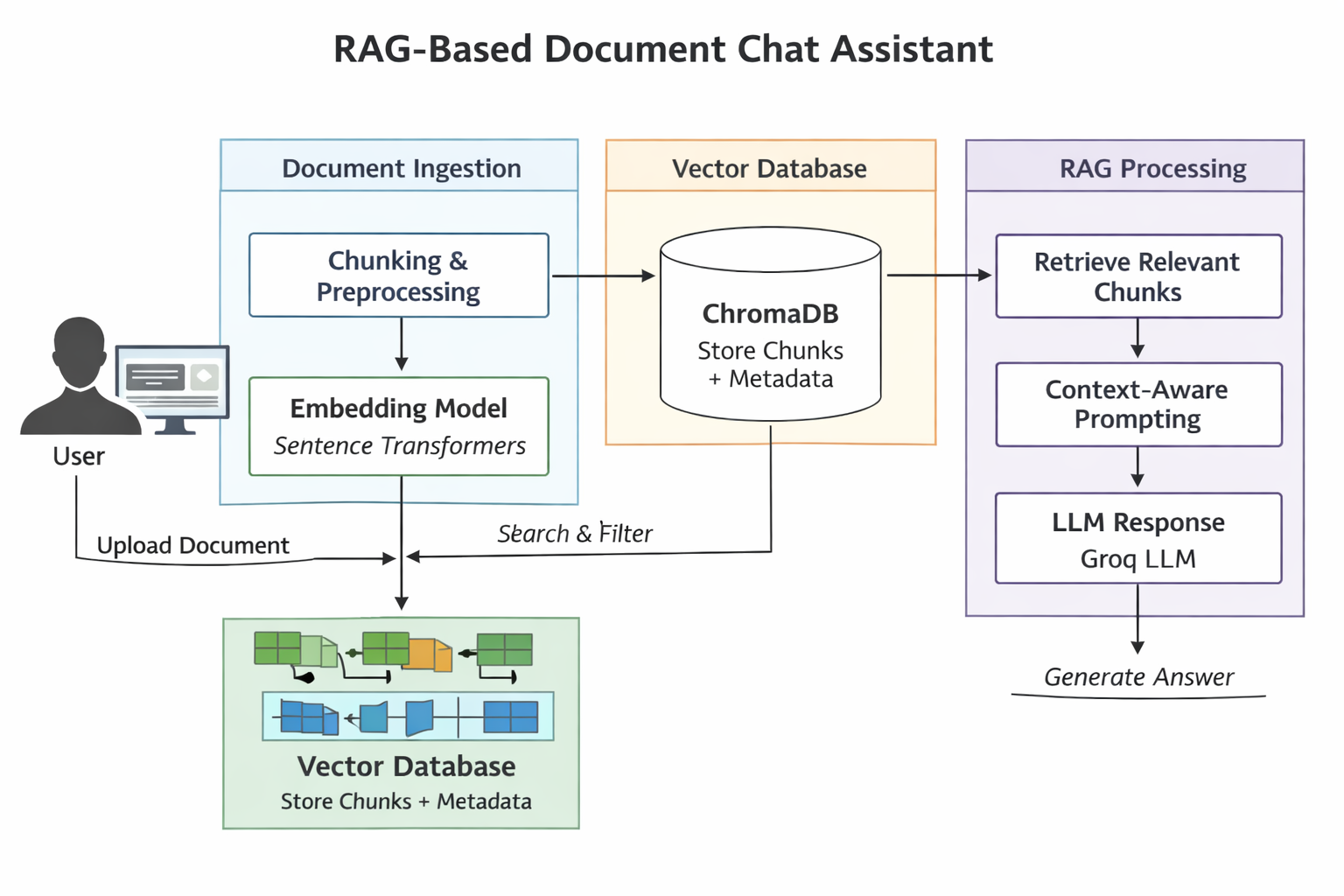
This project implements a Retrieval-Augmented Generation (RAG) chat assistant that allows users to upload documents and interact with them conversationally through a professional interface. Each document maintains its own persistent chat history, ensuring context isolation and accurate retrieval. The system combines vector search, metadata-filtered retrieval, and LLM-based reasoning to deliver grounded, document-specific answers through a clean web UI.
📌 Introduction
1.1 Purpose and Scope
The purpose of this project is to demonstrate a clean, reliable, and user-centric RAG system that allows users to:
- Upload documents (PDF, text-based formats)
- Select a document explicitly
- Ask natural language questions about it
- Receive answers strictly grounded in the document content
The system is intentionally scoped to single-document conversations to maximize correctness and interpretability.
Techniques and Tech Stack
Core Techniques:
- Retrieval-Augmented Generation (RAG)
- Vector similarity search with metadata filtering
- Context-controlled prompting
- Stack: FastAPI · ChromaDB · HuggingFace · LangChain · Groq LLM
1.2 Importance of Effective Presentation
Many RAG demos fail in real usage due to:
- Mixing context across multiple documents
- Unclear retrieval boundaries
- UI designs that hide system state
This project addresses those issues by aligning backend architecture, retrieval logic, and UI design around clarity and determinism.
🧩 Foundations of Effective Project Design
2.1 Core Tenets of a Strong RAG System
- Context Isolation – each document has its own chat history
- Grounded Answers – LLM responses are strictly limited to retrieved chunks
- Persistent Memory – chat history is stored on disk per document
- Explicit Retrieval – no hidden or implicit context mixing
- User Transparency – UI always shows which document is active
2.2 Project Type on Ready Tensor
Category:
🔹 AI Application / System Design
This is a full-stack AI system, not just a model demo. It showcases practical integration of LLMs into a real user-facing workflow.
2.3 Selecting the Right Scope
Instead of supporting unrestricted multi-file chat, this project deliberately limits conversations to one document at a time.
Benefits:
- Higher retrieval accuracy
- No ambiguity about answer source
- Simpler and more intuitive UX
- Reduced hallucinations
This mirrors how professional document assistants are often designed in enterprise settings.
🏗️ Architecture Overview
System Flow
- User uploads a document
- Document is chunked and embedded
- Chunks are stored in ChromaDB with
file metadata
- User selects a document from the sidebar
- User asks a question
- Relevant chunks are retrieved using:
- Semantic similarity
- Metadata filtering (
file = selected_file)
- LLM generates an answer using only retrieved context
- Conversation is stored in a file-scoped history
🧪 Assessing the Technical Content
Retrieval Layer
- Dense embeddings using SentenceTransformers (MiniLM)
- Vector search via ChromaDB
- Metadata-based filtering to ensure file isolation
- Controlled chunk limits to avoid context overflow
This ensures answers remain relevant, concise, and grounded.
Prompt Engineering Strategy
The system prompt enforces:
- Use of retrieved context only
- Explicit refusal when the answer is not present
- Clear separation between conversation history and document knowledge
This significantly reduces hallucinations and improves reliability.
Chat History Management
- Each document has its own
FileChatMessageHistory
- Stored as JSON on disk
- Reloaded automatically when switching documents
- Preserved across server restarts
This design mirrors scoped memory in professional AI tools.
🎨 Enhancing Readability and User Experience
Interface Highlights
- professional-style layout
- Sidebar for document navigation
- Active document indicator
- Disabled input until a document is selected
- Scrollable chat window with clear message roles
Every UI element reflects the system’s internal state.
Error Handling & Safety
- Invalid or empty documents are rejected
- Failed uploads are clearly reported
- Users cannot query without selecting a document
These checks improve robustness and user trust.
⚠️ Known Limitations
- Single-document chat only
- No token-level streaming
- No inline citation highlighting
These are intentional design trade-offs to maintain clarity and correctness.
🔮 Future Improvements
- Streaming responses (typing effect)
- Per-answer citations with chunk references
- Document preview pane
- Optional analytical multi-document mode
⚙️ Installation and Usage
Purpose of This Section
This section ensures reproducibility and usability, which are essential for both academic rigor and open-source collaboration. It allows reviewers, users, and contributors to easily install, run, and evaluate the system.
Installation
The project is implemented in Python 3.10+ and follows a modular, service-oriented architecture.
Steps to install and run the system:
- Clone the repository from GitHub:
git clone <repository-url>
cd <project-directory>
2.Create and activate a virtual environment:
python -m venv venv
source venv/bin/activate   # On Windows: venv\Scripts\activate
3.install dependencies:
pip install -r requirements.txt
4.Configure environment variables:
set GROQ_API_KEY for llm inference
start the FastAPI server:
uvicorn app:app --reload
🧾 Summary
This project demonstrates how to build a production-minded RAG assistant by:
- Prioritizing correctness over feature sprawl
- Aligning backend design with UX clarity
- Using metadata and history scoping to avoid confusion
A good RAG system is defined not by how much it answers, but by how well it knows its limits.




 Certifiedunder the RAG-Based AI Assistant module in the Agentic AI Essentials program.