



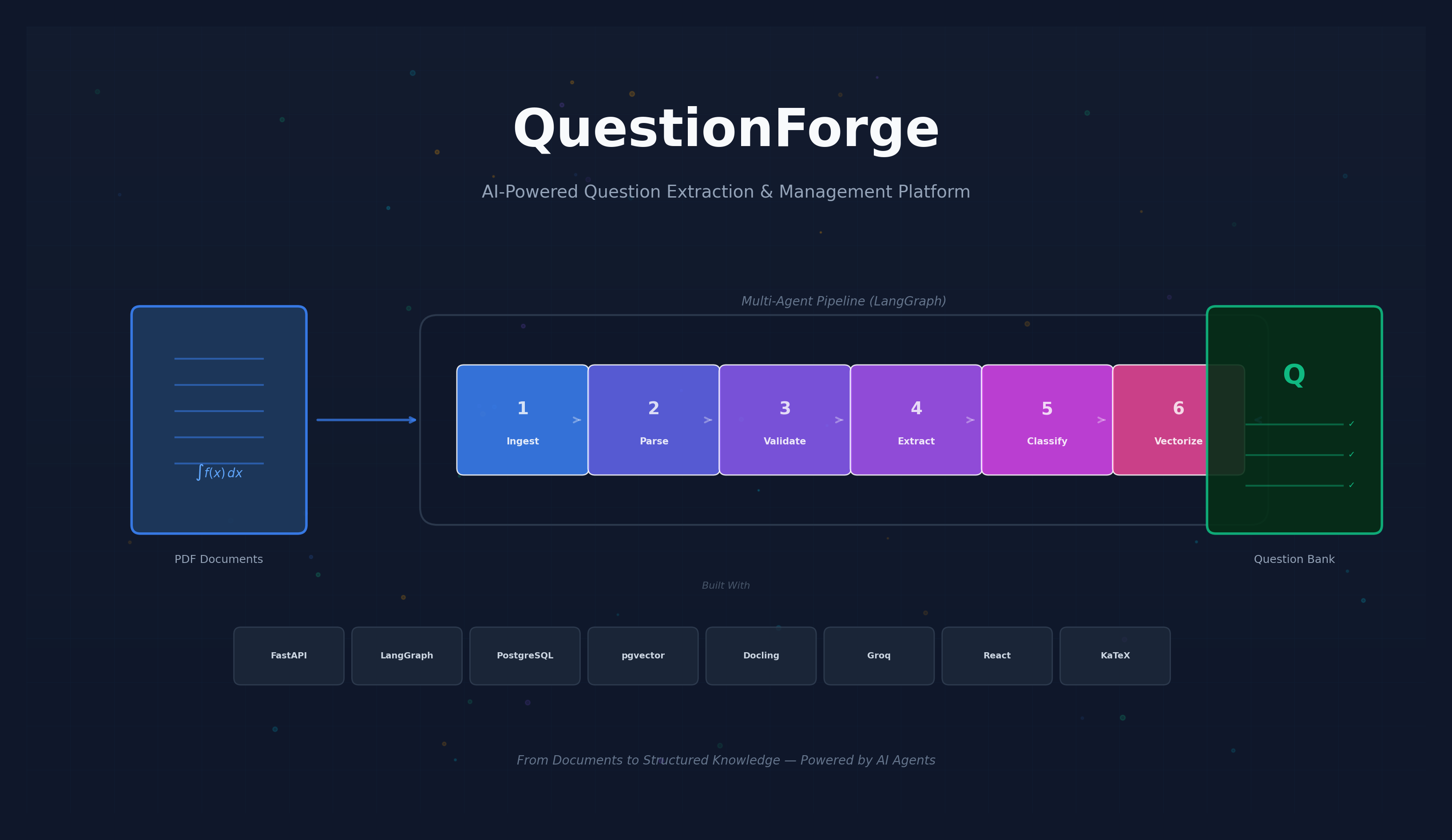
QuestionForge is an end-to-end platform that automates the extraction, classification, and management of educational questions from uploaded documents such as exam papers and worksheets. The system employs a multi-agent architecture orchestrated by LangGraph, where six specialized agents — Ingestion, Parsing, Markdown Validation, Persistence, Classification, and Vectorization — collaborate in a stateful pipeline to transform raw PDF documents into structured, searchable question banks.
Documents are uploaded to Google Cloud Storage and processed asynchronously through IBM Docling for layout-aware parsing, preserving complex elements including mathematical formulas, tables, and embedded images. An LLM-powered extraction agent identifies individual questions from the parsed markdown, while a validation agent ensures structural correctness through an iterative feedback loop. Extracted questions are persisted in PostgreSQL, classified by type, difficulty, topic, and cognitive level, and embedded into a vector space using sentence transformers (pgvector) to enable semantic similarity search and deduplication.
The backend is built on FastAPI with client-credential authentication (bcrypt-hashed secrets), and includes production-grade infrastructure:
A React + TypeScript frontend provides:
| Layer | Technologies |
|---|---|
| Backend | Python, FastAPI, LangGraph, LangChain |
| Database | PostgreSQL, pgvector |
| Storage | Google Cloud Storage |
| Document Parsing | IBM Docling |
| LLM | Groq (LLaMA 3.3 70B) |
| Embeddings | HuggingFace sentence-transformers |
| Frontend | React, Vite, TanStack Query, CodeMirror 6, KaTeX |
The creation of educational assessments — exams, quizzes, and practice worksheets — is a labor-intensive process for educators and content developers. A significant portion of this effort is spent not on authoring new questions, but on digitizing, organizing, and cataloging questions from existing documents. Exam papers arrive as scanned PDFs, formatted Word documents, or image-heavy layouts containing mathematical notation, diagrams, and multi-column formatting. Manually extracting individual questions from these documents, classifying them by topic and difficulty, and storing them in a searchable format is tedious, error-prone, and does not scale.
Existing tools for document processing typically handle either text extraction or question management, but rarely both in an integrated pipeline. General-purpose OCR and PDF parsers often fail to preserve the structural elements critical to educational content — LaTeX formulas, geometry diagrams, chemistry notation, and the logical grouping of questions with their answer choices. On the other side, question bank management systems assume questions are already in a structured format and offer no pathway from raw documents to organized content.
Educators and assessment organizations face several challenges when working with document-based question content:
Format Diversity — Questions exist across PDFs, scanned images, Word documents, and spreadsheets with inconsistent layouts, requiring format-specific handling.
Structural Complexity — Educational documents contain mathematical formulas, tables, embedded images, and multi-part questions that general-purpose parsers fail to preserve accurately.
Manual Classification — Each extracted question must be manually tagged with metadata such as topic, subtopic, difficulty level, cognitive level, and question type — a process that is subjective and time-consuming.
Duplicate Detection — As question banks grow across multiple documents and years, identifying semantically similar or duplicate questions becomes increasingly difficult without vector-based search capabilities.
Lack of Integrated Tooling — No single platform provides an end-to-end workflow from document upload through parsing, extraction, classification, and searchable storage with a user-facing editing interface.

QuestionForge addresses these challenges through a multi-agent architecture that decomposes the document-to-question-bank pipeline into specialized, composable processing stages. Each stage is handled by a dedicated agent with a clearly defined responsibility, orchestrated as a stateful graph using LangGraph.
The platform accepts raw documents, processes them through layout-aware parsing (IBM Docling), extracts individual questions using large language models, validates the structural integrity of the output, classifies questions across multiple taxonomic dimensions, and stores them with vector embeddings for semantic search. A web-based frontend allows users to upload documents, monitor processing progress in real time, browse extracted questions, and edit them with live-rendered mathematical notation.
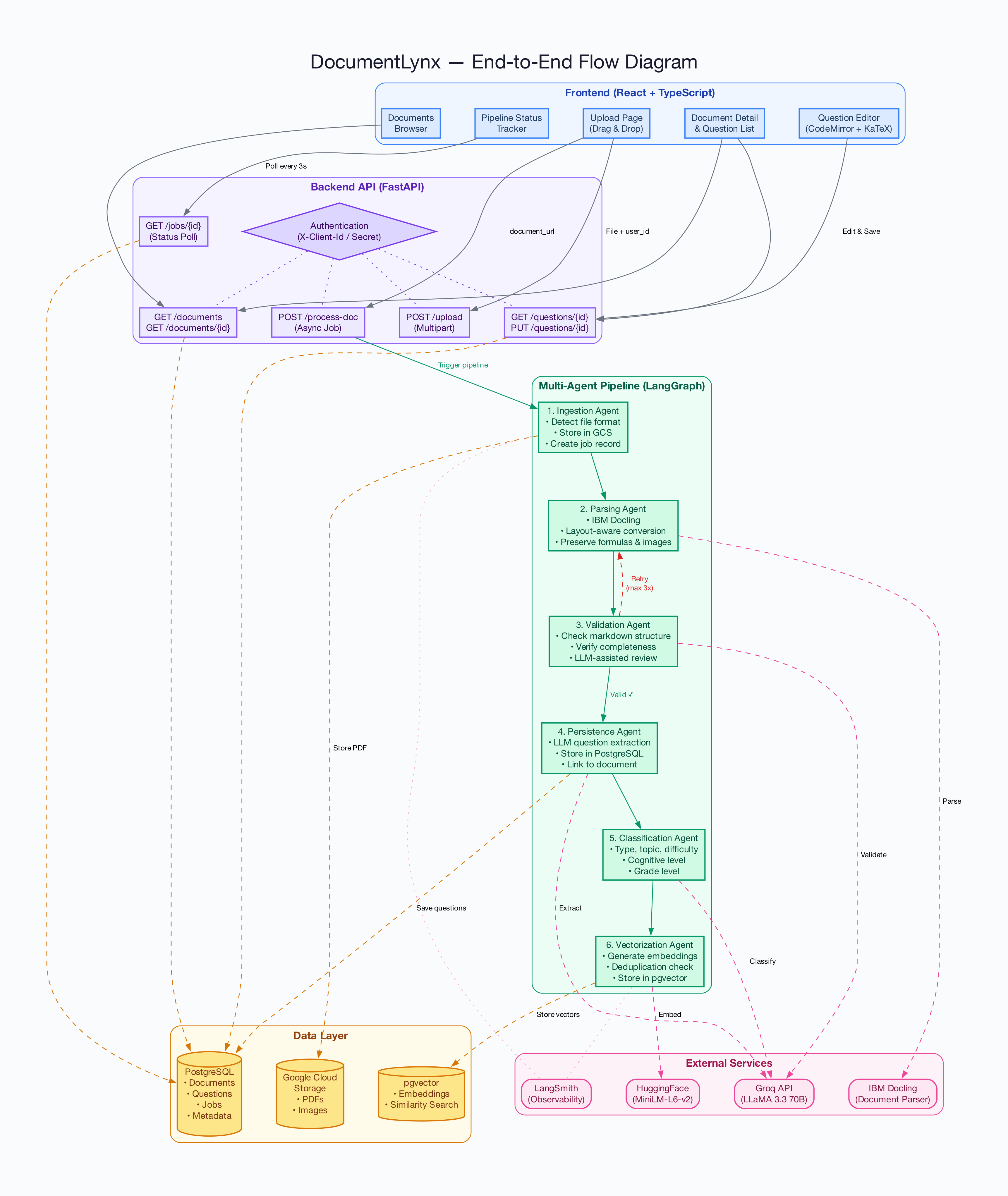
The system is composed of three primary layers:
Six agents operate in sequence within a LangGraph state graph, each reading from and writing to a shared state object:
| Agent | Responsibility |
|---|---|
| Ingestion Agent | Accepts document uploads, detects file format, stores in Google Cloud Storage, and creates a processing job |
| Parsing Agent | Invokes IBM Docling for layout-aware conversion to Markdown, preserving tables, images, and formulas |
| Markdown Validation Agent | Validates structural correctness of parsed output; loops back to parsing (up to 3 iterations) on failure |
| Persistence Agent | Uses LLM to extract individual questions from validated Markdown and stores them in PostgreSQL |
| Classification Agent | Classifies each question by type, topic, difficulty, cognitive level, and grade using LLM |
| Vectorization Agent | Generates sentence-transformer embeddings and stores them in pgvector for semantic search |
The frontend provides four primary views:
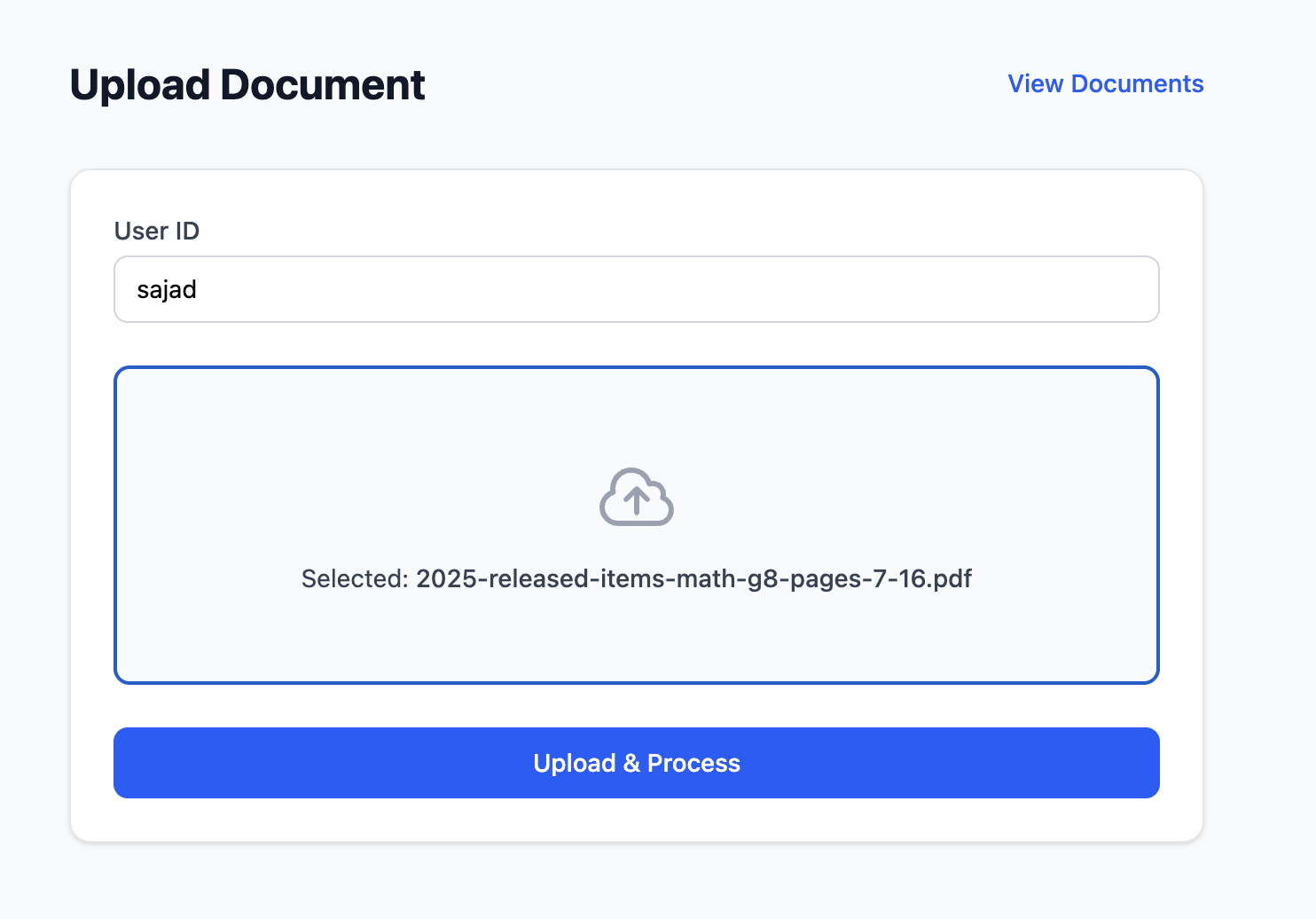
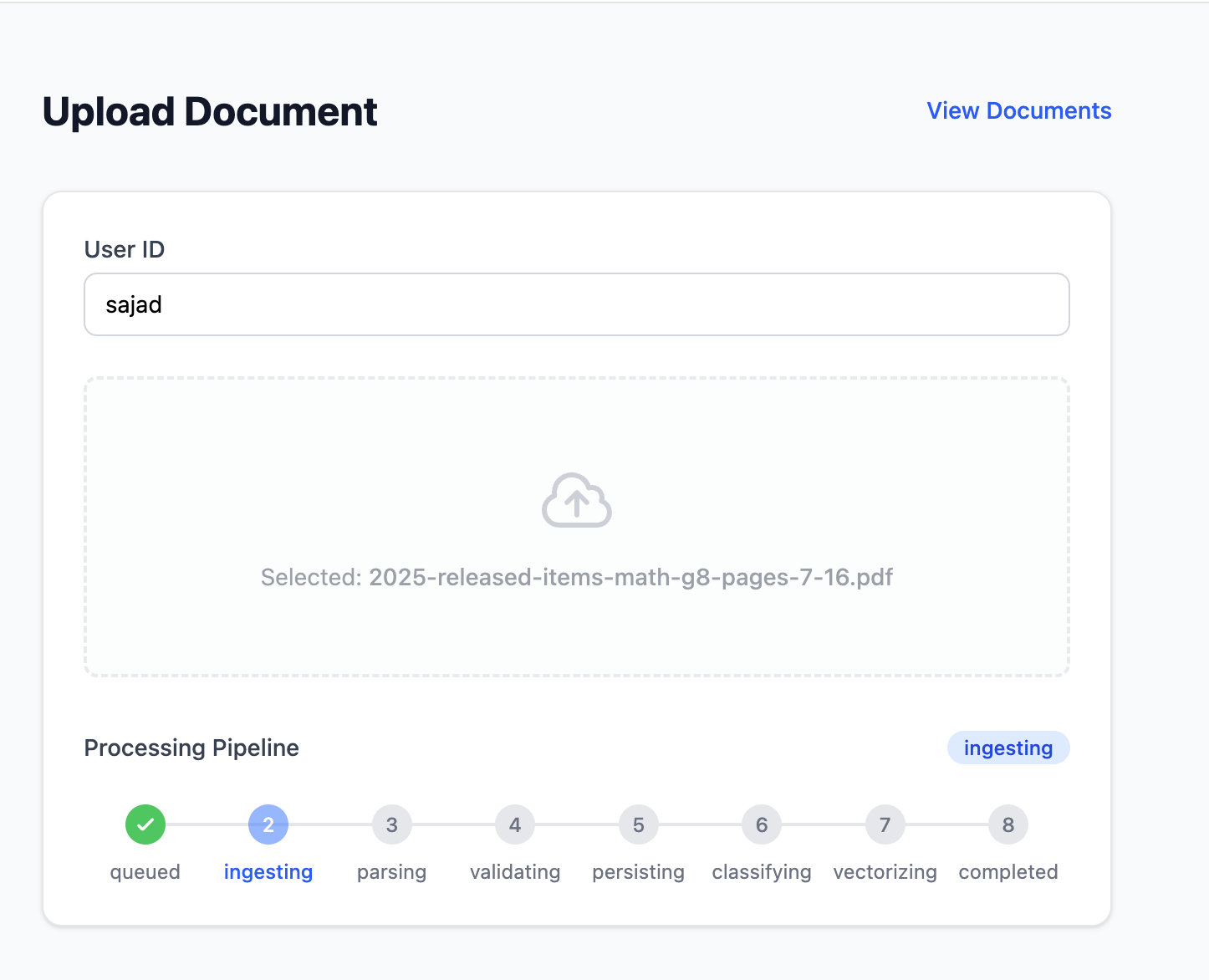
Upload Page — Drag-and-drop document upload with a visual pipeline status tracker showing progress through each agent stage in real time.
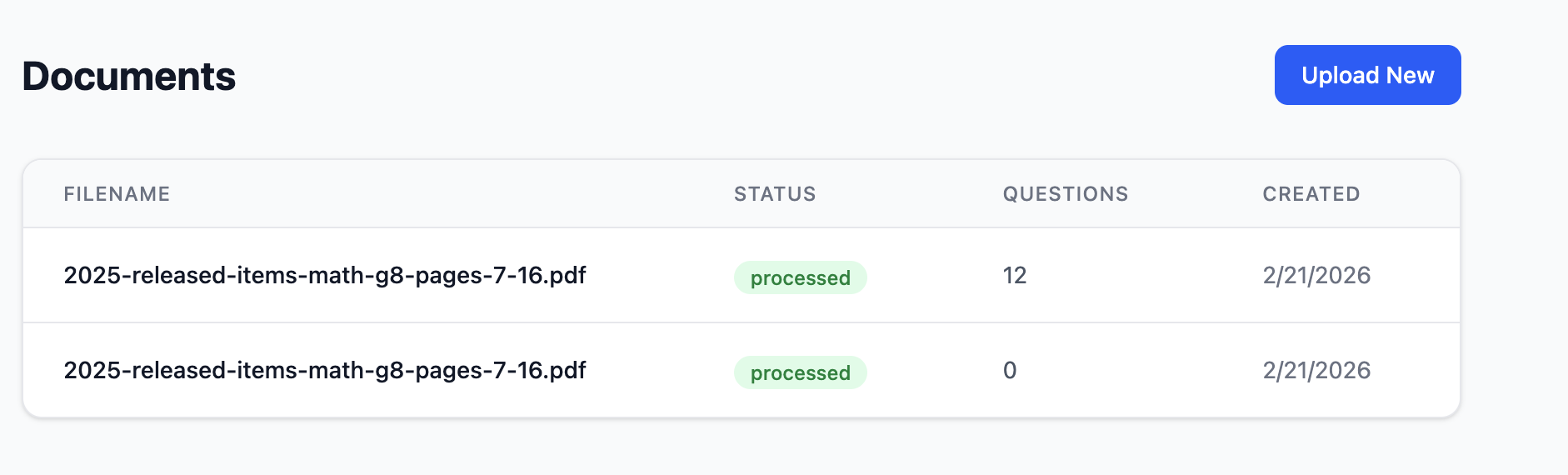
Documents List — Paginated table of all processed documents with status indicators, question counts, and creation dates.
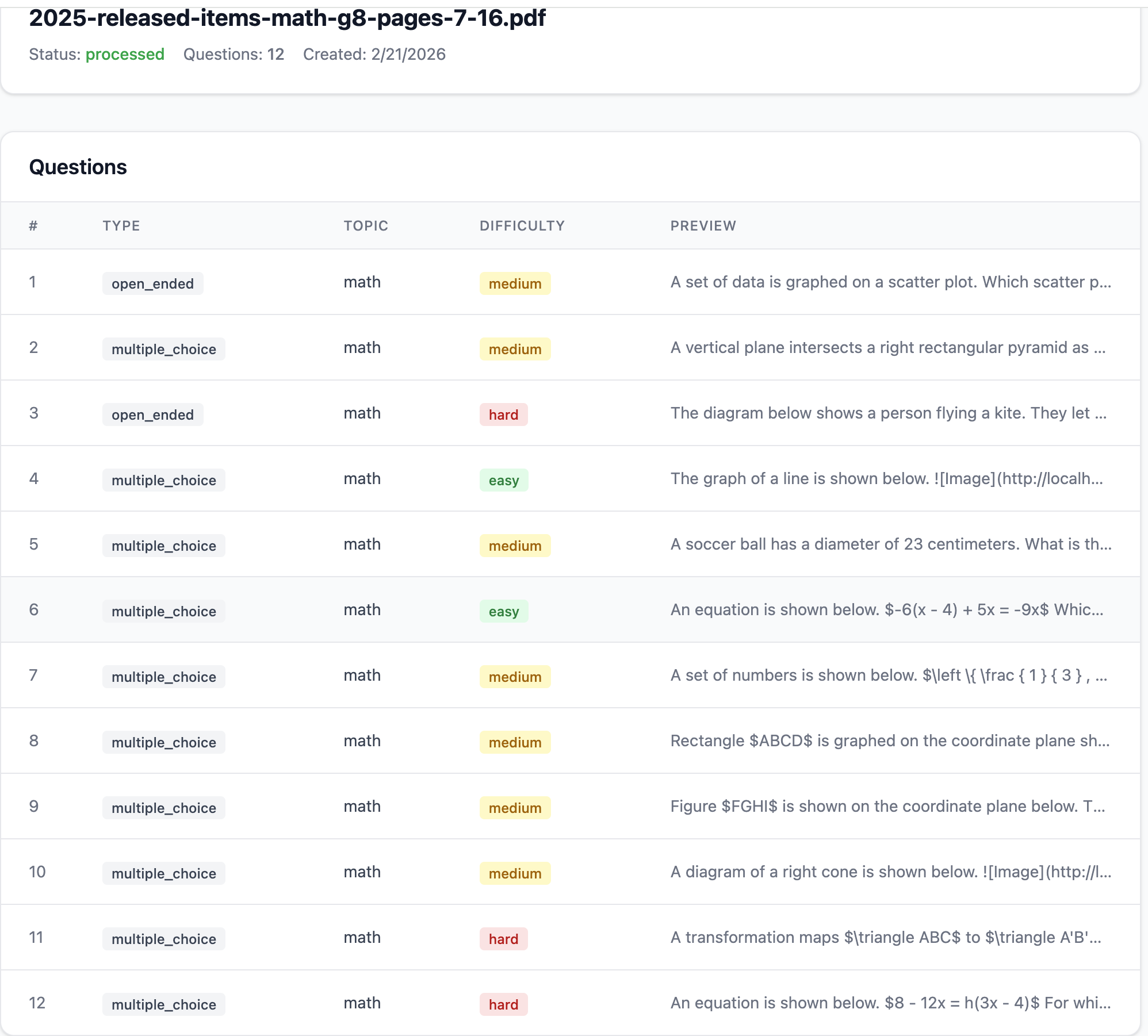
Document Detail — Detailed view of a single document showing metadata and a paginated list of extracted questions with type, topic, difficulty, and preview text.
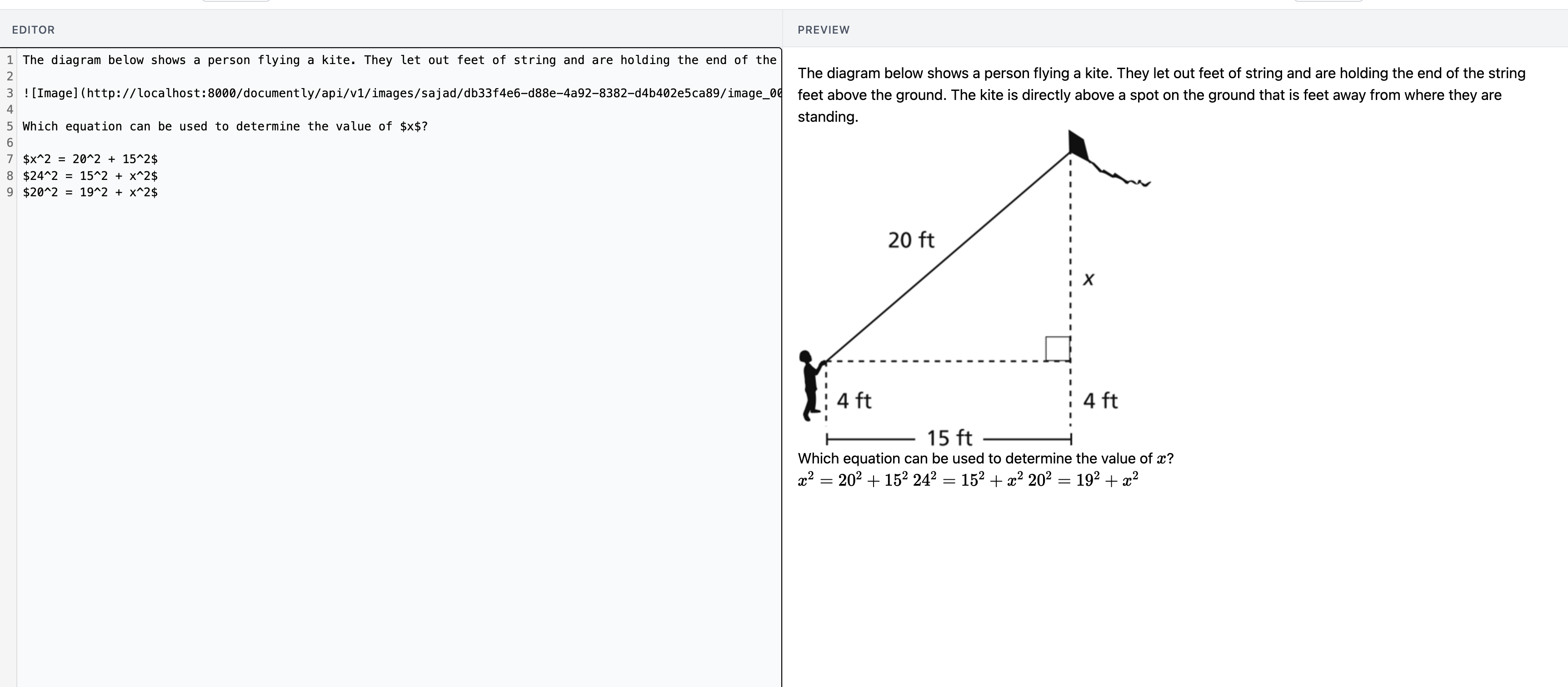
Question Editor — Split-pane editing interface with a CodeMirror Markdown editor on the left and a live-rendered preview (with KaTeX mathematical notation) on the right. Multiple-choice options and correct answers are editable inline and persist to their respective database columns.
IBM Docling provides layout-aware document conversion that goes beyond basic text extraction. Complex elements — multi-column layouts, embedded mathematical notation, geometry diagrams, and tabular data — are preserved in the Markdown output rather than flattened into plain text.
Rather than relying on regex patterns or rule-based heuristics, DocumentLynx uses large language models to identify question boundaries, separate questions from instructional text, headers, and footers, and structure the output with associated answer choices.
Each extracted question is automatically classified across multiple dimensions:
| Dimension | Example Values |
|---|---|
| Question Type | multiple_choice, short_answer, open_ended, true_false |
| Topic | math, science, english, social_studies |
| Subtopic | geometry, algebra, calculus |
| Difficulty | easy, medium, hard |
| Cognitive Level | recall, understanding, application, analysis |
| Grade Level | elementary, middle_school, high_school |
Vector embeddings generated by sentence-transformers enable semantic similarity search across the question bank. This allows educators to find related questions across different documents and years, and helps prevent duplicate questions from entering the system.
The platform includes infrastructure patterns typically found in production systems:
| Layer | Technologies |
|---|---|
| Backend Framework | Python 3.8+, FastAPI, Uvicorn |
| Agent Orchestration | LangGraph, LangChain |
| Document Parsing | IBM Docling |
| Large Language Model | Groq (LLaMA 3.3 70B Versatile) |
| Embeddings | HuggingFace sentence-transformers (all-MiniLM-L6-v2) |
| Database | PostgreSQL 15+ with pgvector extension |
| Object Storage | Google Cloud Storage |
| Authentication | Client credentials with bcrypt-hashed secrets |
| Frontend | React 19, TypeScript, Vite 7 |
| UI Libraries | TanStack Query, CodeMirror 6, KaTeX, Tailwind CSS 4 |
| Observability | LangSmith (optional) |
| Testing | pytest, evaluation harness with baseline datasets |
git clone https://github.com/sajadreshi/documentlynx.git
cd documentlynx
cp .env.example .env
Edit .env:
DATABASE_URL=postgresql://username:password@localhost:5432/documently
GOOGLE_CLOUD_PROJECT_ID=your-project-id
GOOGLE_CLOUD_STORAGE_BUCKET=your-bucket-name
GOOGLE_APPLICATION_CREDENTIALS=path/to/credentials.json
GROQ_API_KEY=your-groq-api-key
createdb documently
psql -d documently -c "CREATE EXTENSION IF NOT EXISTS vector;"
python3 -m venv venv
source venv/bin/activate
pip install -r requirements.txt
python -m app.scripts.init_db
python -m app.scripts.manage_clients create dev-client dev-secret
uvicorn app.main:app --reload --port 8000
Backend runs at http://localhost:8000. API docs at http://localhost:8000/docs.
Open a new terminal:
cd frontend
npm install
Create frontend/.env:
VITE_API_URL=http://localhost:8000
VITE_CLIENT_ID=dev-client
VITE_CLIENT_SECRET=dev-secret
npm run dev
Frontend runs at http://localhost:5173.
docker run -p 5001:5001 ds4sd/docling-serve
http://localhost:5173All endpoints require X-Client-Id and X-Client-Secret headers.
| Method | Endpoint | Description |
|---|---|---|
POST | /documently/api/v1/upload | Upload a document (multipart) |
POST | /documently/api/v1/process-doc | Trigger async processing pipeline |
GET | /documently/api/v1/jobs/{id} | Poll job status |
GET | /documently/api/v1/documents | List documents (paginated) |
GET | /documently/api/v1/documents/{id} | Document detail |
GET | /documently/api/v1/documents/{id}/questions | List questions (paginated) |
GET | /documently/api/v1/documents/{id}/questions/{qid} | Question detail |
PUT | /documently/api/v1/documents/{id}/questions/{qid} | Update question, options, correct answer |
GET | /health/detailed | Health check (database, GCS, Docling) |
python -m app.scripts.manage_clients create <client_id> <secret>
python -m app.scripts.manage_clients list
python -m app.scripts.manage_clients activate <client_id>
python -m app.scripts.manage_clients deactivate <client_id>
python -m app.scripts.manage_clients delete <client_id>
pytest tests/ -v
# Mock mode (no LLM calls)
python run_evals.py --mode mock --agent all

# Live mode (requires Groq API key)
python run_evals.py --mode live --agent extraction --output eval_results.json
documentlynx/
├── app/
│   ├── main.py                 # FastAPI application & startup
│   ├── config.py               # Pydantic settings
│   ├── database.py             # SQLAlchemy connection
│   ├── models.py               # ORM models (Document, Question, Job)
│   ├── auth.py                 # Client credential authentication
│   ├── api_routes.py           # Upload & processing endpoints
│   ├── question_routes.py      # Document & question CRUD endpoints
│   ├── exceptions.py           # Typed exception hierarchy
│   ├── retry.py                # Exponential backoff decorator
│   ├── circuit_breaker.py      # Circuit breaker pattern
│   ├── observability.py        # LangSmith @traceable wrapper
│   ├── agents/                 # LangGraph agents (6 pipeline stages)
│   ├── services/               # Business logic (storage, embedding, orchestrator)
│   ├── tools/                  # Classification, search, JSON parsing tools
│   ├── evaluation/             # Evaluation harness & baseline datasets
│   └── scripts/                # DB init, client management
├── frontend/
│   ├── src/
│   │   ├── pages/              # Upload, Documents, Detail, QuestionEdit
│   │   ├── components/         # Dropzone, StatusTracker, Editor, Preview
│   │   ├── hooks/              # Job polling, unsaved changes
│   │   └── api/                # Axios client & API functions
│   └── package.json
├── tests/                      # pytest test suite
├── prompts/                    # YAML prompt templates
├── docs/                       # Architecture diagrams
├── requirements.txt
├── .env.example
└── README.md
DocumentLynx demonstrates that a multi-agent architecture can effectively automate the end-to-end pipeline of extracting, classifying, and managing educational questions from raw documents. By combining layout-aware document parsing, LLM-powered question extraction, automated classification, and vector-based semantic search, the platform eliminates the manual effort traditionally required to build and maintain structured question banks.
The current system establishes a foundation that can be extended in several directions:
AI-Powered Homework Assistant — With a structured and searchable question bank in place, the platform can evolve into a student-facing tool that provides step-by-step solutions, hints, and explanations for similar problems. Students could upload their homework, and the system would match questions against the existing bank to offer guided help rather than direct answers.
Competitive Exam Preparation — The classification and semantic search capabilities make this platform well-suited for students preparing for standardized and competitive exams. Questions can be filtered by topic, difficulty, and cognitive level to generate targeted practice sets, mock tests, and adaptive quizzes that focus on areas where a student needs the most improvement.
Automated Assessment Creation for Educators — Educators can leverage the question bank to automatically generate worksheets, quizzes, and exams by specifying criteria such as subject, difficulty distribution, and question types. This reduces the time spent assembling assessments and ensures balanced coverage across topics and difficulty levels.
Collaborative Question Curation — The editing interface can be extended to support multi-user collaboration, allowing teams of educators to review, refine, and approve extracted questions before they enter the active question bank.
These extensions position DocumentLynx not just as a document processing tool, but as a broader educational platform that serves students, educators, and assessment organizations alike.