




A party of specialized micro-agents, running entirely on your machine, working through tasks while you sleep.
I started building QuestChain after spending time with OpenClaw. The architecture there is genuinely impressive: multi-agent orchestration, rich tool use, long-running autonomous tasks. But the moment you try to run it against a local model, the practical reality sets in fast.
The problem isn't Ollama. Ollama is excellent. The problem is prompt assembly. Orchestration frameworks designed for frontier models construct large, rich prompts with broad tool schemas, long conversation histories, and multi-agent context merged into single calls. A 4B model hits its context window before the conversation has really started, hallucinates tool call syntax, or gets lost mid-task. The model is fine. It's being asked to do too much with too little.
QuestChain is my answer to that gap: a local-first agent framework designed from scratch to make small models productive. The core insight is simple: smaller context, fewer tools, and a clear role per agent means better decisions and fewer failures. Instead of one generalist agent trying to do everything, QuestChain runs a party of specialized micro-agents, each focused on a narrow domain.
No cloud. No subscriptions. Nothing leaving the machine.
The core engine is a custom async ReAct loop built directly on the Ollama Python client with streaming enabled.
# engine/agent.py — simplified loop
for iteration in range(max_iterations):
    messages = self._build_messages(context)
    async for chunk in self.model.chat_stream(messages, tools=tool_schemas):
        if chunk.text:
            yield chunk.text  # stream tokens to caller
        if chunk.done:
            tool_calls = chunk.tool_calls

    if tool_calls:
        results = await self.tools.execute_parallel(tool_calls)
        context.extend(results)
        context.save()
        continue  # back to model with results
    else:
        context.add({"role": "assistant", "content": full_text})
        context.save()
        return
The core run() loop, including streaming, parallel tool execution, context management, and <think> tag filtering for reasoning models, is about 85 lines. No middleware, no hidden prompt injection.
Tool calls are dispatched in parallel via asyncio.gather. When a model requests a web search and a file read in the same turn, they run concurrently.
Conversation history is stored as JSONL files at ~/.questchain/sessions/{thread_id}.jsonl: one message per line, human-readable, no database required.
Token budgeting is handled before each turn. If accumulated history is approaching the model's context window, QuestChain runs a compaction step: it calls the model itself to summarize the older portion of the conversation, replaces those messages with the summary, and continues. The model never crashes mid-conversation from an overflowing context. It just compresses.
if context.needs_compaction():
    await context.compact(self.model)
The compactor uses the same model with a minimal system prompt: "You are a concise summarizer. Preserve key facts, decisions, file paths, and tool outcomes." Compaction quality scales with model quality, and you never need a separate embedding model or vector store for basic memory.
Tools are registered via a @tool decorator that auto-generates JSON schemas from Python type hints:
@tool
async def read_file(path: str) -> str:
    """Read a file from the filesystem."""
    ...
Each agent in QuestChain has a class: a role template that defines its system prompt, tool loadout, and terminal display color. When you create a new agent, you choose its class and it gets wired up accordingly.
| Class | Role | Tools |
|---|---|---|
| Keeper 📚 | Files and knowledge management | read_file, write_file, edit_file, ls, glob, grep |
| Explorer 🔭 | Web research and information | web_search, web_browse |
| Builder ⚒️ | Code and systems | files, shell, claude_code |
| Planner 🔮 | Planning and strategy | file tools |
| Scheduler ⏱️ | Automation and cron jobs | cron only |
| Custom 🌀 | User-defined | user-configured |
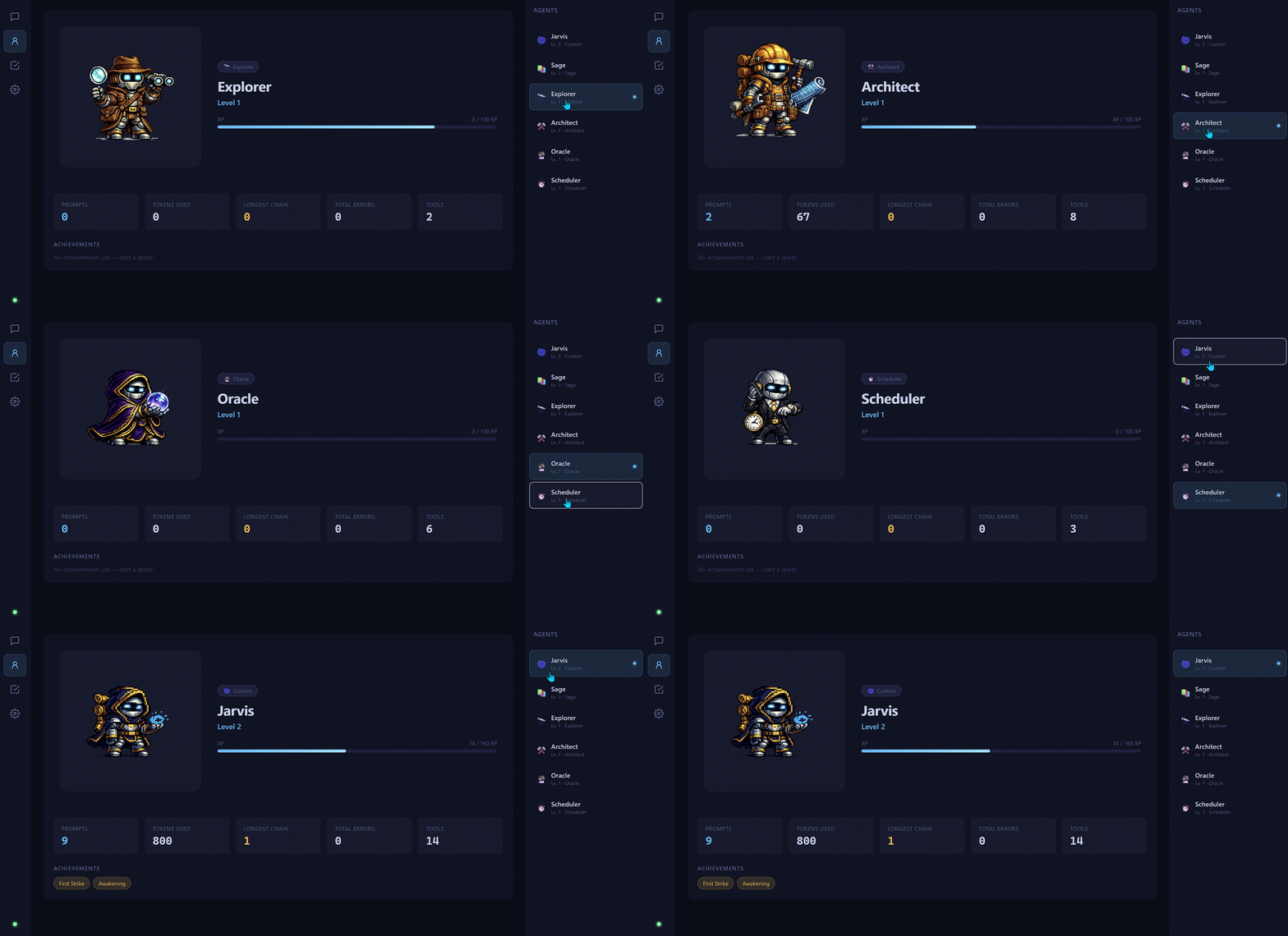
The separation isn't cosmetic. Each class gets a distinct system prompt tuned for its domain:
# Builder system prompt (abbreviated)
You are {agent_name}, a software builder and coder running locally via Ollama.

## Rules
- Delegate coding tasks to claude_code for implementation.
- Never hallucinate file contents — read them first.
- Confirm before any destructive file changes.
# Explorer system prompt (abbreviated)
You are {agent_name}, a web research and information specialist running locally via Ollama.

## Rules
- Use web_search first to find relevant sources, then web_browse for depth.
- Cross-reference multiple sources before drawing conclusions.
- Never hallucinate URLs or facts — verify with tools.
Focused agents make better decisions on small local models for a concrete reason: shorter tool schemas, narrower context, and a clearer identity. A 4B model given six file tools and a specific file-management role will outperform the same model given every tool and a vague "do anything" prompt. The class system enforces that constraint systematically.
Agents persist individually. Each has its own name, progression data, and optionally a custom model override. You can run your Scheduler on qwen3:1.7b and your Builder on qwen3:8b.
Quests are the autonomous background work layer. Every 60 minutes (configurable), QuestChain picks the first .md file alphabetically from workspace/quests/, runs the agent against it, and deletes the file when done.
# workspace/quests/find-api-docs.md
Find the REST API docs for the weather service and save a summary to /workspace/memory/weather-api.md
The quest prompt is constructed with an explicit autonomy instruction. The agent is told not to ask for clarification, to make judgment calls, and to produce results directly:
prompt = (
    f"QUEST: Complete the following task (from {quest_name}).\n\n"
    f"{quest_content}\n\n"
    f"Work autonomously. Do NOT ask for clarification — make your best judgment "
    f"call and proceed. When finished, present your actual findings, results, or "
    f"produced content directly in your response — not a description of steps taken."
)
Results surface in the terminal and, if configured, as a Telegram message. The quest runner interval is configurable at startup:
questchain --quests 30   # check every 30 minutes
questchain --no-quests   # disable entirely
The /quest command gives you an arrow-key menu to create, view, and delete quests without leaving the terminal. Quests are intentionally low-ceremony: no DSL, no YAML config, no schema. Just a Markdown file describing what you want done.
Every agent starts at Level 1 and earns XP through real work: tool calls, completed conversations, background quests, and scheduled jobs. Levels run from 1 to 20, with achievements tracked along the way.
The gamification isn't just flavor. It solves a real usability problem: local models feel impersonal and forgettable because they don't persist identity between sessions and don't grow. The progression system gives each agent a persistent identity and makes accumulated work visible.
/stats
┌─ Jarvis (Builder ⚒️) ──────────────────────────────────┐
│ Level 7 · 3,240 XP                                      │
│ ████████████████░░░░░░░░░░░░ 64% to Level 8             │
│                                                          │
│ Top tools: claude_code (48×) · shell (31×) · read (27×) │
│ Achievements: First Strike · Blacksmith                  │
└──────────────────────────────────────────────────────────┘
The stat sheet gives you a real picture of what your agent actually does: which tools it reaches for, how often it's been used, and what it's accomplished. That's useful diagnostic data disguised as an RPG screen.
Runtime
ollama Python client, raw async, no wrapper frameworkAgent / OllamaModel / ToolRegistry / ContextManager classesInterfaces
Integrations
Storage
~/.questchain/sessions/~/.questchain/agents.jsonThe primary bottleneck for local agent performance isn't reasoning quality. It's tool call reliability. A model that reasons well but generates malformed JSON for tool arguments is useless as an agent. Model selection matters a lot here.
| Model | VRAM | Notes |
|---|---|---|
| qwen3 8b | ~6 GB | Default. Fast, excellent tool calling, native chain-of-thought |
| qwen3 4b | ~3 GB | Solid tool calling, native thinking, runs on 4 GB VRAM |
| qwen3.5 9b | ~7 GB | Strong tool calling across complex multi-step tasks |
| qwen3 1.7b | ~2 GB | Usable for simple tasks; tool call reliability degrades on complex chains, but works well for web search |
The Qwen3 family has been the most consistently reliable for structured tool use at small sizes. The native thinking mode (<think> tags) improves multi-step task completion. QuestChain strips those tags from visible output transparently.
The 4B sweet spot: Models at 4B parameters hit a reasonable balance between response quality, tool call reliability, and VRAM requirements on consumer hardware. Below that, you'll see more tool call failures and hallucinated arguments on tasks with multiple required steps. I've tested as low as 0.8B: simple single-tool queries work, but autonomous multi-step quest completion becomes unreliable.
Context window matters more than parameter count for agents. A 4B model with a larger context window is more capable as an agent than the same model at a smaller one. QuestChain sets context window per model via MODEL_PRESETS — the default for qwen3:8b is 8K, with higher settings available depending on your hardware.
Parallel tool execution has a measurable impact. When an Explorer agent needs to search three queries and extract content from two URLs, running those concurrently rather than sequentially cuts wall-clock time significantly on CPU-bound local inference.
QuestChain is open source and in active development. The roadmap includes:
workspace/tools/, auto-discovered, no restart requiredThe self-coding loop is already live. QuestChain's Builder agent (Jarvis) has been writing features and pushing commits to the repo. It's a useful stress test of the autonomy system and a good demonstration of what focused micro-agents can do on local hardware.
Install in one command:
# macOS / Linux
curl -fsSL https://raw.githubusercontent.com/RayP11/QuestChain/master/install.sh | bash

# Windows (PowerShell)
powershell -ExecutionPolicy Bypass -c "irm https://raw.githubusercontent.com/RayP11/QuestChain/master/install.ps1 | iex"
questchain start
Ollama handles the model. QuestChain handles the rest.