



Retrieval-Augmented Generation (RAG) Pipeline with Local LLaMA Model
Overview
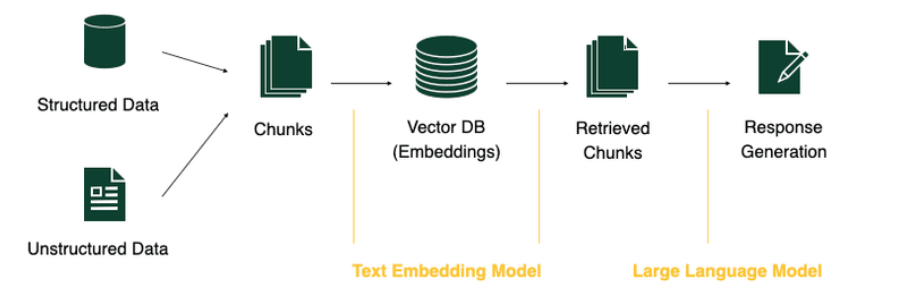
This project implements a full-fledged Retrieval-Augmented Generation (RAG) system that allows users to upload documents (PDFs, DOCX, PPTX, XLSX, images, and more), process them into semantic chunks, retrieve relevant context, and generate answers using a local LLaMA model — all within a simple Streamlit UI or a command-line interface.
Abstract
This project is designed to extract table data accurately from .docx files using a Python-based GUI. The main goal is to provide a simple and effective way for users to upload a .docx document, identify and extract tabular data, and display it in a readable format. It ensures that when new input is provided, the previous data is automatically cleared, preventing confusion. Accuracy in extracting structured information, especially from tables, is a primary focus of the application.
1. Introduction
1.1. Motivation and Problem Definition
In many professional and academic contexts, documents contain critical information in table format. Manually copying this tabular data is error-prone and time-consuming, especially when dealing with multiple or complex tables. Existing tools often extract text but fail to preserve table structure or require significant user intervention. The motivation behind this project is to create a lightweight, automated solution that allows users to:
The problem addressed here is twofold: the lack of tools that provide accurate table extraction from .docx files and the absence of an intuitive GUI that handles such tasks efficiently.
1.2 Objectives
The primary objective of this project is to develop an automated, user-friendly tool that extracts tabular content from .docx documents with high accuracy. To achieve this, the project focuses on the following specific goals:
1.3. Intended Audience
This project is designed for a broad range of users who frequently work with tabular data embedded in Word documents and need a reliable method to extract it:
2. Methodology and System Architecture
This section outlines the technical approach used to extract table data from .docx documents. The project employs a lightweight and efficient pipeline to process uploaded documents, identify tabular content, and render it cleanly in a user interface. The solution leverages Python libraries such as python-docx for document parsing and Tkinter for the GUI.
2.1 System Architecture
The system follows a modular architecture with the following components:
2.2 Data Ingestion and Processing
Once a input file is uploaded through the GUI, the system performs the following steps:
File Selection: The user selects a file using a file dialog.
Document Reading: The file is opened using python-docx which parses the document’s internal structure.
3.Table Extraction:
2.3 Query Processing Pipeline
Although the system does not process user-generated queries in a traditional database sense, it performs a lightweight form of query processing in response to file upload actions:
2.4 Tools Used
| Tool | Purpose |
|---|---|
| LangChain | For text splitting and chaining logic for LLM pipelines |
| LlamaIndex | For vector indexing and querying document embeddings |
| OpenAI/LLaMA | Generative model for contextual responses |
| Streamlit | Frontend interface for uploading documents and querying |
| ReadyTensor | Deployment platform to test, host, and publish RAG pipelines |
2.5 Key Features and System Capabilities
This section outlines the core features and architectural decisions that make the system modular, extensible, and practical for document understanding tasks.
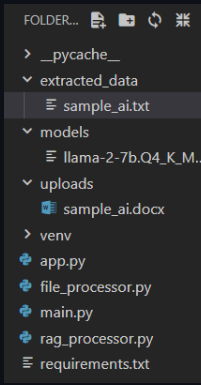
Organized by clear directories:
uploads/: raw uploaded documents.
extracted_data/: cleaned and structured output.
models/: LLM or RAG-related utilities and checkpoints.
| File | Role |
|---|---|
app.py | Web UI (likely Streamlit) to upload files and query content. |
main.py | CLI interface and high-level pipeline controller. |
file_processor.py | Core logic for reading and chunking content from various file types. |
rag_processor.py | Handles embeddings, vector store management, and query answering. |
2.5 System Workflow Overview
Architecture Diagram:
      User Query
            ↓
   RAGProcessor.retrieve() → Top-k chunks
            ↓
   generate_answer(query + context)
            ↓
   Answer via OpenAI or LLaMA2
Directory & File Structure
Multi Format Document Rag System/
├── pycache/
├── extracted_data/
├── models/
├── uploads/
├── README.md
├── app.py
├── file_processor.py
├── main.py
├── rag_processor.py
└── requirements.txt
Step-by-Step Guide to Running the Pipeline
1.Set Up Your Environment
pip install streamlit llama-index langchain openai sentence-transformers
pdfplumber python-docx python-pptx pytesseract fitz opencv-python pandas
2.Upload and Process Document (file_processor.py)
5.Interfaces
Streamlit App (app.py):
Upload document → Ask question → Get contextual answers.
Run with:
n streamlit run app.py
CLI Interface (main.py):
Commands:
- upload: to ingest a file.
- query: to ask a question.
- exit: to close session.
3. Implementation and Usage Guide
This section provides a step-by-step guide to installing, running, and interacting with the table extraction tool.
3.1 Installation and Execution
Prerequisites:
Steps to Run the Application
3.2 Multi-Format Document Support
This project supports processing and extracting information from various file types, making it flexible and suitable for different use cases. The following formats are currently supported:
4. Discussion
4.1 Limitations:
4.2 Future Work and Enhancements:
Structural Format Matching & Feedback System:
A planned enhancement is to store templates or schemas representing the expected structure of official or compliant documents (e.g., reports, proposals, SOPs). When a new .docx is uploaded:
Model Upgrade for Better Context Retention:
Replacing the current model with a larger or more context-aware LLM (e.g., GPT-4, Claude, or Mixtral) would significantly improve the system's ability to handle large files and nuanced queries.
Persistent Vector Store and Scalable Indexing:
Introducing a persistent vector database like FAISS, ChromaDB, or Pinecone can allow:
Faster retrieval over time.
Scalable storage of embeddings from multiple documents.
Multi-document querying and cross-referencing.
5. Conclusion
This project presents a robust and modular Retrieval-Augmented Generation (RAG) system capable of extracting and querying content from a wide range of document formats, including PDFs, Word documents, PowerPoint presentations, Excel sheets, and images. It ensures high-quality text and table extraction while maintaining the structural context of the original document, which is especially valuable for downstream tasks like semantic search and validation.
The system supports automatic cleanup, organized storage, and an easy-to-use interface via both Streamlit and CLI, making it accessible for both technical and non-technical users. While lightweight models are currently used for efficiency, there may be some trade-offs in accuracy when querying very long documents. Future enhancements are planned to address this, including storing and validating document structures to provide automated feedback on formatting and compliance.
Overall, the project lays a solid foundation for intelligent document analysis and offers extensibility for future enterprise or research-focused use cases.