



 Certifiedunder the Multi-Agent System module in the Mastering AI Agents program.
A Hierarchical AI Agent Framework for Automated Software Development
Multi-Agent System
Multi-Agent System ( 4 - for creating ) Multi-Agent System
This repository presents a production-grade multi-agent system (MAS) built on the PraisonAI Agents framework, implementing a hierarchical orchestration pattern for automated software development workflows. The system employs five specialized AI agents that collaborate through a structured decision-making process to transform high-level user requirements into fully functional, tested, and deployed software solutions. The architecture incorporates enterprise-grade features including caching, load balancing, monitoring, security, and optimization mechanisms, making it suitable for both research and production deployments.
The Multi-Agent System (MAS) is designed to automate the complete software development lifecycle through intelligent agent collaboration. The system accepts natural language requirements and orchestrates multiple specialized agents to produce production-ready code, comprehensive test suites, and deployment configurations.
This system is designed for:
The system implements a hierarchical process flow where agents operate in a structured sequence with decision points for quality control and iterative refinement.
┌─────────────────────────────────────────────────────────────────┐
│                    User Input (Natural Language)                │
└────────────────────────────┬────────────────────────────────────┘
                             │
                             ▼
┌─────────────────────────────────────────────────────────────────┐
│              InteractiveChatAgent (Loop Task)                   │
│  • Gathers requirements via conversational interface            │
│  • Uses internet_search_tool for research                       │
│  • Outputs structured requirement specification                 │
└────────────────────────────┬────────────────────────────────────┘
                             │
                             ▼
┌─────────────────────────────────────────────────────────────────┐
│                    Decision Task (Quality Gate)                 │
│  Conditions: approve → planning_task                            │
│              revise → loop_interactive_task                     │
│              reject → loop_interactive_task                     │
└────────────────────────────┬────────────────────────────────────┘
                             │
                             ▼
┌─────────────────────────────────────────────────────────────────┐
│                    PlannerAgent                                 │
│  • Analyzes requirements                                        │
│  • Researches implementation options                            │
│  • Generates JSON specification with:                           │
│    - Agent definitions                                          │
│    - Tool requirements                                          │
│    - Workflow steps                                             │
│    - Dependencies                                               │
└────────────────────────────┬────────────────────────────────────┘
                             │
                             ▼
┌─────────────────────────────────────────────────────────────────┐
│                    CoderAgent                                   │
│  • Generates Python code from JSON specification                │
│  • Uses code_interpreter for safe execution                     │
│  • Implements: main.py, agents.py, tools.py, requirements.txt   │
│  • Tools: execute_code, analyze_code, format_code, lint_code    │
└────────────────────────────┬────────────────────────────────────┘
                             │
                             ▼
┌─────────────────────────────────────────────────────────────────┐
│                    TesterAgent                                  │
│  • Performs static code analysis                                │
│  • Validates against original plan                              │
│  • Generates test report with confidence scores                 │
└────────────────────────────┬────────────────────────────────────┘
                             │
                             ▼
┌─────────────────────────────────────────────────────────────────┐
│              Test Decision Task (Quality Gate)                  │
│  Conditions: approve → deployer_task                            │
│              revise → loop_interactive_task                     │
└────────────────────────────┬────────────────────────────────────┘
                             │
                             ▼
┌─────────────────────────────────────────────────────────────────┐
│                    DeployerAgent                                │
│  • Generates Docker/Docker Compose configurations               │
│  • Creates Kubernetes manifests (if needed)                     │
│  • Ensures localhost deployment                                 │
└─────────────────────────────────────────────────────────────────┘
1. InteractiveChatAgent
Role: Conversational Interface Manager
Tools Used:
create_chat_interface(): Interactive terminal-based chat
internet_search_tool(): Real-time information retrieval
Assigned Role: Conversational Interface Manager
Model: gpt-4o-mini (configurable)
Available Tools:
create_chat_interface(): Interactive terminal-based chatinternet_search_tool(): Real-time information retrievalTask Type: Loop (iterative conversation)
It creates a ChatInterface to guide the user for inputs that fulfills the basic requirements for the initial setup/planning to handover the requirements to the next agent. This task is reiterated until the requirements are well-defined & makes sure no field is left unfulfilled.
Output Format: Structured requirement specification with:
  - Programming language selection
  - Framework recommendations
  - Implementation type (API, Web App, Desktop, Mobile, CLI)
  - Deployment preferences
2. PlannerAgent
Role: Senior Project Manager / System Architect
Available Tool: internet_search_tool()
Assigned Role: Senior Project Manager / System Architect
Model: gpt-4o-mini (configurable)
Reasoning Steps: 3 (multi-step reasoning enabled)
Tool Used: internet_search_tool()
This agent transforms the gathered user requirements into a well-defined plan for the code implementation using the internet tool to meet with available frameworks and refers for further assistance in breaking down into details such as dependencies, required tools & functions, etc., which would be handed over to the next agent, CoderAgent.
Output Format: JSON specification containing:
{
  "project_name": "string",
  "agents_to_create": [{"class_name": "...", "description": "..."}],
  "required_tools": [{"function_name": "...", "description": "..."}],
  "workflow": ["step 1", "step 2", ...],
  "dependencies": ["package1", "package2", ...]
}
3. CoderAgent
Role: Senior Python Developer
Tools Used:
code_interpreter(): E2B sandbox execution
execute_code(): Code execution utilities
analyze_code(): Static analysis
format_code(): Code formatting
lint_code(): Linting capabilities
disassemble_code(): Bytecode analysis
Assigned Role: Senior Python Developer
Model: gpt-4o-mini (configurable)
Available Tools:
code_interpreter(): E2B sandbox executionexecute_code(): Code execution utilitiesanalyze_code(): Static analysisformat_code(): Code formattinglint_code(): Linting capabilitiesdisassemble_code(): Bytecode analysisBy going through one by one of the above tool functions, the coding task is executed by the CoderAgent.
Output Format: Complete Python project structure:
  - `main.py`: Orchestration logic
  - `agents.py`: Agent class definitions
  - `tools.py`: Tool implementations
  - `requirements.txt`: Dependencies
4. TesterAgent
Role: Senior QA Engineer
Function: Static code analysis and validation
Assigned Role: Senior QA Engineer
Model: gpt-4o-mini (configurable)
Defined Function: Static code analysis and validation
Ensures the integrity of the produced code by performing test from automatic generated test cases.
Output Format: Test report JSON as:
{
  "success": boolean,
  "errors": ["error1", "error2", ...],
  "suggestions": ["suggestion1", ...],
  "confidence_score": float
}
5. DeployerAgent
Role: DevOps Engineer / Localhost Deployer
Tool Used: internet_search_tool()
To perform deployment in localhost/user machine.
Assigned Role: DevOps Engineer / Localhost Deployer
Model: gpt-4o-mini (configurable)
Available Tool: internet_search_tool()
Output Format: Deployment configurations:
  - Dockerfile
  - docker-compose.yml
  - Kubernetes manifests (optional)
  - Health check endpoints
- Internet Search Tool
Provider: DuckDuckGo Search API
Function: internet_search_tool(query: str) -> List[Dict]
Max Results: 5 per query
Use Cases: Research, framework selection, best practices lookup
Output Format:
[
  {
    "title": "Result title",
    "url": "https://...",
    "snippet": "Result description"
  }
]
- Code Interpreter Tool
Provider: E2B Code Interpreter (sandboxed environment)
Function: code_interpreter(code: str) -> Dict
Security: Fully sandboxed execution environment
Capabilities: Python code execution, package installation, file I/O
Output Format:
{
  "results": ["output1", "output2", ...],
  "logs": {
    "stdout": ["log1", "log2", ...],
    "stderr": ["error1", ...]
  },
  "error": "error message (if any)"
}
- Caching Layer (
cache/)
Implementation: Redis + in-memory LRU cache
Purpose: Reduce API calls and improve response times
Cache Strategy: MD5-based key generation, TTL-based expiration
Files:
cache/agent_cache.py: AgentCache class with Redis integration
- Load Balancing (
load_balancer/)
Purpose: Distribute agent workloads across multiple instances
Strategy: Round-robin and least-connections algorithms
Files:
load_balancer/agent_balancer.py: Agent load distribution logic
- Monitoring (
monitoring/)
Provider: Prometheus metrics
Metrics Collected:
Files:
monitoring/metrics.py: MetricsCollector class
- Security (
security/)
Components:
Key Management: Encrypted API key storage (Fernet encryption)
AWS Secrets Manager: Integration for production key management
Rate Limiting: Per-agent request throttling
Input Validation: Sanitization and validation of user inputs
Files:
security/key_manager.py: SecureKeyManager class
security/rate_limiter.py: Rate limiting implementation
security/validator.py: Input validation utilities
- Optimization (
optimization/)
Model Selection: Cost-optimized model selection based on task requirements
Token Optimization: Token counting and context window management
Files:
optimization/model_selector.py: CostOptimizedModelSelector class
optimization/token_optimizer.py: Token usage optimization
- Health Checks (
health/)
Purpose: System health monitoring and readiness checks
Files:
health/health_check.py: Health check endpoints and logic
- Utilities (
utils/)
Connection Pooling: Async HTTP connection management
Error Handling: Production-grade error handling and logging
Files:
utils/connection_pooling.py: Async connection pool
utils/prod_error_handler.py: Error handling decorators
- Configuration (
config/)
Environment-based Configuration: Production settings management
Files:
config/production.py: Production configuration
- Logging (
logging_config.py)
Format: JSON-structured logging for production
Provider: pythonjsonlogger
Features: Structured logs, log levels, agent-specific logging
Logging can be enabled at runtime by setting the environment variable Debug to trueor LOGGING.LEVEL to INFO / DEBUG / ERROR / WARNING - combination of levels is possible by numerical value ( such as 30, 40 ) instead of single mentioned label.
``
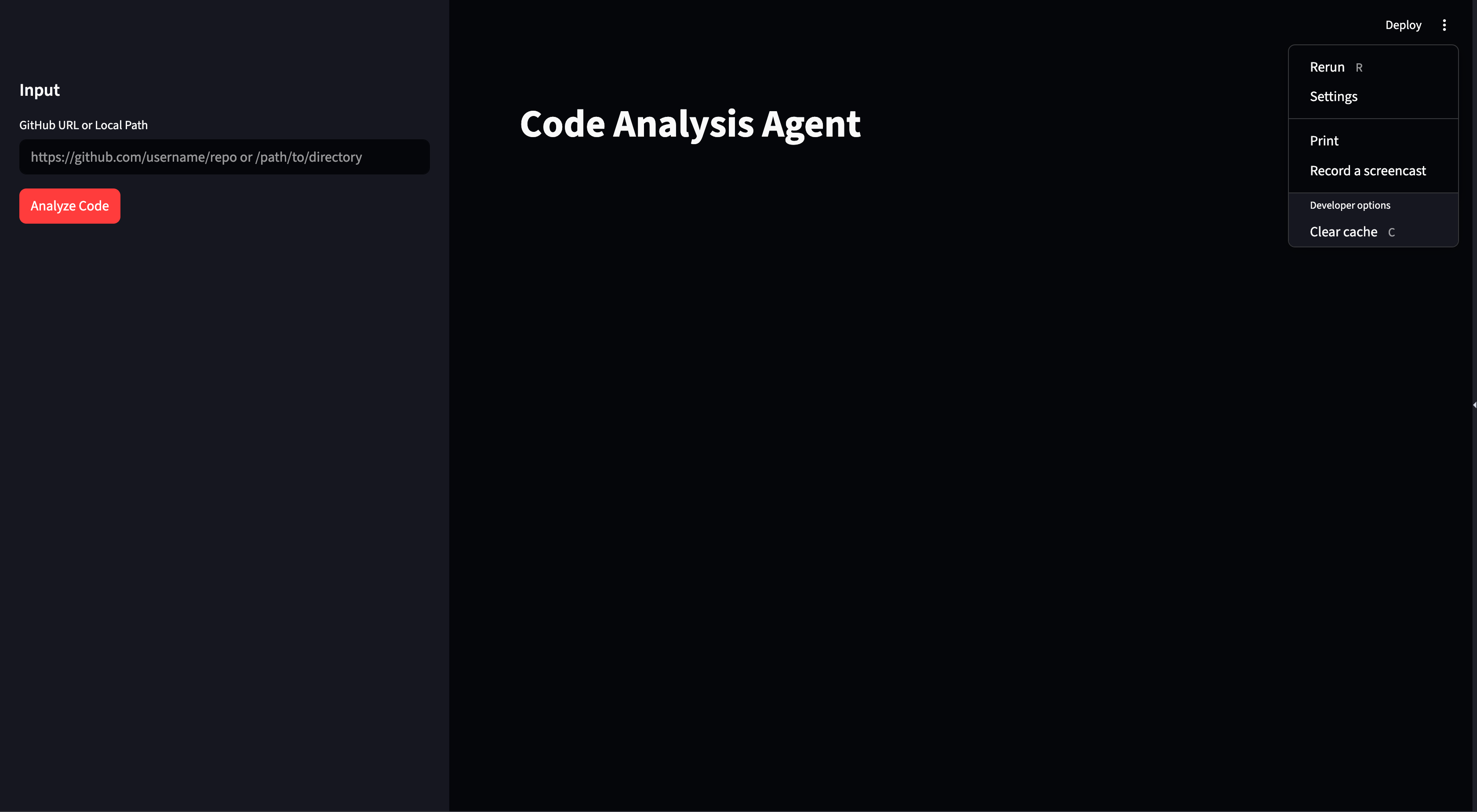
- User Interface (
ui/)
Separate Code Analyser: Standalone function with UI implementation
Files:
ui/code_analysis_ui.py: UI for Code Analysis
mas/
├── main.py                          # Main entry point and agent definitions
├── prompts.py                       # Centralized prompt templates for agents
├── model_checker.py                 # Model capability detection and selection
├── context-engineering-workflow.py # Advanced context engineering workflow
├── logging_config.py                # Production logging configuration
├── Dockerfile                       # Production container definition
├── requirements.txt                 # Python dependencies
├── README.md                        # This file
├── .gitignore                       # Git ignore patterns
│
├── cache/                           # Caching layer
│   └── agent_cache.py              # Redis + in-memory caching implementation
│
├── config/                          # Configuration management
│   └── production.py               # Production environment settings
│
├── deploy/                          # Deployment configurations
│   ├── docker-compose.yml          # Docker Compose for development
│   └── Dockerfile.dev              # Development container definition
│
├── health/                          # Health check system
│   └── health_check.py             # Health monitoring endpoints
│
├── load_balancer/                   # Load balancing
│   └── agent_balancer.py           # Agent workload distribution
│
├── monitoring/                      # Observability
│   └── metrics.py                  # Prometheus metrics collection
│
├── optimization/                    # Performance optimization
│   ├── model_selector.py           # Cost-optimized model selection
│   └── token_optimizer.py          # Token usage optimization
│
├── security/                        # Security features
│   ├── key_manager.py              # Secure API key management
│   ├── rate_limiter.py             # Request rate limiting
│   └── validator.py                # Input validation and sanitization
│
├── tests/                           # Test suite
│   ├── conftest.py                 # Pytest configuration and fixtures
│   ├── pytest.ini                  # Pytest settings
│   ├── capture_out_err.py          # Output capture utilities
│   ├── debug_utils.py              # Debugging helpers
│   ├── factories.py                # Test data factories (factory_boy)
│   ├── utils.py                    # Test utilities
│   │
│   ├── data/                       # Test data
│   │   └── test_cases.py          # Test case definitions
│   │
│   ├── integration/                # Integration tests
│   │   ├── test_multi_agent.py    # Multi-agent integration tests
│   │   └── test_tool_integration.py # Tool integration tests
│   │
│   ├── mock/                       # Mock objects
│   │   ├── llm_mock.py            # LLM API mocks
│   │   └── tool_mock.py           # Tool mocks
│   │
│   ├── performance/                # Performance tests
│   │   ├── test_load.py           # Load testing
│   │   └── test_memory.py         # Memory profiling
│   │
│   ├── unit/                       # Unit tests
│   │   ├── test_agents.py         # Agent unit tests
│   │   ├── test_tasks.py          # Task unit tests
│   │   └── test_tools.py          # Tool unit tests
│   │
│   ├── test_properties.py         # Property-based tests (Hypothesis)
│   └── test_snapshots.py          # Snapshot tests (Syrupy)
│
└── utils/                           # Utility modules
    ├── connection_pooling.py       # Async HTTP connection pooling
    └── prod_error_handler.py       # Production error handling
-
main.py
Purpose: System entry point and agent orchestration
Contents:
-
context-engineering-workflow.py
Purpose: Advanced context engineering demonstration
Features:
-
model_checker.py
Purpose: Model capability detection and selection
Features:
- Prerequisites
Step 1: Clone Repository
git clone https://github.com/mukundan1/MAS4MAS.git
Step 2: Create Virtual Environment
python -m venv .venv
source .venv/bin/activate  # On Windows: .venv\Scripts\activate
Step 3: Install Dependencies
pip install --upgrade pip
pip install -r requirements.txt
Step 4: Environment Configuration
Create a .env file in the project root:
# Required: LLM API Configuration
OPENAI_API_KEY=your_openai_api_key_here
OPENAI_BASE_URL=https://api.openai.com/v1  # Update for compatible APIs
OPENAI_BASE_URL=https://localhost:8000/v1  # to work with Ollama / local LLM


# Required: Code Interpreter
E2B_API_KEY=your_e2b_api_key_here

# Optional: Redis (for distributed caching)
REDIS_URL=redis://localhost:6379/0

# Optional: AWS Secrets Manager (for production key management)
AWS_REGION=us-east-1
USE_AWS_SECRETS=false

# Optional: Encryption (auto-generated if not provided)
ENCRYPTION_KEY=your_fernet_encryption_key_here

# Optional: Monitoring
PROMETHEUS_PORT=9090
Note: The OPENAI_BASE_URL should be updated according to your LLM provider:
https://api.openai.com/v1https://api.anthropic.com/v1Step 5: Verify Installation
python -c "import praisonaiagents; print('Installation successful')"
Method 1: Direct Execution
python main.py
This will:
Method 2: PraisonAI CLI
After initializing the virtual environment, you can use the below commands:
# Initialize a new multi-agent system
praisonai --init "Create a stock analysis system with research and reporting agents"

# Run with specific framework
praisonai --init "Your prompt" --framework crew
praisonai --init "Your prompt" --framework autogen

# Execute using agents.yaml
praisonai
Custom Agent Configuration:
Modify agent definitions in main.py:
CustomAgent = Agent(
    name="CustomAgent",
    role="Custom Role",
    goal="Custom goal",
    backstory="Custom backstory",
    llm="gpt-4",  # Use different model
    api_key=api_key,
    reasoning_steps=5,  # Increase reasoning depth
    tools=[custom_tool],
    verbose=True
)
Custom Workflow:
Create custom task sequences:
custom_workflow = PraisonAIAgents(
    agents=[Agent1, Agent2, Agent3],
    tasks=[task1, task2, task3],
    process="sequential",  # or "hierarchical", "parallel"
    max_retries=5,  # retry for looping / fine-processing
    manager_llm="gpt-4",
    verbose=True
)
Using Context Engineering:
from context_engineering_workflow import ContextEngineeringWorkflow

workflow = ContextEngineeringWorkflow(
    project_path="./my_project",
    llm="gpt-4o-mini"
)

result = workflow.execute("Create a REST API for user management")
Agents communicate through:
- Planning Output (
Planning.md)
# Implementation Plan

## Project: [project_name]

## Agents
- [Agent descriptions]

## Tools
- [Tool specifications]

## Workflow
1. Step 1
2. Step 2
...

## Dependencies
- package1
- package2
- Code Output (
Code.md)
- Generated Python files
- Code explanations
- Execution instructions
- Test Output (
Test.md)
- Test results
- Confidence scores
- Error reports
- Suggestions
- OpenAI-Compatible APIs
The system supports any OpenAI-compatible API by configuring OPENAI_BASE_URL:
# Example: Using Anthropic Claude
OPENAI_BASE_URL=https://api.anthropic.com/v1

# Example: Using local LLM / Ollama
OPENAI_BASE_URL=http://localhost:8000/v1
- Model Selection
The system includes intelligent model selection:
from model_checker import ModelCapabilities

capabilities = ModelCapabilities()
best_model = capabilities.recommend_model({
    "type": "code_generation",
    "complexity": "high",
    "context_needed": 8000
})
This system demonstrates a hierarchical process flow with quality gates, enabling:
The context-engineering-workflow.py demonstrates advanced context engineering:
Production-ready features for research and deployment:
Comprehensive test suite including:
The CostOptimizedModelSelector selects models based on:
tiktoken# Run all tests pytest # Run with coverage pytest --cov=. --cov-report=html # Run specific test categories pytest tests/unit/ # Unit tests pytest tests/integration/ # Integration tests pytest tests/performance/ # Performance tests # Run with verbose output pytest -v # Run with specific markers pytest -m "not slow" # Skip slow tests
factory_boy for test data generationProduction:
docker build -t mas:latest .
docker run -p 8000:8000 --env-file .env mas:latest
Development:
cd deploy
docker-compose up
The system can be deployed to Kubernetes with:
Health check endpoint: http://localhost:8000/health
Returns:
{
  "status": "healthy",
  "agents": ["agent1", "agent2", ...],
  "timestamp": "2024-01-01T00:00:00Z"
}
Prometheus metrics available at: http://localhost:9090/metrics
Key metrics:
agent_requests_total: Total requests by agent and statusagent_request_duration_seconds: Request latencyactive_agents: Number of active agentstoken_usage_total: Token usage by model and agentDevelopment Setup:
git checkout -b feature/amazing-featurepip install -r requirements.txtOptional
- 1. Run tests: `pytest`
- 2. Format code: `black .`
- 3. Lint code: `pylint *.py`
git commit -m 'Add amazing feature'git push origin feature/amazing-featureCopyright 2025 Mukundan
Licensed under the Apache License, Version 2.0 (the "License");
you may not use this file except in compliance with the License.
You may obtain a copy of the License at
http://www.apache.org/licenses/LICENSE-2.0
Unless required by applicable law or agreed to in writing, software
distributed under the License is distributed on an "AS IS" BASIS,
WITHOUT WARRANTIES OR CONDITIONS OF ANY KIND, either express or implied.
See the License for the specific language governing permissions and
limitations under the License.
Frameworks & Libraries:
Research & Development:
This system was developed as part of research into:
Made with ❤️ by Mukundan