



 Certifiedunder the Multi-Agent System module in the Mastering AI Agents program.
MakeItReal is an experimental multi-agent AI system designed to help aspiring developers turn vague software ideas into a concrete, actionable project plan. The tool acts as a virtual project manager and technical advisor, guiding users (especially those without formal software engineering experience) from an initial concept to a structured Minimum Viable Product (MVP) specification. By breaking down a high-level idea into well-defined features, suggesting an appropriate technology stack, and outlining a set of development tasks, MakeItReal bridges the gap between ideation and implementation. This publication describes the purpose and design of MakeItReal, how it works, and how to use it in practice.
Many hobbyist programmers and newcomers to software development struggle with the initial planning phase of a project. They might start with a great idea, but due to limited experience in requirements gathering and project scoping, they find it difficult to refine that idea into a clear set of features and tasks. This often leads to false starts, scope creep, or projects that stall out. In fact, studies have shown that nearly half of software project failures can be traced back to unclear or incomplete requirements. Clearly, a well-defined project specification and roadmap are critical for success.
MakeItReal addresses this problem by acting as an AI co-pilot for the early project planning stages. The system’s goal is to ensure that a user’s “fuzzy” idea is systematically developed into:
By providing this structured output, MakeItReal empowers users without technical project management skills to kick-start their software projects on solid footing. The tool guides the user step-by-step, helping them avoid common pitfalls such as missing critical requirements or choosing an inappropriate tech stack that could lead to technical debt down the line. Ultimately, MakeItReal makes the development process more approachable and efficient for novices, increasing the likelihood that their project will be completed successfully.
MakeItReal is structured as a multi-agent workflow organized into sequential stages. Each stage tackles a distinct aspect of the project definition process, and together they form a pipeline from idea to execution plan. The stages are: Requirement Analysis, Tech Stack Discovery, and Task Creation. These correspond to deriving the core product features, determining a suitable technology stack, and generating a list of development tasks, respectively. Under the hood, the orchestration is implemented using the LangGraph framework, which allows us to define the workflow as a directed graph of nodes (steps) with conditional transitions. This design enables complex interactions like iterative loops and conditional branching while maintaining a clear overall flow.
At a high level, the workflow can be visualized as a flowchart diagram, shown below in Mermaid syntax:
---
config:
  flowchart:
    curve: linear
---
graph TD;
    __start__([<p>__start__</p>]):::first
    requirement_analysis(requirement_analysis)
    techstack_discovery(techstack_discovery)
    task_creation(task_creation)
    log_tasks(log_tasks)
    __end__([<p>__end__</p>]):::last
    __start__ --> requirement_analysis;
    requirement_analysis --> techstack_discovery;
    techstack_discovery --> task_creation;
    task_creation --> log_tasks;
    log_tasks --> __end__;
    classDef default fill:#f2f0ff,line-height:1.2
    classDef first fill-opacity:0
    classDef last fill:#bfb6fc
In this main graph, the nodes requirement_analysis, techstack_discovery, and task_creation each represent a sub-process handled by a pair of agents (explained below). The final node log_tasks simply collates and outputs the results. The directed arrows show the progression: first the idea goes through requirements analysis, then the outcome feeds into tech stack discovery, then into task planning, and finally the compiled plan is output at the end. The linear progression ensures that each subsequent stage has the context it needs (for example, the Task Creation stage uses the features and tech stack decided earlier).
Critically, each of the first three stages is not a single step but an internal loop of proposal and review. This loop is a Generator–Evaluator pattern (also known as a generator–reviewer or propose–critique loop) that helps refine the output at each stage. We have implemented this by nesting a subgraph for each stage. In each subgraph, one agent generates a proposal (a list of items for that stage), and another agent evaluates that proposal, possibly requesting changes. This cycle may repeat until the proposal is satisfactory. The diagram below illustrates the internal workflow for each stage (requirement analysis, tech stack, and task creation all follow this same pattern):
--- config: flowchart: curve: linear --- graph TD; __start__([<p>__start__</p>]):::first requirements_agent(requirements_agent) review_agent(review_agent) human_review(human_review) __end__([<p>__end__</p>]):::last __start__ --> requirements_agent; requirements_agent --> review_agent; review_agent -. approved .-> human_review; review_agent -. rejected .-> requirements_agent; human_review -. approved .-> __end__; human_review -. rejected .-> requirements_agent; classDef default fill:#f2f0ff,line-height:1.2 classDef first fill-opacity:0 classDef last fill:#bfb6fc
As shown above, each stage’s subgraph involves three roles: a generator agent (requirements_agent in the diagram), a review agent (review_agent), and a final human review node. The workflow within a stage is as follows:
human_review node. Here the system pauses and asks the human user (via the CLI interface) to either approve the proposed list or request changes. This Human-in-the-Loop step ensures the user has final control to accept the results or provide their own input if something is missing or undesirable.This iterative Generator–Reviewer loop (with potential Human-in-the-Loop feedback) continues until each stage yields an outcome that is approved by both the AI reviewer and the user. The use of conditional graph transitions (the dotted lines labeled "approved" and "rejected" in the diagram) is a key aspect of LangGraph’s orchestration. We leverage LangGraph’s ability to branch the workflow based on the state: the system checks a boolean flag (approved or not) attached to the proposal and routes the flow accordingly. This dynamic control flow is what allows the multi-agent team to refine their outputs collaboratively.
MakeItReal employs a team of six AI agents, grouped into three pairs, each pair focusing on one of the stages.
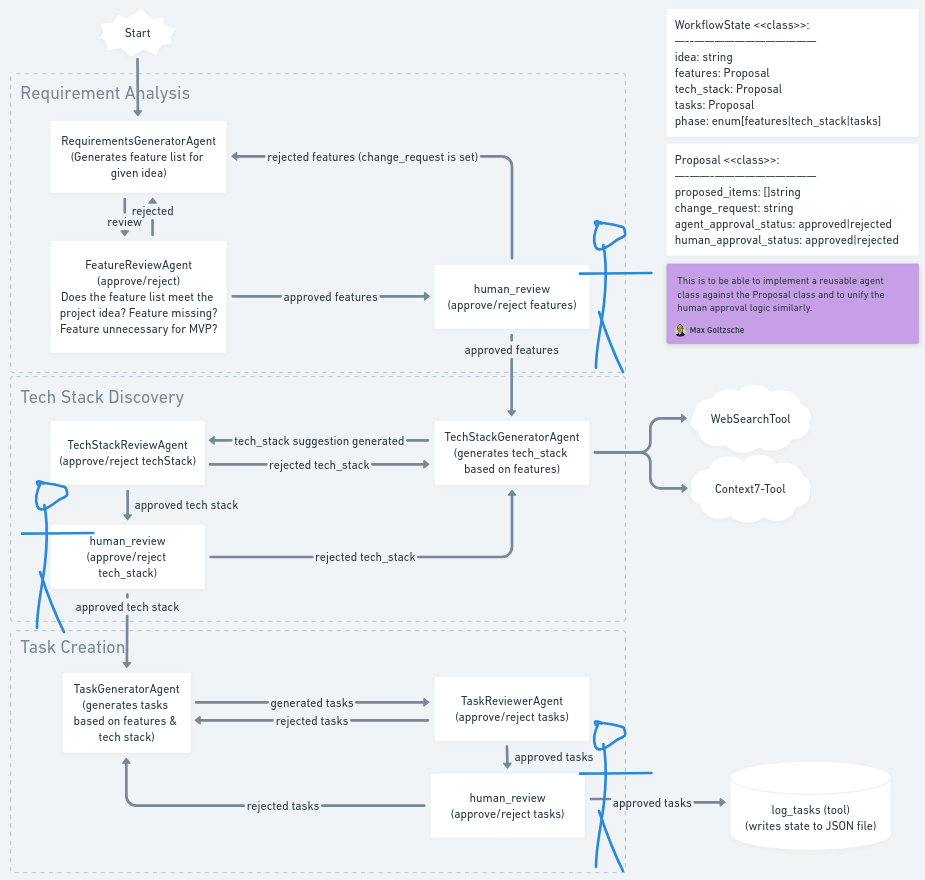
Requirements Generator Agent: A specialized agent that takes the user’s raw idea and suggests a list of essential product features or use-cases that the MVP should include. This agent acts like a seasoned product requirements engineer, trying to derive the minimal, most crucial features from the idea.
Requirements Review Agent: This agent evaluates the feature list proposed by the generator. Its role is to ensure that the list of features is complete (no obvious necessary feature is missing) and focused (no extraneous "nice-to-have" features that don't belong in an MVP). If it finds issues, it will provide feedback specifying what to add or remove, thereby prompting a revision. For example, if the idea is a "task management app", the review agent might notice if a feature like "user authentication" is missing (perhaps critical for a multi-user app) and request it to be added, or it might flag that a proposed feature is out of scope for a first version and should be dropped. Only when the feature set looks reasonable and lean does this agent approve it.
Tech Stack Generator Agent: Once the features are finalized, this agent proposes a suitable technology stack to implement the project. It considers the nature of the application and features, and suggests specific frameworks, languages, and tools. For instance, it might recommend building a web application with a Python backend using FastAPI, a React frontend, and a PostgreSQL database, if those fit the project. This agent is designed to be intelligent in its choices: it prioritizes modern, well-documented technologies that align with the project requirements.
Tech Stack Review Agent: The tech stack suggestions are then scrutinized by a review agent. It checks for feasibility and appropriateness: Are the recommended technologies capable of delivering the identified features? Are they overkill or underpowered for the scope? Are they reasonably easy to work with for a first version? The Tech Stack Review Agent can reject the proposal if, for example, it finds a missing layer (perhaps no database was suggested for an app that clearly needs data persistence) or if an unnecessary tool was included. It will then specify changes (e.g., "add a database", "remove X library as it's not needed for MVP") and send it back for refinement.
Task List Generator Agent: In the final creative stage, this agent generates a detailed list of development tasks required to build the MVP, given the confirmed features and chosen tech stack. It breaks the project into manageable tasks or milestones. The tasks are typically phrased as actionable steps – for example, "Set up project repository and environment", "Implement user login and authentication (using framework X)", "Develop task creation API endpoint", "Build frontend page for task management", etc. The agent ensures that every feature is covered by one or more tasks and that the tasks take into account the specifics of the tech stack (so it will incorporate tasks relevant to the technologies chosen, like setting up a database schema if a database is in the stack).
Task List Review Agent: The task list is finally reviewed by an agent that acts like a software project manager. It checks if the tasks are comprehensive (cover all features), well-scoped, and ordered logically. If tasks are missing or some are too ambiguous, it will ask for modifications. For example, if the list skipped setting up testing or deployment, the reviewer might flag that, or if a task is too large and not specific, it might suggest breaking it down. Once it is satisfied that the task list is thorough and implementable, it approves the plan.
Each agent is implemented using an LLM (OpenAI’s GPT-4 model, in this case) with a carefully crafted prompt and instructions tailored to its role. The generator agents are prompted with the context of the idea (and previous stage results when applicable) and asked to output a structured list of items. The review agents are prompted with both the idea and the current proposal and tasked with providing a critical evaluation and either an approval or a set of required changes. This division of roles ensures a form of “peer review” where one AI checks the work of another, enhancing the quality and reliability of the outcome before involving the human user.
A notable aspect of our system design is the enforcement of structured outputs for each agent using Pydantic schemas. Rather than relying on free-form text from the LLMs and then trying to parse it, we define explicit data models for what each agent should return. For example, the Requirements Generator returns a model ProposalResult which contains a list of feature items, and the Requirements Review returns a model ReviewResult containing a boolean approved flag and a changes string describing requested modifications. We utilize the OpenAI function-calling and JSON output mechanisms via the LangChain/OpenAI integration to have the LLM respond in a way that conforms to these Pydantic models. This approach serves as an input validation and reliability measure: if the LLM output does not fit the schema (for instance, missing a field or not providing a boolean where expected), the system will detect it as an error. By structuring the LLM-agent interaction, we reduce ambiguity and ensure that each agent’s output can be programmatically interpreted by the next step in the workflow without brittle text parsing. The structured schemas act as a contract, making the multi-agent chain more deterministic and robust.
Using Pydantic for schema enforcement also helps to keep the agents honest about the format and content of their answers. For instance, the Task List Generator must return its tasks as a list of strings in a specified field. If it were to go off on a tangent or produce a long narrative, the schema validation would fail, prompting a retry or an error. In practice, this encourages well-formatted outputs and allows us to trust that, when a proposal passes from a generator to a reviewer agent, it’s in a known-good structure. It’s an effective way to implement validation within an AI-driven pipeline, analogous to how API endpoints validate inputs before processing.
While the AI agents work together to refine the idea, MakeItReal keeps the human user firmly in control of the final decisions through a human-in-the-loop (HITL) mechanism. After the AI review agent in each stage approves a proposal, the system pauses and asks the user to review the proposed list of features, tech stack items, or tasks. In the CLI, this is presented clearly by listing the items (numbered) and then prompting the user: “Do you approve [the current list]? [Y/n]”. The user can simply press Enter or type “Y” to accept, or “n” to indicate they want changes. If they request changes, they are then prompted: “What do you want to change?”. The user can then type a brief instruction, for example: “Add a feature for data export” or “Remove the use of technology X, I prefer not to use it”. This input is taken as the human’s change request and is fed back into the workflow (specifically, stored in the Proposal.change_request field for that stage). The system then resumes the loop, with the generator agent receiving not only the idea and current list, but also this additional human feedback on what to modify. The generator will incorporate the feedback in its next proposal. This HITL loop can repeat as needed until the user is satisfied and approves the list.
This design ensures that the user’s vision and preferences are respected. The AI provides structure and suggestions, but the user can iteratively steer the outcome. For non-technical users, this is a gentle introduction to the idea of refining requirements— they don’t have to come up with everything from scratch, but they can adjust the plan to match their intent. From a technical standpoint, implementing the human feedback loop was made easy by LangGraph’s interrupt feature: we use a special interrupt node (human_review) that effectively checkpoints the state and yields control back to the CLI, which then handles user input. Once the input is gathered, the workflow is resumed seamlessly. The internal state carries over the user’s remarks to the next iteration. We also utilize LangGraph’s MemorySaver (in-memory checkpointing) so that the state of the conversation (the idea, current proposals, etc.) is preserved across these interruptions and could even be saved and reloaded if needed.
Beyond basic LLM capabilities, MakeItReal integrates external tools to extend what the agents can do – a key requirement for the project was to use at least three distinct tools. Currently, two custom tools have been implemented and a third is in development (to enable session persistence):
Web Search Tool: The Tech Stack Generator agent is equipped with a web search capability (search_suitable_techstack) that allows it to perform an online search for relevant technologies. When formulating a tech stack, if the agent is unsure or needs to discover what libraries or frameworks might be suitable, it can issue a search query (for example, “best web framework for a task management app backend”). Under the hood, this tool uses a DuckDuckGo Search API to fetch results and even attempts to retrieve and summarize content from the top result. The agent can analyze this information to inform its recommendations – for instance, confirming the popularity or viability of a suggested technology or finding alternatives.
Documentation Lookup Tool: In addition to general web search, the Tech Stack Generator has access to a library documentation search tool (search_library_docs). This tool connects to an external service (Context7 MCP server) that provides up-to-date documentation excerpts for a given library or topic. The agent uses this when it needs detailed, specific information about a technology. For example, if the agent is considering recommending a particular database or an AI service, it can retrieve the latest official docs or usage examples for that library. This ensures that its suggestions are grounded in current, accurate technical information and not just based on the model’s static training data. The inclusion of this tool demonstrates the system’s use of an advanced communication protocol (the MCP – Multi-Chain Proxy or similar) to augment the LLM: the model can effectively ask an external knowledge base for help before finalizing its answer.
State Persistence Tool (Planned): In the current implementation, the final state (including the idea and all finalized proposals) is automatically saved to a JSON file on disk at the end of a run. The forthcoming improvement leverages this by enabling a user to reload that state in a future session. This could be useful if the user wants to pause and continue later, or if they want to iterate on the plan over multiple sessions. The MemorySaver and state serialization in the design lay the groundwork for this capability.
By integrating these tools, MakeItReal goes beyond a vanilla LLM chatbot – it becomes a research assistant as well as a planner. The web search and documentation lookup ensure that technology recommendations are not solely based on potentially outdated training data; instead, the AI can fetch current information on demand. This is crucial in the tech domain, where best practices and popular frameworks can evolve rapidly. It also shows the extensibility of our multi-agent framework: new tools can be added and bound to agents as needed to improve their performance on specific tasks.
The overall orchestration uses the LangGraph StateGraph to tie everything together. Each node in the workflow updates a shared state (a Python dictionary following the WorkflowState schema). Key parts of this state include the original idea (stored as a message object), and three Proposal objects named features, tech_stack, and tasks. The Proposal is a custom Pydantic model we created to hold the current list of proposed items for that stage, a change_request (if any), and flags indicating whether the agent and human have approved it. This structured state design is pivotal. When an agent in a stage runs, it reads the relevant part of the state (e.g., the features proposal) and writes its output back into that state. The conditional transitions (approved/rejected loops) simply check those flags in the state to decide the next node.
One benefit of using LangGraph with a defined state is that it inherently supports memory and context passing. Earlier stages’ outcomes are available to later stages. For instance, by the time the Task Generator agent runs, the state already contains the final approved features list and tech stack, so it can incorporate those into its prompt (which our implementation does – it explicitly feeds the features and tech stack into the task-generation prompt). This ensures coherence across stages: the tasks are directly aligned with the chosen features and technologies. Similarly, if the user provided any custom change requests in earlier stages, those are part of the state and can influence subsequent suggestions (for example, if the user insisted on using a certain technology, the Task agent will naturally generate tasks related to that tech).
Additionally, the orchestration framework and MemorySaver allow the system to be reproducible and debuggable. At any point, we can dump the graph or examine the state transitions, which is helpful for development and also serves as documentation. In fact, a Makefile command make dump-graph is provided to output the Mermaid diagrams of the workflow – the same diagrams we included above – directly from the code, ensuring the design documentation stays in sync with the implementation.
MakeItReal is implemented in Python and makes use of several modern libraries and tools to achieve its multi-agent functionality:
ChatOpenAI interface with function calling to produce JSON-formatted outputs that Pydantic can validate. This provides the natural language understanding and generation capabilities for each agent..env file) and for the structured output models exchanged between agents. This use of data models ensures type-safe and predictable interactions..env and .mcp.env), and an example env file is provided to guide this setup.pyproject.toml for dependencies and packaging, and source code under a package directory). We’ve included a Makefile to streamline common actions like running the app or dumping the workflow graph. Continuous integration tools (like linting with Ruff, formatting, and tests via Pytest) are configured to ensure code quality.Despite being a prototype, MakeItReal was built with an eye on maintainability and clarity, so that other developers can understand the system design from both the code and the documentation. The use of modern frameworks (LangChain, LangGraph) and clear separation of concerns for each agent make it relatively straightforward to modify or improve parts of the system (for example, adding a new agent stage, or plugging in a different LLM).
Using MakeItReal is straightforward, thanks to the provided CLI and Docker setup. Below is a typical process to run the application and generate a project plan from an idea:
Setup: Ensure you have Docker installed, and obtain the necessary API keys. You will need an OpenAI API key for the LLM agents, and (optionally) a GitHub personal access token if you want to enable the documentation lookup tool fully. Place these in a .env file (for OpenAI) and a .mcp.env file (for the Context7 service) as described in the repository README. For example, your .env should contain OPENAI_API_KEY=<your key> and you can leave the model and base URL as provided defaults.
Launch the System: Build and start the Docker containers using the Makefile. You can do this in one step by running the provided make run command. For instance, to run the system with your custom idea, execute:
make run IDEA="task management app for developers"
This will build the Docker image if not already built, spin up the necessary containers (the MakeItReal app and the Context7 tool server), and then run the CLI inside the container with the given idea. You can replace the IDEA text with any project idea you have.
Interactive Session: Once running, the CLI will greet you and start processing the idea. You will see messages indicating the workflow stage (e.g., "Analyzing your product idea...") and then it will present the generated list of features. It will ask for your approval. If you just press Enter (which counts as yes), it will proceed; if you type "n" and press Enter, you can then provide a change request. You will go through this approval step for features, tech stack, and tasks in sequence.
Output: At the end of the process, after the task list is approved, the system will output the final list of tasks in the console (each task prefixed by an asterisk bullet for readability). It will also save the entire plan (your idea, the features, tech stack, and tasks) to a timestamped JSON file in a .state directory. This file can be referred back to as documentation of what was generated, or used in the future to reload the plan (once the resume functionality is fully implemented).
Next Steps: With the plan in hand, you can proceed to implement the project. The features outline what to build, the tech stack tells you how to build it (with which tools), and the task list tells you where to start. Even as you begin coding (possibly with the help of AI pair-programming tools), you have a solid map to follow, which was the goal of MakeItReal – to set you off on the right foot.
Example: Suppose you run the tool with the idea “a personal finance tracker app”. The system might guide you through something like this (illustrative example): It proposes features such as “User can input transactions, Categorize expenses, Set monthly budget, View summary reports”. After a couple of revisions (maybe you ask it to add a feature for multi-currency support), you approve the feature set. Next, it suggests a tech stack, perhaps “Flutter for a cross-platform mobile app, Firebase as a backend service for authentication and database, Plaid API for bank integration”. You discuss and approve those choices. Finally, it outputs a task list including items like “Initialize Flutter project”, “Implement login with Firebase Auth”, “Design expense input UI and storage”, “Integrate Plaid API for account linking”, “Test and polish UI”, and so on. These tasks are saved to a JSON file and also printed out for you. With this, you now have a concrete action plan to start building your personal finance tracker.
Interactive Workflow: After running the command, the system will begin processing the idea. You will see a message that it’s analyzing your product idea, and then the agents go to work:
1. User can create an account and log in2. User can create a new task with title and description3. User can mark tasks as completedY (just press Enter for yes) if the feature list looks good. If you type n for no, the CLI will then ask: “What do you want to change?”. You can enter something like “Add a feature for password recovery” or “Remove the user profile feature for now”, depending on your judgment. The system will take that input as a change request and automatically loop back to regenerate a new feature list that accounts for your feedback. This loop continues until you approve the features list.1. **Backend:** Django (Python) – for rapid development of web backend and REST APIs2. **Frontend:** React – for building a dynamic user interface3. **Database:** PostgreSQL – for reliable data storage1. Set up a new Django project and initialize a Git repository2. Create Django app for tasks and implement models3. Implement user authentication (login/logout/signup)4. Create API endpoints for task CRUD operations5. Develop React frontend app and connect to backend API6. Test end-to-end functionalityOutput: At the end of the interaction, you will have:
All of this information is printed to the console in a structured way. You can copy it out or, in future updates, the tool may save it to a file for you. With this output, you have a ready-made project plan. You can proceed to implement each task, and even use AI coding assistants or your own coding skills to develop the MVP with confidence that you’re building the right things in the right order.
MakeItReal demonstrates how a carefully orchestrated multi-agent AI system can assist in early-phase software project planning. By decomposing the problem into specialized roles (requirements, tech stack, tasks) and using an iterative generator-reviewer approach, the system produces results that are both creative and vetted for feasibility. Importantly, it keeps the user in the loop, allowing non-experts to inject their domain knowledge or preferences without requiring them to have technical expertise in project scoping.
In its current state, MakeItReal is a powerful proof-of-concept. Users can take a nebulous idea and, within minutes, obtain a structured specification to guide development. This can shorten the time between ideation and prototyping and reduce false starts. In the future, the system could be extended with more agents (for example, an agent to perform market analysis or risk assessment was conceptualized in our design) or integrated into a user-friendly web interface for broader accessibility. There is also potential to incorporate formal evaluation metrics for the AI outputs or to benchmark different LLMs within the agent roles to continuously improve quality. Nonetheless, even as an experimental tool, MakeItReal provides genuine utility to its target audience – helping them make their ideas real by combining the strengths of AI planning with human creativity and judgment.
This project is licensed under the Apache 2.0 License.
Contributions are welcome! Please feel free to open issues or pull requests within the GitHub repository.
For questions or support, please open an issue on GitHub.