



 Certifiedunder the LLM Fine-Tuning & Optimization module in the LLM Engineering and Deployment program.
This presents the use of LoRA for finetuning Phi-4-mini-instruct base model on the African History Dataset from Huggingface.
Aim
Fine tune Phi-4-mini-instruct model using LoRA on the consolidated African History Dataset
Objectives
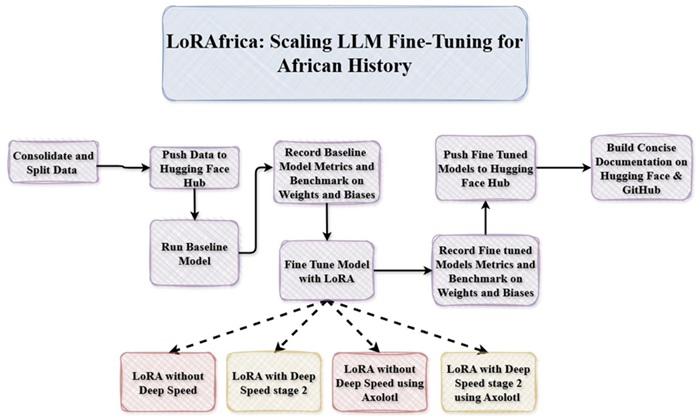
The dataset is in the form of questions and answers having about 2000 examples for training, 200 for validation and 100 for testing.
question: Questions about African Historyanswer: Contained the relevant answerData Formatting
Data was formatted using the chat template as specified from the base model
<|system|>Insert System Message<|end|><|user|>Insert User Message<|end|><|assistant|>
using the code below
def tokenisation(example)->dict:
    """
    Tokenizes the input example by applying the chat template.
    """
    messages = [
        {
            "role": "system",
            "content":"You are a helpful AI assistant specialised in African history which gives concise answers to questions asked"
        },
        {
            "role":"user",
            "content":example["question"]
        },
        {
            "role":"assistant",
            "content":example["answer"]
        }
    ]
    full_text = tokeniser.apply_chat_template(messages,tokenize=False)
    return tokeniser(full_text, truncation=True,
                     max_length=2048,
                     add_special_tokens=False
                    )
<|system|>: is the System Message<|user|>: is the User Message (question)<|assistant|>: is the response given to the questionTokenisation
Masking
Assistant only masking was employed to avoid computing loss on all tokens but rather on only the assistant tokens
# Custom data collator to mask inputs before assistant response
class AssistantMaskingCollator():
    def __init__(self,tokeniser):
        self.tokeniser = tokeniser
        self.assistant_header = tokeniser.encode("<|assistant|>\n", add_special_tokens=False)

    def __call__(self,features):
        input_ids = [torch.tensor(f["input_ids"]) for f in features]
        input_ids = torch.nn.utils.rnn.pad_sequence(input_ids,batch_first=True,padding_value=self.tokeniser.pad_token_id)

        labels = input_ids.clone()

        for i in range(len(labels)):
            # Find where assistant response starts
            found = False
            for j in range(len(input_ids[i]) - len(self.assistant_header) + 1):
                if input_ids[i][j : j + len(self.assistant_header)].tolist() == self.assistant_header:
                    # Mask everything before and including the header
                    labels[i, : j + len(self.assistant_header)] = -100
                    found = True
                    break

            # If for some reason header isn't found, mask everything to be safe
            if not found:
                labels[i, :] = -100

            # Mask actual padding tokens
            labels[i][input_ids[i] == self.tokeniser.pad_token_id] = -100

        return {
            "input_ids": input_ids,
            "attention_mask": input_ids.ne(self.tokeniser.pad_token_id).long(),
            "labels": labels
        }
Phi-4-mini-instruct was chosen because of the its score to on the Instruction-Following Evaluation (IFEval); 73.78%. It's able to following instructions, formatting and generation.
Model specifications:
The process was executed on an A40 GPU Pod instance from Runpod. The requirements.txt was installed for further setup as shown below
# Python version (install separately or with pyenv / venv)
# python==3.11
scikit-learn==1.5.0
seaborn==0.13.2
plotly==5.22.0
pandas==2.2.2
matplotlib==3.10.8
scipy==1.10.1
pytest>=8.4
nltk==3.9.1
sentence-transformers==2.7.0
accelerate==1.12.0
transformers==4.57.6
git+https://github.com/felipemaiapolo/tinyBenchmarks
lm_eval==0.4.9.2
bert-score==0.3.13
deepspeed==0.18.4
wandb==0.19.11
datasets==4.5.0
evaluate==0.4.6
python-dotenv==1.1.0
tensorflow==2.20.0
tf-keras==2.20.1
ctransformers>=0.2.27
LoRA
(LoRA) Low Rank Adaptation was employed to reduce the number of trainable parameters by freezing the original weights and learning from only low-rank decomposition of weight updates. Although there is a slight performance drop when using LoRA, it allows you to save money on compute, thereby allowing you to fine tune massive models efficiently and effectively on limited resources. Below is the LoRA config used;
lora_config = LoraConfig(
    r=8,
    lora_alpha=16,
    target_modules=["q_proj", "v_proj", "k_proj", "o_proj"],
    lora_dropout = 0.05, # dataset is small, hence a low dropout value
    bias = "none",
    task_type="CAUSAL_LM"
)
trainable params: 1,572,864 || all params: 3,837,594,624 || trainable%: 0.0410
| Parameter | Meaning |
|---|---|
| Rank (r) | This determines how much your adapters learn. By increasing this, the learning capacity increases, but this can overfit for small datasets. |
| Alpha (α) | This controls the strength of the adaptation via LoRA. A rule of thumb as read from this program is set α = 2r, so in my case, r = 8, so α = 2r = 16. |
| Dropout | This was set to 0.05 due to the size of the dataset and also to avoid overfitting. |
| Target Modules | As LoRA doesn't adapt the entire model, the target layers was selected which are; Query, Value, Key and Output projection vectors. |
Training Hyperparameters
The Training hyperparameters are shown below;
training_args = TrainingArguments(
    output_dir=output_dir,
    per_device_train_batch_size=2,
    gradient_accumulation_steps = 4,
    learning_rate=2e-5,
    num_train_epochs=10,
    bf16=True,
    eval_strategy="steps",
    eval_steps=100,
    save_strategy="steps",
    save_steps=200,
    logging_steps=10,
    deepspeed="ds_config_2.json", # DeepSpeed config file (when using Deep Speed)
    report_to="wandb",
    remove_unused_columns=False
)
| Parameter | Meaning |
|---|---|
| Learning Rate | This controls how much the model parameters are updated during training. A High learning rate speeds up learning but may unstable and lead to overfitting |
| per_device_train_batch_size | This sets the number of training samples processed per GPU/CPU in each forward pass |
| gradient_accumulation_steps | This determines how many steps gradients are acuumulated before performing a weight update |
| num_train_epochs | This defines how many times the model sees the full training dataset. Too high of an epoch will lead to overfitting |
| bf16 | This enables the bfloat16 precision to further reduce memory usage and speed |
| up computation | |
| eval_strategy | This specifies when evaluation is performed during training |
| eval_steps | Determines how often the evaluation is run using a step-based evaluation |
| save_strategy | This defines the model checkpoints saving procedure during training |
| logging_steps | This controls how often training metrics are logged |
Deep Speed
Deep Speed was explored in this project using the ZeRO-2 method which shards optimisers and gradients while replicating the model; the sweet spot for most fine tuning approaches.
Below is the configuration used;
{
    "fp16": { "enabled": false },
    "bf16": { "enabled": true },
    "zero_optimization": {
        "stage": 2,
        "offload_optimizer": {
            "device": "cpu",
            "pin_memory": true
        },
        "overlap_comm": true,
        "contiguous_gradients": true,
        "reduce_bucket_size": "auto"
    },
    "gradient_accumulation_steps": "auto",
    "gradient_clipping": "auto",
    "train_batch_size": "auto",
    "train_micro_batch_size_per_gpu": "auto"
}
| Parameter | Meaning |
|---|---|
| fp16 | This controls whether 16-bit floating-point precision (FP16) is used during training. It is disabled here to avoid potential numerical instability. |
| bf16 | This enables bfloat16 precision training to reduce memory usage and accelerate computation. It provides better numerical stability than FP16 on supported hardware. |
| zero_optimization.stage | This specifies the ZeRO optimisation stage used to reduce GPU memory consumption. Stage 2 partitions optimiser states across devices, enabling larger models to be trained efficiently. |
| offload_optimizer.device | This moves optimiser computations and states to the CPU instead of the GPU. It frees GPU memory at the cost of slightly increased communication overhead. |
| offload_optimizer.pin_memory | This pins CPU memory for faster data transfer between CPU and GPU. It improves performance when optimiser offloading is enabled. |
| overlap_comm | This allows communication and computation to overlap during distributed training. It improves overall training speed by reducing idle GPU time. |
| contiguous_gradients | This stores gradients in contiguous memory blocks and reduces memory fragmentation, thereby improving communication efficiency. |
| reduce_bucket_size | This controls the size of gradient communication buckets. Setting it to “auto” lets DeepSpeed choose an optimal value for performance. |
| gradient_accumulation_steps | This determines how many steps gradients are accumulated before updating model weights. By setting it to “auto”, DeepSpeed will select an optimal accumulation strategy. |
| gradient_clipping | This limits the magnitude of gradients to prevent unstable updates. By using “auto”, DeepSpeed will apply an appropriate clipping value automatically. |
| train_batch_size | This defines the effective total batch size across all GPUs. Setting it to “auto” allows DeepSpeed to infer the best batch size based on available resources. |
| train_micro_batch_size_per_gpu | This sets the batch size processed by each GPU before gradient accumulation. Using “auto” enables DeepSpeed to optimise micro-batch size for memory efficiency. |
Axolotl
Axolotl was also explored in this project to see how to fine-tune model with just yaml files. In order to make use of Axolotl, you would need to use the axolotl docker template from Runpod. Below are the yaml files for lora.yaml (without deepspeed) and deep_speed_lora.yml (with deep speed).
lora.yaml
base_model: microsoft/Phi-4-mini-instruct
model_type: AutoModelForCausalLM
tokenizer_type: AutoTokenizer

datasets:
  - path: DannyAI/African-History-QA-Dataset
    split: train
    type: alpaca_chat.load_qa
    system_prompt: "You are a helpful AI assistant specialised in African history which gives concise answers to questions asked"
test_datasets:
  - path: DannyAI/African-History-QA-Dataset
    split: validation
    type: alpaca_chat.load_qa
    system_prompt: "You are a helpful AI assistant specialised in African history which gives concise answers to questions asked"

output_dir: ./phi4_african_history_lora_out
chat_template: tokenizer_default
train_on_inputs: false

micro_batch_size: 2
gradient_accumulation_steps: 4

adapter: lora
lora_r: 8
lora_alpha: 16
lora_dropout: 0.05
lora_target_modules: [q_proj, v_proj, k_proj, o_proj]

sequence_len: 2048
sample_packing: true
eval_sample_packing: false
pad_to_sequence_len: true
bf16: true
fp16: false

max_steps: 650
warmup_steps: 20
learning_rate: 0.00002
optimizer: adamw_torch
lr_scheduler: cosine

wandb_project: phi4_african_history
wandb_name: phi4_lora_axolotl

eval_strategy: steps
eval_steps: 50
save_strategy: steps
save_steps: 100
logging_steps: 5

hub_model_id: DannyAI/phi4_lora_axolotl
push_adapter_to_hub: true
hub_private_repo: false
deep_speed_lora.yml
base_model: microsoft/Phi-4-mini-instruct
model_type: AutoModelForCausalLM
tokenizer_type: AutoTokenizer

datasets:
  - path: DannyAI/African-History-QA-Dataset
    split: train
    type: alpaca_chat.load_qa
    system_prompt: "You are a helpful AI assistant specialised in African history."
test_datasets:
  - path: DannyAI/African-History-QA-Dataset
    split: validation
    type: alpaca_chat.load_qa
    system_prompt: "You are a helpful AI assistant specialised in African history."

chat_template: tokenizer_default
train_on_inputs: false

micro_batch_size: 2
gradient_accumulation_steps: 4

adapter: lora
lora_r: 8
lora_alpha: 16
lora_dropout: 0.05
lora_target_modules: [q_proj, v_proj, k_proj, o_proj]

sequence_len: 2048
sample_packing: true
eval_sample_packing: false
pad_to_sequence_len: true
bf16: true
fp16: false

max_steps: 650
warmup_steps: 20
learning_rate: 0.00002
optimizer: adamw_torch
lr_scheduler: cosine

deepspeed: using_axolotl/ds_config_2.json
wandb_project: phi4_african_history
wandb_name: phi4_axolotl_stage2

eval_strategy: steps
eval_steps: 50
save_strategy: steps
save_steps: 100
logging_steps: 5

hub_model_id: DannyAI/phi4_african_history_lora_ds2_axolotl
push_adapter_to_hub: true
hub_private_repo: false
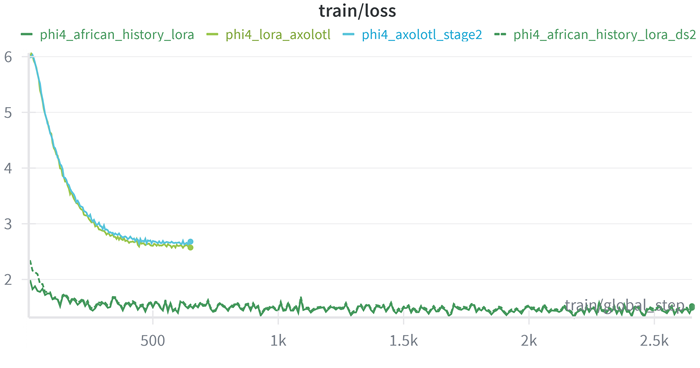
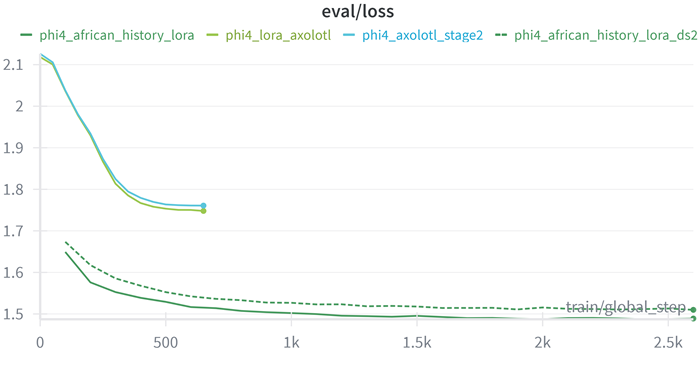
The results are shown be for;
Training Loss
Evaluation Loss
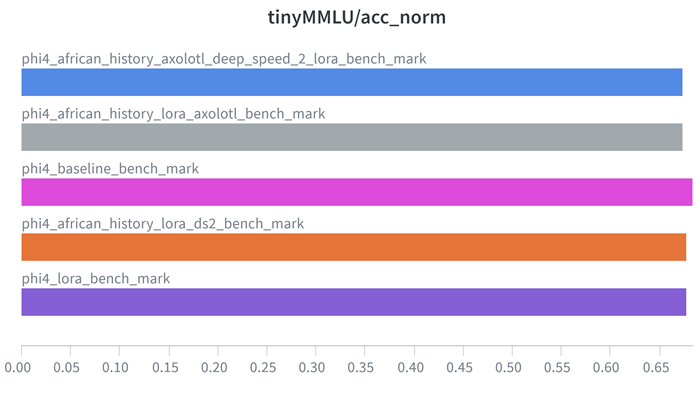
TinyMMLU
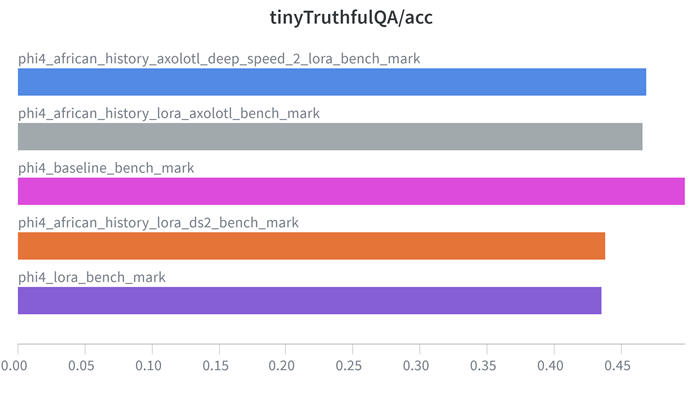
TinyTruthfulQA
BERTScore
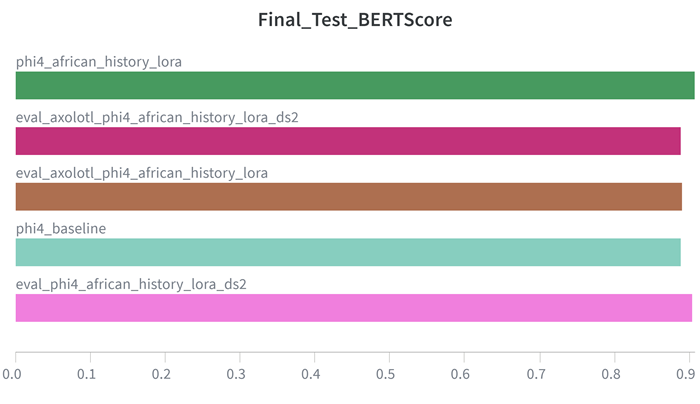
| Model | Bert Score |
|---|---|
| phi4_baseline | 0.88868 |
| phi4_african_history_lora | 0.90726 |
| eval_phi4_african_history_lora_ds2 | 0.90339 |
| eval_axolotl_phi4_african_history_lora | 0.88981 |
| eval_axolotl_phi4_african_history_lora_ds2 | 0.88872 |
| Model | Tiny MMLU |
|---|---|
| phi4_baseline_bench_mark | 0.6837 |
| phi4_lora_bench_mark | 0.67751 |
| phi4_african_history_lora_ds2_bench_mark | 0.67788 |
| phi4_african_history_lora_axolotl_bench_mark | 0.67371 |
| phi4_african_history_axolotl_deep_speed_2_lora_bench_mark | 0.67371 |
| Model | Tiny TruthfulQA |
|---|---|
| phi4_baseline_bench_mark | 0.49745 |
| phi4_lora_bench_mark | 0.43555 |
| phi4_african_history_lora_ds2_bench_mark | 0.43822 |
| phi4_african_history_lora_axolotl_bench_mark | 0.46626 |
| phi4_african_history_axolotl_deep_speed_2_lora_bench_mark | 0.46877 |
This is the link to the weights and biases project results which has all the logs for this project.
Example response
Question:
What economic losses is Africa facing due to climate change?

Reference:
According to the African Development Bank, climate change is causing significant economic losses in Africa, estimated at between 3-5% of GDP annually. By 2050, adaptation costs could reach $50 billion annually if global temperatures rise by 2°C, and up to $100 billion if temperatures rise by 4°C.

Base Model:
Africa is facing economic losses of $50 billion annually due to climate change, with the agricultural sector being particularly affected.

LoRA Model: (DannyAI/phi4_lora_axolotl):
Africa is facing significant economic losses due to climate change, including reduced agricultural productivity, increased costs of disaster response, loss of biodiversity, and damage to infrastructure. These losses are estimated to be in the billions of dollars annually, with the agricultural sector being particularly vulnerable.
lora_config = LoraConfig(
    r=4,
    lora_alpha=8,
    target_modules=["q_proj", "v_proj"],
    lora_dropout = 0.1,
    bias = "none",
    task_type="CAUSAL_LM"
)
