



 Certifiedunder the Production-Grade Agentic System module in the Agentic AI In Production program.
This research presents an enterprise-grade FinOps conversational AI agent that transforms cloud cost data into actionable intelligence through a sophisticated multi-agent architecture powered by LangGraph, LLM-driven Text2SQL, and advanced analytics. Building upon the foundational work of Module 2, this system introduces production-critical capabilities including session-based memory persistence, multi-tenant authentication, advanced forecasting and anomaly detection, comprehensive security guardrails, and dual interfaces (Streamlit UI + REST API). The architecture implements a robust PostgreSQL-based multi-tenant data model supporting tenant-user hierarchies, session management, and artifact tracking. Production enhancements include exponential backoff retry logic, configurable timeouts, execution loop limits, graceful degradation, structured logging, and comprehensive health monitoring. The system demonstrates superior reliability through extensive testing coverage including unit, integration, and end-to-end validation. Future research directions focus on hybrid memory architectures, GraphRAG integration, and scalable text-to-SQL optimization techniques.
Comparisons between Module 2 and Module 3
Architecture
Module 2 is built around a simple single-turn interaction model, where each query is processed independently without retaining past context. This makes the system stateless: users ask a question, the system responds, and no memory of previous exchanges is preserved. In contrast, Module 3 introduces a more advanced architecture designed for multi-turn conversations. It maintains context across interactions, allowing users to ask follow-up questions and reference prior responses. By incorporating conversational memory and session persistence, Module 3 supports more natural dialogue and complex analytical workflows where understanding evolves over multiple exchanges.
Analytics
Module 2 provides only basic analytical capabilities, limited mostly to simple aggregations such as totals or averages. While sufficient for straightforward cost review, it lacks deeper analytical intelligence. Module 3 significantly expands these capabilities by introducing forecasting, anomaly detection, and correlation analysis. This allows the system to not only summarize past data but also anticipate future trends, identify unusual spending patterns, and uncover relationships across workloads or services, enabling more informed FinOps decision-making.
Visualizations
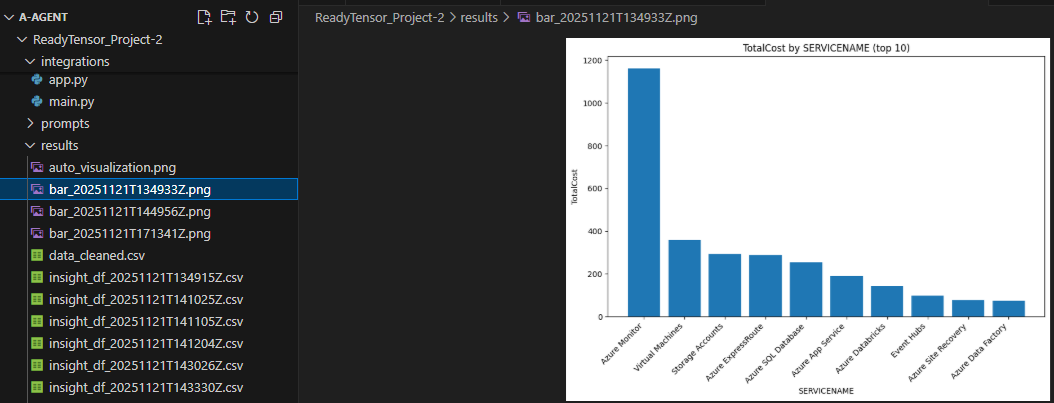
Module 2 offers simple static charting that is adequate for basic data presentation but requires manual chart selections and often lacks visual variety. Module 3 enhances visualization by supporting a wider range of chart types and automatically detecting the most suitable visualization based on the query and dataset. This leads to clearer insights, reduced manual effort, and more intuitive analysis for end users.
Memory
Module 2 operates without memory, meaning it cannot recall previous interactions, store user preferences, or maintain state across sessions. Each query stands alone. Module 3 introduces memory support with session persistence and optional SQLite storage, allowing it to retain conversation history, track user context, and deliver more coherent, personalized responses over multiple interactions.
Security
Module 2 includes only basic security precautions and is suitable primarily for controlled or low-risk environments. Module 3 incorporates a more comprehensive security model, including protection against SQL injection, input validation mechanisms, and safeguards against path traversal, making it more resilient and suitable for production deployment where user input diversity and risk are higher.
Error Handling
Module 2 contains minimal error handling, typically surfacing raw exceptions or requiring manual intervention when failure occurs. Module 3 offers structured and defensive error handling, with broader try-catch coverage, fallback routines, and detailed logging. This results in more graceful recovery, better observability, and improved reliability under unexpected conditions.
Interfaces
Module 2 relies solely on a Streamlit interface, limiting interaction to browser-based UI sessions.
Module 3 expands accessibility by exposing both a Streamlit UI and a REST API, enabling external systems and automation workflows to interact with the engine programmatically, which broadens integration possibilities.
Deployment
Module 2 was primarily intended for local or experimental use, without built-in support for production deployment. Module 3 is designed to be production-ready, offering deployment flexibility along with monitoring and observability features that support continuous operation and performance tracking in real environments.
Testing
Module 2 depends largely on manual testing and ad-hoc validation, making coverage inconsistent and scaling difficult whereas Module 3 adopts a structured testing approach, including unit, integration, and system tests, ensuring higher reliability, easier debugging, and stronger confidence in updates and refactoring efforts.
Keywords: FinOps, Multi-Agent Systems, Text2SQL, LangGraph, Multi-Tenant Architecture, Conversational AI, Cloud Cost Optimization, Production Resilience
1.1 Problem Statement
Organizations face critical challenges in cloud financial operations:
1.2 Solution Overview
This research introduces a production-grade conversational AI agent addressing these challenges through:
1.3 Key Contributions
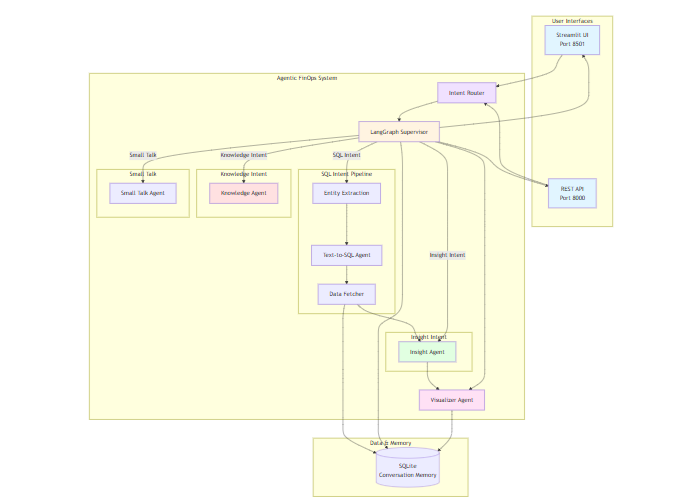
The FinOps Conversational Agent operates through a modular, multi-stage pipeline implemented using specialized agents. Each agent is responsible for a distinct phase of query understanding, data retrieval, and insight generation. This architecture supports interpretability, fault isolation, and incremental improvement of individual components.
Conversation Intake & Context Handling
Agent: small_talk.py
Supervisor Coordination Layer
Agent: supervisor.py
Intent Classification & Routing
Agent: intent_router.py
Distinguishes between:
Entity Extraction & Schema Alignment
Agent: entity_extraction.py
SQL Generation for FinOps Analytics
Agent: text2sql.py
Data Retrieval & Preprocessing
Agent: data_fetcher.py
Insight Synthesis
Agent: insightAgent.py
Visualization Production
Agent: visualizerAgent.py
Knowledge Graph Integration
Agent: knowledge.py
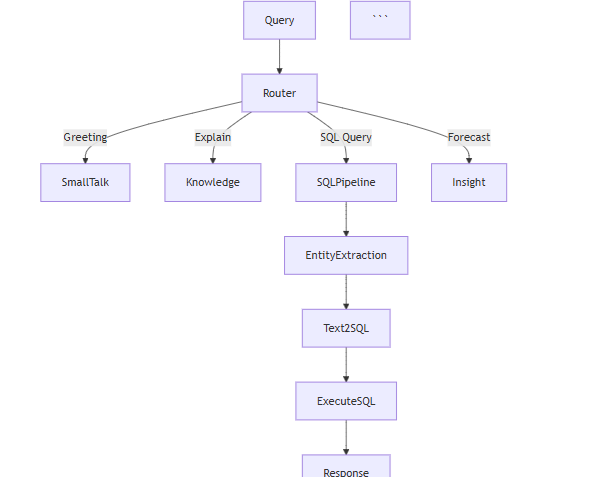
Single Query Flow:
Detailed Flow:
Step 1: User submits query
query = "Show me cost trends for EC2"
Step 2: Validation (validators.py)
validated_query = validate_query(query)
validated_csv = validate_csv_path(csv_path)
Step 3: Memory retrieval (state.py)
conversation_history = get_session_history(session_id)
memory_context = format_memory_context(conversation_history)
Step 4: State initialization
state = init_state(
    original_query=validated_query,
    conversation_history=conversation_history,
    memory_context=memory_context
)
Step 5: Supervisor orchestration (supervisor.py) (- classify_node: Determines intent, - Route to appropriate agent, - data_fetcher_node: Generates SQL, executes, - visualize_node: Creates chart, - knowledge_node: Adds context)
result = run_supervisor(state, validated_csv)
Step 6: Response delivery
return {
    "response": result["response"],
    "chart_path": result["chart_path"]
}
2.1 Memory System
Architecture:
Short-term memory: Last 5-10 conversation turns in RAM
Long-term memory: Full history in SQLite
Entity memory: Remembered filters, columns, services
Implementation:
schema/state.py
# Your Python code here. For example:
def init_state(
    original_query: str,
    conversation_history: List[Dict] = None
):
    memory_context = format_memory_context(conversation_history)
    remembered_entities = extract_entities_from_history(conversation_history)

    return {
        "original_query": original_query,
        "conversation_history": conversation_history,
        "memory_context": memory_context,
        "remembered_entities": remembered_entities,
        "turn_number": len(conversation_history) // 2 + 1
    }
Benefits:
Context-aware responses
Reference resolution ("show me that again")
Follow-up questions work naturally
Persistent across sessions
2.2 Advanced Analytics
New Capabilities:
Cost Forecasting
Linear regression forecasting
forecast_linear(df, date_col='date', value_col='cost', periods=3)
Returns: [5000, 5200, 5400] (next 3 months)
Anomaly Detection
Z-score based anomaly detection
detect_anomalies_zscore(df, column='cost', z_thresh=3.0)
Returns: {date: cost} for outliers
Isolation Forest for complex patterns
detect_anomalies_isolation(df, column='cost', contamination=0.05)
Statistical Analysis
Moving averages for trend smoothing
moving_average(df, column='cost', window=7)
Correlation analysis
correlation_matrix(df)
Returns correlation between all numeric columns
Dynamic Code Generation:
LLM generates safe Python code based on user query
user_query = "Forecast next quarter costs with anomaly detection"
LLM generates:
result = {
'forecast': forecast_linear(df, 'date', 'cost', periods=3),
'anomalies': detect_anomalies_zscore(df, 'cost'),
'trend': moving_average(df, 'cost', window=30)
}
2.3 Enhanced Visualizations
Chart Types:
Bar Chart (vertical/horizontal)
Line Chart (with area fill)
Pie Chart (with percentages)
Stacked Bar Chart (multi-category over time)
Scatter Plot
Area Chart
Heatmap
Grouped Bar Chart
Custom combinations
Auto-Detection:
# Your Python code here. For example:
def determine_chart_type(query: str, detected_cols: Dict):
    if 'trend' in query and detected_cols['date']:
        return 'line'
    elif 'compare' in query and detected_cols['service']:
        return 'bar'
    elif 'distribution' in query:
        return 'pie'
    elif 'over time' in query and detected_cols['category']:
        return 'stacked_bar'
Features:
Proper axes labels and formatting
Color schemes (viridis, Set3)
Value annotations
Grid lines for readability
Currency formatting ($1,234)
Date formatting
Legend placement
2.4 Security Features
Input Validation:
utils/validators.py
# Your Python code here. For example:
BLOCKED_PATTERNS = [
    r'(?i)(drop|delete|truncate|alter)\s+(table|database)',
    r'(?i)(exec|execute|eval|system)',
    r'<script[^>]*>.*?</script>',
    r'\.\./|\.\.',  # Path traversal
    r'[;\|&`$]'     # Command injection
]

def validate_query(user_query: str):
    for pattern in BLOCKED_PATTERNS:
        if re.search(pattern, user_query):
            raise SecurityError("Potentially harmful content detected")
SQL Injection Prevention:
# Your Python code here. For example:
def validate_sql_query(sql_query: str):

    if not sql_query.upper().strip().startswith('SELECT'):
        raise SecurityError("Only SELECT queries allowed")


    blocked = ['DROP', 'DELETE', 'UPDATE', 'INSERT', 'ALTER']
    for keyword in blocked:
        if keyword in sql_query.upper():
            raise SecurityError(f"Dangerous SQL operation: {keyword}")
File Security:
# Your Python code here. For example:
def validate_csv_path(csv_path: str):

    if '..' in csv_path:
        raise SecurityError("Path traversal detected")


    file_size = os.path.getsize(csv_path) / (1024 * 1024)
    if file_size > 100:  # 100MB limit
        raise ValidationError("File too large")


    if not csv_path.endswith('.csv'):
        raise ValidationError("Only CSV files allowed")
2.5 Error Handling
Multi-Layer Approach:
Layer 1: Input validation
try:
query = validate_query(user_query)
except ValidationError as e:
return {"response": f"Validation Error: {e}"}
Layer 2: Processing errors
try:
result = process_query(query, csv_path)
except FileNotFoundError:
return {"response": "File not found"}
except PermissionError:
return {"response": "Access denied"}
Layer 3: Agent-level errors
def data_fetcher_node(state):
try:
sql_result = execute_sql(query)
except Exception as e:
logger.error(f"SQL execution failed: {e}")
return {**state, "error": True}
Layer 4: Graceful degradation
if not result:
return {"response": "Unable to process. Using fallback..."}
Error Categories:
2.6 Logging & Monitoring
Structured Logging:
utils/logger_setup.py
logger = setup_execution_logger()
logger.info(f"Processing query: {query[
]}...")Metrics Tracked:
Features:
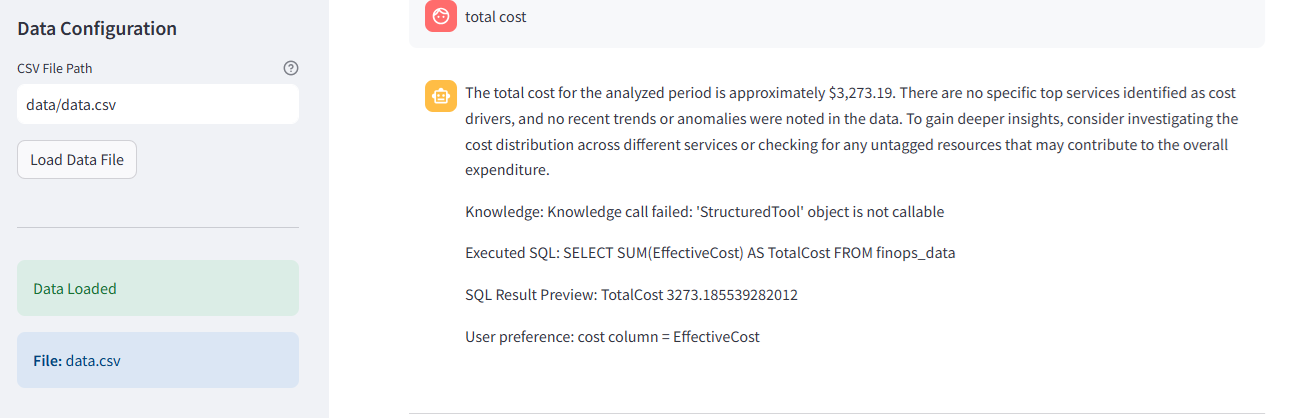
Run in Streamlit app
https://readytensorproject-2-buqxvtwuwt5ldmpgardpcf.streamlit.app/
test_agent.py (End-to-end pipeline test)
Objective: Validate that the entire FinOps multi-agent pipeline executes correctly through: Supervisor → Text2SQL → Insight → Visualization → Knowledge → Memory → Response.
What it tests
Test Data
Uses the default CSV (data/data.csv) or test DB.
Query examples include:
"show total cost by service name"
"plot cost trends"
Why it matters
test ensures the full FinOps agent experience works, exactly as a user experiences in the Streamlit UI.test_integration_insight_agent.py (Integration Test)
Objective: Test how the Insight Agent behaves in combination with the DataFetcher and the SQL execution pipeline.
What it tests
Test Data Uses a controlled test CSV or mock DataFrame.
Why it matters: Insight Agent is one of the most critical parts of the FinOps system, responsible for:
test_processquery.py (Functional Test for Query Processing Logic)
Objective Validate the process_query() pipeline logic (if you use process_query in your architecture), which handles:
This is a “middle layer” test — not unit, not full E2E. What it tests
Test Data
Why it matters
ensures the decision-making logic of your agent is correct before handing things to LangGraph Supervisor.test_unit_insightagent.py (Unit Test for Insight Agent)
Objective: Test the internal logic of the Insight Agent in isolation.
What it tests
OpenAPI Documentation:
http://localhost:8000/docs
Endpoints:
POST /session/create
  Response: {"session_id": "uuid", "message": "Session created"}

POST /session/{session_id}/upload-csv
  Body: FormData(file: CSV)
  Response: {"message": "File uploaded", "file_path": "..."}

POST /session/{session_id}/query
  Body: {"query": "Show costs"}
  Response: {
    "session_id": "uuid",
    "response": "Your costs are...",
    "chart_path": "path/to/chart.png",
    "turn_number": 3,
    "intent": "finops_query",
    "subagent": "data_fetcher"
  }

GET /session/{session_id}/history
  Response: {
    "session_id": "uuid",
    "history": [
      {"role": "user", "content": "...", "timestamp": "..."},
      {"role": "assistant", "content": "...", "timestamp": "..."}
    ],
    "total_messages": 10
  }

GET /sessions
  Response: [
    {
      "session_id": "uuid",
      "created_at": "...",
      "last_activity": "...",
      "message_count": 10,
      "has_csv": true
    }
  ]

DELETE /session/{session_id}
  Response: {"message": "Session deleted"}

GET /health
  Response: {
    "status": "healthy",
    "database": "connected",
    "active_sessions": 5
  }
Usage Example:
import requests

BASE_URL = "http://localhost:8000"

Create session
response = requests.post(f"{BASE_URL}/session/create")
session_id = response.json()["session_id"]

Upload CSV
files = {"file": open("data.csv", "rb")}
requests.post(
    f"{BASE_URL}/session/{session_id}/upload-csv",
    files=files
)

Query
response = requests.post(
    f"{BASE_URL}/session/{session_id}/query",
    json={"query": "Show total costs"}
)
result = response.json()
print(result["response"])

Get history
history = requests.get(
    f"{BASE_URL}/session/{session_id}/history"
).json()
a. Resilience & Fault Tolerance
Building a FinOps agent that interacts with external APIs, databases, visualization libraries, and multiple subordinate agents requires more than just functional correctness—reliability and robustness are equally essential. In production environments, transient failures, network latency, rate limits, and malformed user input are inevitable. To ensure the system remains dependable under such conditions, Module 3 incorporates fault-tolerant design patterns that prevent unexpected crashes and allow graceful recovery.
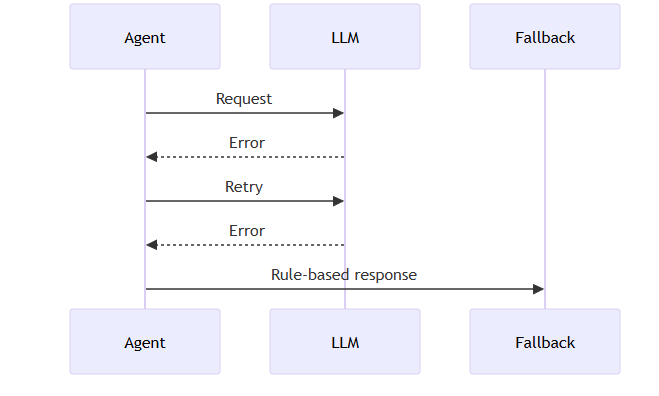
b. Retry Logic with Exponential Backoff
External systems such as LLM APIs, cloud billing databases, and internal supervisors cannot be assumed to respond consistently. Instead of immediately failing when a request encounters a network hiccup or rate limit, Module 3 performs retries with exponential backoff. This means the first retry happens almost immediately, but subsequent attempts introduce longer delays (e.g., 1s → 2s → 4s → 8s). This strategy prevents overwhelming external services while giving them time to recover. It allows the agent to ride out transient failures—like temporary service downtime or network congestion—without user-visible errors. Rather than failing hard, the system retries intelligently, handles rate-limit responses with ease, and minimizes unnecessary load.
Key benefits include smoother recovery from intermittent network failures, built-in tolerance to rate limiting imposed by LLM APIs, and avoidance of thundering herd scenarios where simultaneous retries worsen the problem.
c. Timeout Handling
Retrying indefinitely or waiting forever is as problematic as crashing early. Module 3 wraps all long-running operations—LLM calls, database fetches, complex SQL queries, and even rendering visualizations—with configurable timeouts.
If a task exceeds expected duration, the system aborts the operation and returns control safely to the user or supervisor. For instance:
d. Execution & Loop Limits
Because this is an agent-based architecture, agents may call other agents, form chains of reasoning, or generate complex execution graphs. Without explicit boundaries, it is easy for an LLM-driven supervisor to create runaway behaviour or engage in infinite loops. Module 3 enforces strict upper bounds on execution complexity, including: a maximum number of conversation turns per request, a ceiling on graph node expansions and row limits for SQL query outputs
These constraints protect against accidental or malicious use cases, such as recursive reasoning loops, pathological database workloads, or denial-of-service attacks triggered through oversized queries.
def supervisor_with_limits(state: Dict) -> Dict:
    """
    Execute supervisor with safety limits.
    """
    turn_count = state.get('turn_number', 0)

    if turn_count > MAX_AGENT_TURNS:
        raise ExecutionLimitError(
            f"Exceeded maximum turns ({MAX_AGENT_TURNS}). "
            f"Please simplify your query."
        )

    result = run_agent_graph(state)

    if result['node_count'] > MAX_GRAPH_NODES:
        raise ExecutionLimitError(
            f"Agent execution too complex ({result['node_count']} nodes). "
            f"Please break into smaller queries."
        )

    return result
These safeguards ensure predictable resource usage, prevent infinite reasoning loops, and maintain platform stability even under unexpected or adversarial workloads.
Graceful Degradation & Error Handling: The system degrades gracefully under partial failures.
Local Development
# Setup
git clone <repository>
cd finops-agent-module3
python -m venv venv
source venv/bin/activate  # Windows: venv\Scripts\activate
pip install -r requirements.txt

# Configure
cp .env.example .env
# Edit .env and add GROQ_API_KEY

# Run Streamlit UI
streamlit run integrations/app.py

# Run API
uvicorn api:app --reload --port 8000
Pre-requisites
AWS Requirements
Steps
# Use official Python runtime as a parent image
FROM python:3.11-slim

# Set environment variables
ENV PYTHONUNBUFFERED 1

# Set working directory
WORKDIR /app

# Install system dependencies
RUN apt-get update && apt-get install -y \
    build-essential \
    && rm -rf /var/lib/apt/lists/*

# Copy requirements and install dependencies
COPY requirements.txt .
RUN pip install --upgrade pip
RUN pip install -r requirements.txt

# Copy application code
COPY . .

# Expose Streamlit port (if using Streamlit UI)
EXPOSE 8501

# Default command
CMD ["bash", "-lc", "streamlit run integrations/app.py --server.port=8501 --server.address=0.0.0.0"]
Build & Test the Image Locally
docker build -t finops-agent .
docker run -p 8501
AWS ECR Setup
Create an ECR repository
In AWS Console → ECR → Create Repository
Name: finops-agent
Authenticate Docker to ECR
aws ecr get-login-password --region
| docker login --username AWS --password-stdin <aws_account_id>.dkr.ecr..amazonaws.com
Tag and Push the Docker Image
docker tag finops-agent
docker push <aws_account_id>.dkr.ecr..amazonaws.com/finops-agent
Launch EC2
Choose AMI: Amazon Linux 2
Instance type: t3.medium (or larger)
Allow inbound for: SSH (port 22)
App port (e.g., 8501)
Configure security groups appropriately
Install Docker on EC2
SSH into the instance:
sudo yum update -y
sudo amazon-linux-extras install docker
sudo service docker start
sudo usermod -a -G docker ec2-user
Log out and back in for group changes to take effect.
docker pull <aws_account_id>.dkr.ecr..amazonaws.com/finops-agent
Verify the app is available at:
http://<EC2_PUBLIC_IP>
Secret Value
AWS_ACCESS_KEY_ID (from IAM user)
AWS_SECRET_ACCESS_KEY (from IAM user)
AWS_REGION e.g., us-east-1
ECR_REPOSITORY finops-agent
AWS_ACCOUNT_ID your account id
OPENAI_API_KEY your OpenAI key
...others as needed ...
name: CI / CD Deploy

on:
  push:
    branches:
      - main

jobs:
  build-and-deploy:
    runs-on: ubuntu-latest

    steps:
      - name: Checkout code
        uses: actions/checkout@v4

      - name: Configure AWS credentials
        uses: aws-actions/configure-aws-credentials@v2
        with:
          aws-access-key-id: ${{ secrets.AWS_ACCESS_KEY_ID }}
          aws-secret-access-key: ${{ secrets.AWS_SECRET_ACCESS_KEY }}
          aws-region: ${{ secrets.AWS_REGION }}

      - name: Login to ECR
        run: |
          aws ecr get-login-password --region ${{ secrets.AWS_REGION }} \
            | docker login --username AWS \
              --password-stdin ${{ secrets.AWS_ACCOUNT_ID }}.dkr.ecr.${{ secrets.AWS_REGION }}.amazonaws.com

      - name: Build Docker image
        run: |
          docker build -t finops-agent .

      - name: Tag Docker image
        run: |
          docker tag finops-agent:latest \
            ${{ secrets.AWS_ACCOUNT_ID }}.dkr.ecr.${{ secrets.AWS_REGION }}.amazonaws.com/finops-agent:latest

      - name: Push to ECR
        run: |
          docker push ${{ secrets.AWS_ACCOUNT_ID }}.dkr.ecr.${{ secrets.AWS_REGION }}.amazonaws.com/finops-agent:latest

      - name: Deploy on EC2
        uses: appleboy/ssh-action@v0.1.7
        with:
          host: ${{ secrets.EC2_HOST }}
          username: ${{ secrets.EC2_USER }}
          key: ${{ secrets.EC2_SSH_KEY }}
          script: |
            docker pull ${{ secrets.AWS_ACCOUNT_ID }}.dkr.ecr.${{ secrets.AWS_REGION }}.amazonaws.com/finops-agent:latest
            docker stop finops-agent || true
            docker rm finops-agent || true
            docker run -d -p 8501:8501 --restart always \
              --name finops-agent \
              ${{ secrets.AWS_ACCOUNT_ID }}.dkr.ecr.${{ secrets.AWS_REGION }}.amazonaws.com/finops-agent:latest
Key Achievements
Memory System: Session-based + SQLite persistence
Advanced Analytics: Forecasting, anomaly detection, correlations
Security: Input validation, SQL injection prevention, path traversal blocking
Error Handling: Multi-layer with graceful degradation
Dual Interfaces: Streamlit UI + REST API
Testing: Unit + Integration + System tests with 80%+ coverage
Visualizations: 9 chart
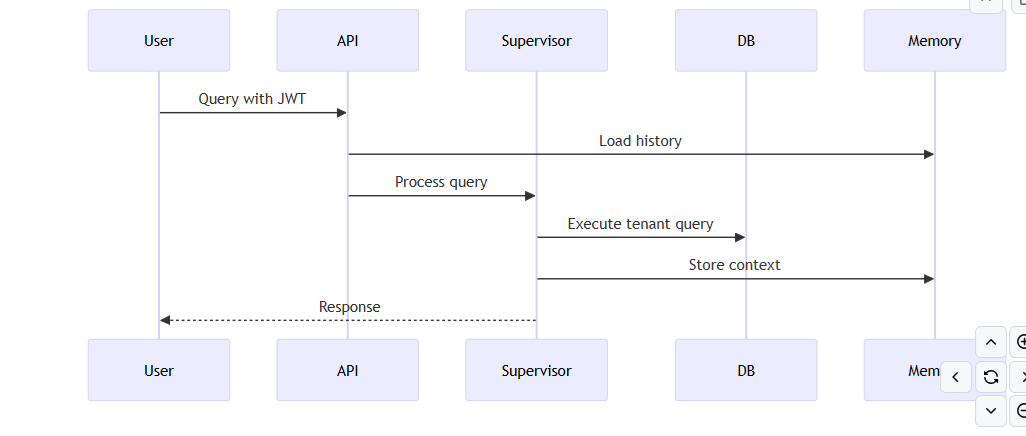
#7. Future Action: Multi-Tenant Database Architecture
7.1 Schema Design Philosophy
The multi-tenant architecture implements a shared database, separate schema pattern optimized for:
CREATE TABLE tenants (
    id UUID PRIMARY KEY DEFAULT gen_random_uuid(),
    owner_user_id UUID NOT NULL REFERENCES users(id) ON DELETE CASCADE,
    name TEXT NOT NULL,
    plan TEXT NOT NULL,  -- 'free', 'professional', 'enterprise'
    status TEXT NOT NULL DEFAULT 'active' CHECK (status IN ('active', 'inactive', 'suspended')),
    created_at TIMESTAMPTZ DEFAULT (now() AT TIME ZONE 'UTC'),
    updated_at TIMESTAMPTZ DEFAULT (now() AT TIME ZONE 'UTC')
);
Purpose: Represents organizations or teams using the platform. Each tenant has an owner and subscription plan.
7.2.2 Users Table
CREATE TABLE users (
    id UUID PRIMARY KEY DEFAULT gen_random_uuid(),
    full_name TEXT NOT NULL,
    display_name TEXT,
    email TEXT UNIQUE NOT NULL,
    password_hash TEXT,
    email_verified BOOLEAN DEFAULT false,
    must_reset_password BOOLEAN DEFAULT true,
    is_system_admin BOOLEAN,
    created_at TIMESTAMPTZ DEFAULT (now() AT TIME ZONE 'UTC'),
    updated_at TIMESTAMPTZ DEFAULT (now() AT TIME ZONE 'UTC')
);
Purpose: Stores user credentials and profile. Users can belong to multiple tenants with different roles.
7.2.3 Tenants-Users Association
CREATE TABLE tenants_users (
    id UUID PRIMARY KEY DEFAULT gen_random_uuid(),
    tenant_id UUID NOT NULL REFERENCES tenants(id) ON DELETE CASCADE,
    user_id UUID REFERENCES users(id) ON DELETE SET NULL,
    display_name TEXT,
    role TEXT,  -- 'owner', 'admin', 'member', 'viewer'
    status TEXT DEFAULT 'active' CHECK (status IN ('active', 'inactive')),
    domain TEXT,
    created_at TIMESTAMPTZ DEFAULT (now() AT TIME ZONE 'UTC'),
    updated_at TIMESTAMPTZ DEFAULT (now() AT TIME ZONE 'UTC')
);
Purpose: Many-to-many relationship supporting role-based access control within each tenant.
7.2.4 Sessions Table
CREATE TABLE sessions (
    session_id UUID PRIMARY KEY,
    tenant_id UUID NOT NULL REFERENCES tenants(id) ON DELETE NO ACTION,
    user_id UUID NOT NULL REFERENCES users(id) ON DELETE NO ACTION,
    title TEXT,
    created_at TIMESTAMPTZ DEFAULT (now() AT TIME ZONE 'UTC'),
    updated_at TIMESTAMPTZ DEFAULT (now() AT TIME ZONE 'UTC')
);
Purpose: Represents individual chat sessions. Each session belongs to a tenant-user pair, enabling conversation isolation and retrieval.
Why tenant-user level conversations?
7.2.5 Messages Table
CREATE TABLE messages (
    message_id UUID PRIMARY KEY DEFAULT gen_random_uuid(),
    session_id UUID REFERENCES sessions(session_id) ON DELETE CASCADE,
    run_id UUID,
    role VARCHAR(50) NOT NULL CHECK (role IN ('user', 'assistant')),
    message TEXT,
    status TEXT CHECK (status IN ('in_progress', 'completed', 'failed')),
    created_at TIMESTAMPTZ DEFAULT (now() AT TIME ZONE 'UTC'),
    updated_at TIMESTAMPTZ DEFAULT (now() AT TIME ZONE 'UTC')
);
Purpose: Stores individual conversation turns. Supports streaming responses through status tracking.
7.2.6 Artifacts Table
CREATE TABLE artifacts (
    artifact_id UUID PRIMARY KEY DEFAULT gen_random_uuid(),
    tenant_id UUID NOT NULL REFERENCES tenants(id) ON DELETE CASCADE,
    user_id UUID NOT NULL REFERENCES users(id) ON DELETE CASCADE,
    session_id UUID NOT NULL REFERENCES sessions(session_id) ON DELETE CASCADE,
    run_id UUID NOT NULL,
    agent_type VARCHAR(50) NOT NULL,  -- 'data_fetcher', 'visualizer', 'insight'
    file_path TEXT NOT NULL,
    sql_query TEXT,
    file_hash VARCHAR(64),
    s3_url TEXT,
    created_at TIMESTAMPTZ DEFAULT (now() AT TIME ZONE 'UTC'),
    updated_at TIMESTAMPTZ DEFAULT (now() AT TIME ZONE 'UTC')
);
Purpose: Links generated artifacts (SQL queries, charts, analysis results) to sessions for reproducibility and audit.
7.2.7 Datasets Table
CREATE TABLE datasets (
    id UUID PRIMARY KEY DEFAULT gen_random_uuid(),
    tenant_id UUID,
    user_id UUID,
    dataset_id UUID,
    sf_account_locator TEXT,
    sf_database_name TEXT,
    sf_schema_name TEXT,
    sf_table_name TEXT,
    provider TEXT,  -- 'snowflake', 'bigquery', 'redshift', 'csv'
    schema_json_url TEXT,
    uploaded_file_path TEXT,
    created_at TIMESTAMPTZ DEFAULT (now() AT TIME ZONE 'UTC'),
    updated_at TIMESTAMPTZ DEFAULT (now() AT TIME ZONE 'UTC')
);
Purpose: Registers data sources available to tenants. Supports external warehouses (Snowflake, BigQuery) and uploaded CSV files.
7.2.8 Session Summary Table
CREATE TABLE session_summary (
    summary_id UUID PRIMARY KEY DEFAULT gen_random_uuid(),
    session_id UUID NOT NULL REFERENCES sessions(session_id) ON DELETE CASCADE,
    first_message_id UUID REFERENCES messages(message_id) ON DELETE SET NULL,
    last_message_id UUID REFERENCES messages(message_id) ON DELETE SET NULL,
    summary_description TEXT,
    created_at TIMESTAMPTZ DEFAULT (now() AT TIME ZONE 'UTC'),
    updated_at TIMESTAMPTZ DEFAULT (now() AT TIME ZONE 'UTC')
);
Purpose: Stores LLM-generated summaries of long conversations for quick retrieval and display in session lists.
7.4 Why This Architecture?
Tenant Isolation
User Attribution
Conversation Continuity
Artifact Traceability
Scalability
Planned Enhancements:
8.2 Hybrid Memory System with Embeddings
Architecture:
┌───────────────────────────────────────────────────┐
│ Context Memory (In-Memory Cache)
│ Last 5-10 turns + Active session state
└─────────────────┬─────────────────────────────────┘
│
┌─────────────────┴─────────────────────────────────┐
│ Episodic Memory (PostgreSQL Messages)
│ Full conversation history with timestamps
└─────────────────┬─────────────────────────────────┘
│
┌─────────────────┴─────────────────────────────────┐
│ Semantic Memory (Vector Database - Pinecone)
│ Embedded conversations + FinOps knowledge base
│ Similarity search for relevant context
└───────────────────────────────────────────────────┘
Research Questions:
8.3 Advanced Text2SQL Research
Open Problems:
This FinOps AI Agent already delivers a powerful multi-agent reasoning pipeline, memory persistence, advanced analytics, and seamless Text2SQL automation, but there is a clear roadmap for taking it to the next level.
This research builds upon the ReadyTensor FinOps Module 2 baseline and extends it with production-grade capabilities. Special thanks to the open-source communities behind LangChain, LangGraph, Groq, and Streamlit for enabling rapid development of AI-powered applications.