


CamVisioTech is an AI-powered IoT-based security system project, collaboratively developed to implement advanced surveillance features with iterative enhancements. Each version builds upon its predecessor, integrating cutting-edge technologies for home and office security.
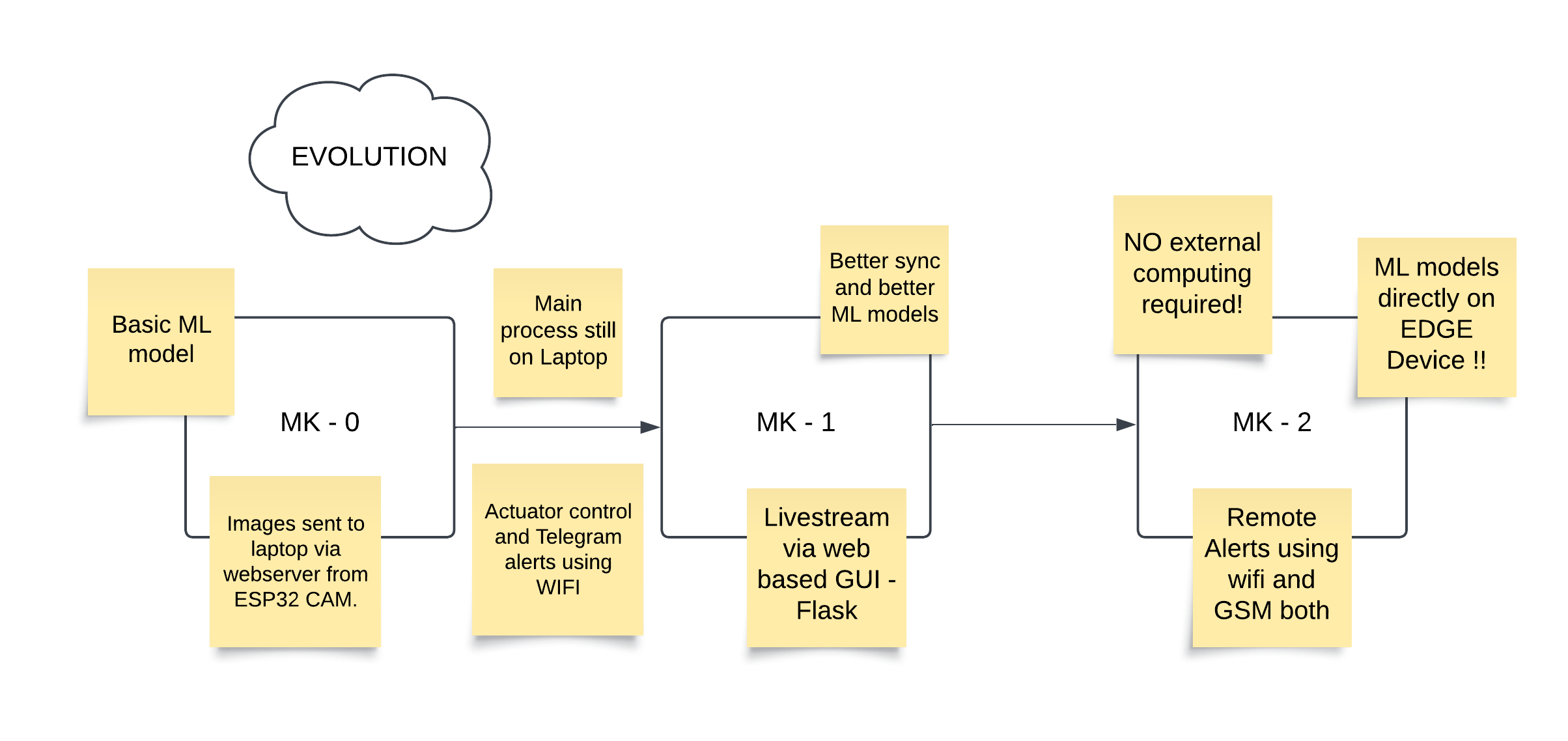
Camvisiotech has been a journey from a simple ESP32 CAM to a powerful Edge AI system. Starting as a third-semester project, it began with a basic security system using dlib. Recognizing its potential, I teamed up with a friend to develop Camvisiotech 2.0, running on an ESP32 CAM with optimized synchronization and improved ML models. This version won us Bytecraft at IIIT Nagpur TechFest 2023. Inspired by the Maixduino’s AI capabilities, we started Camvisiotech 3.0—a standalone, AI-driven face detection and recognition solution. With WiFi and GSM connectivity, it now operates autonomously on EDGE, suitable for rural and remote areas with limited connectivity, making edge AI accessible in low-resource environments.
The system utilizes facial recognition to control a solenoid lock, unlocking the door for 3 seconds when a known person is recognized. If an intruder is detected, the system sends an alert via Telegram and activates a buzzer. Additionally, the system offers a GUI application for monitoring and control, and a custom desktop application built with Python and Tkinter to manage both the facial recognition and alert system.
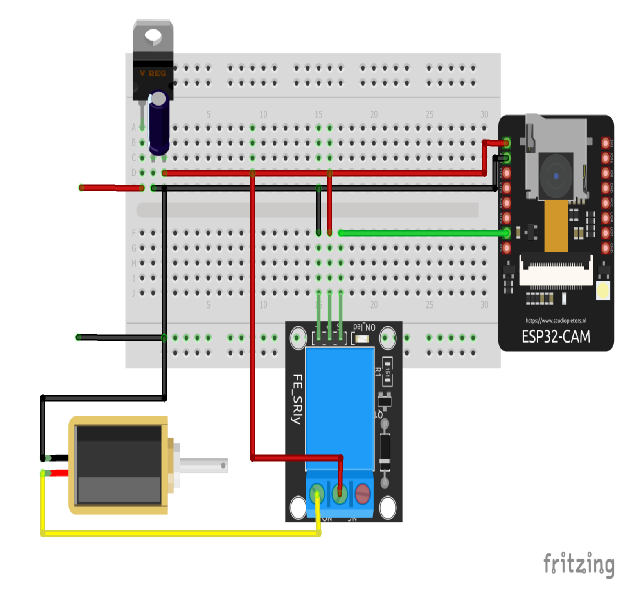
The ESP32-CAM captures images at regular intervals and sends them to the server. The server compares the captured images with pre-stored face encodings to authenticate users.
def process_frame():
    # Fetch the image from the specified URL
    img_resp = urllib.request.urlopen(url)

    # Convert the image data into a NumPy array
    imgnp = np.array(bytearray(img_resp.read()), dtype=np.uint8)

    # Decode the image array into an OpenCV image
    img = cv2.imdecode(imgnp, -1)

    # Resize the image to 25% of its original size for faster processing
    imgS = cv2.resize(img, (0, 0), None, 0.25, 0.25)

    # Convert the image from BGR (OpenCV default) to RGB (required by face_recognition)
    imgS = cv2.cvtColor(imgS, cv2.COLOR_BGR2RGB)

    # Detect face locations in the resized image
    facesCurFrame = face_recognition.face_locations(imgS)

    # Compute face encodings for the detected faces
    encodesCurFrame = face_recognition.face_encodings(imgS, facesCurFrame)

    # Loop through each detected face and its encoding
    for encodeFace, faceLoc in zip(encodesCurFrame, facesCurFrame):
        # Compare the detected face encoding with known encodings
        matches = face_recognition.compare_faces(encodeListKnown, encodeFace)

        # Calculate the distance between the detected face and known faces
        faceDis = face_recognition.face_distance(encodeListKnown, encodeFace)

        # Find the index of the closest match
        matchIndex = np.argmin(faceDis)

        # If the face matches a known person
        if matches[matchIndex]:
            # Retrieve the name of the person
            name = classNames[matchIndex].upper()

            # Extract the face location and scale back to the original image size
            y1, x2, y2, x1 = faceLoc
            y1, x2, y2, x1 = y1 * 4, x2 * 4, y2 * 4, x1 * 4

            # Draw a green rectangle around the recognized face
            cv2.rectangle(img, (x1, y1), (x2, y2), (0, 255, 0), 2)

            # Draw a filled rectangle below the face for the name label
            cv2.rectangle(img, (x1, y2 - 35), (x2, y2), (0, 255, 0), cv2.FILLED)

            # Display the person's name on the image
            cv2.putText(img, name, (x1 + 6, y2 - 6), cv2.FONT_HERSHEY_COMPLEX, 1, (255, 255, 255), 2)

            # Trigger an action (e.g., turning on a device or sending a notification)
            requests.get(urlOn)
        else:
            # If the face is not recognized, treat it as an intruder
            y1, x2, y2, x1 = faceLoc
            y1, x2, y2, x1 = y1 * 4, x2 * 4, y2 * 4, x1 * 4

            # Draw a red rectangle around the unrecognized face
            cv2.rectangle(img, (x1, y1), (x2, y2), (0, 0, 255), 2)

            # Draw a filled rectangle below the face for the label
            cv2.rectangle(img, (x1, y2 - 35), (x2, y2), (0, 0, 255), cv2.FILLED)

            # Display the "Intruder!!!" warning on the image
            cv2.putText(img, "Intruder!!!", (x1 + 6, y2 - 6), cv2.FONT_HERSHEY_COMPLEX, 1, (255, 255, 255), 2)

            # Print an intruder warning in the console
            print("Intruder")

            # Send the image with the intruder to telegram
            sendPhoto(img)

            # Trigger an alert action (e.g., sounding a buzzer)
            requests.get(buzzOn)
If a face does not match the stored faces, the system triggers an intruder alert.
The GUI application allows users to:
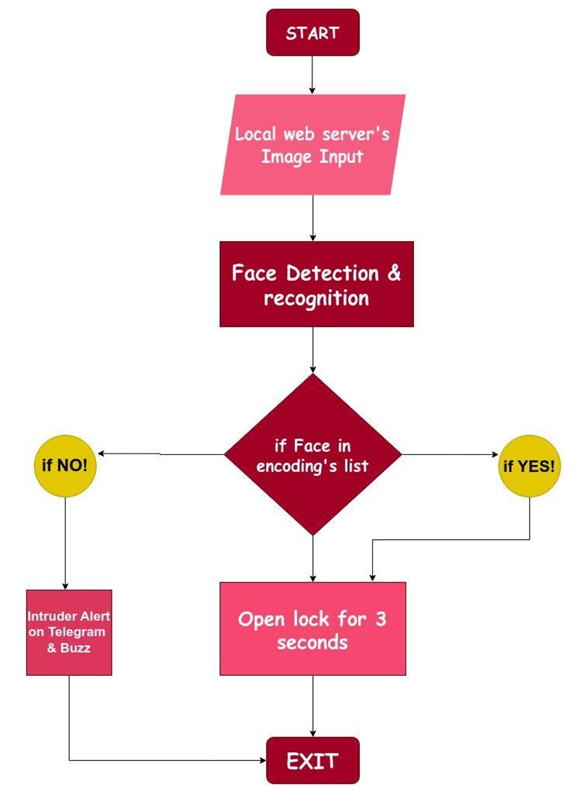
The face recognition is carried out using face_recognition python library, built using dlib's state-of-the-art face recognition built with deep learning. The model has an accuracy of 99.38% on the Labeled Faces in the Wild benchmark.
The library uses a convolutional neural network (CNN) or a Histogram of Oriented Gradients (HOG) model to detect faces in an image. It identifies the coordinates of bounding boxes for each detected face.
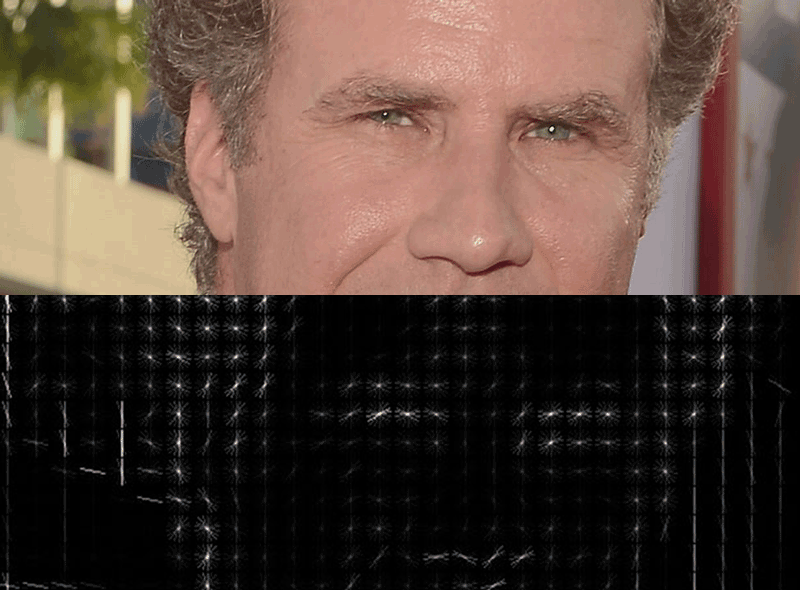
A detected face is transformed into a high-dimensional numerical representation called a "face encoding." This is achieved by analyzing the unique facial features and extracting a fixed-length vector for each face.

The library can compare face encodings to determine similarity. This is achieved using distance metrics such as Euclidean distance.
If the distance between two face encodings is below a certain threshold, the faces are considered a match.
The library allows maintaining a database of face encodings (representing known faces). Detected faces can be matched against this database to identify known individuals or flag unknown ones.
In conclusion, the face_recognition library simplifies implementing advanced face detection and recognition in Python, enabling applications such as security, access control, and surveillance. The project’s ability to send intruder alerts via Telegram and activate a buzzer enhances its utility as a reliable security system. Its modular design, including Python-based GUIs and a streamlined workflow, makes it a practical and scalable solution for modern smart security needs.
The enhanced version introduces real-time object detection and a Flask web application:
.png?versionId=LbM7ji4qyPx.e9z26a2Vzq5b8sVQ7CX9&Expires=1792775338&Key-Pair-Id=K3EVG0QTJR4SK0&Signature=N798dTftp8JeiiJS~wGO~1VZaV9EH3z6dBSOReM77b3ChSZnXnnrfqEL08mWB47o47xW~jIfrd-BQyntfuBe4ZroH0PhtGp0tstEGmX3rD5-mL2~HSv~Bfs101Jr-7W7jYNpUzdgXSAYZTdHZKh7xnignXPiDs6yDAFYAvSF~qdXM9Yb8CqHkRMTMxP8Q5c3jhW02j1Q4KgoXm~aGjo9DqczlPca8andtV3airMPDmGI2CZ~eHcEWUZMM9zmwsSxrJ38MZtdo3QBe1A50fYd54zGRAALeCaKOiRWE-sHkjHEDqb1Pto4AR5EMqX-e1n3fKbIVB6V9frZf3zMZeQ~EA__)
.png?versionId=mGaB4c2ye7JTSJNwfR4h5q5NAx.EKQEs&Expires=1792775338&Key-Pair-Id=K3EVG0QTJR4SK0&Signature=lC1idXx5GRx7RXPwLVR~t0Ygd7lDgT5dmijSdDPLfprTiUpDWbNA6~AVR-9d9UnOFr3L4RWB6Yi2OMrwOu97oKiVTTceJEbK~nyGBIcJ67MpkC4b9A3s4a82PuP8Vi6U1rUzy5XXJqCrCj~G8JLisFDSFFeZn5NRSNjqzCyn2sHAWNRHcp5qpk-FOpdenzOY8cZUEbi-F96J0wO-jhDOq08F0jgRkwAVZgqRZs8kv4S0Wq0BhSI8qeSYH10zuqygT7U2kESF5ZlWB19bARCngJztoAr8TK4Q3EryOhv24qqS5dixW2qBCgUjIBc3kNUAWFYfRQhRQ4JvpooXTwdQkQ__)
def generate_frames():
    global continuous_zeros, last_notification_time

    while True:
        try:
            # Capture the image from the ESP32-CAM's URL
            img_response = urllib.request.urlopen(url)
            img_np = np.array(bytearray(img_response.read()), dtype=np.uint8)
            frame = cv2.imdecode(img_np, -1)

            # Convert the frame to RGB for processing
            image_rgb = cv2.cvtColor(frame, cv2.COLOR_BGR2RGB)

            # Detect faces in the frame using MediaPipe Face Detection
            with mp_face_detection.FaceDetection(
                model_selection=0, min_detection_confidence=0.5) as face_detection:
                results = face_detection.process(image_rgb)

                # Initialize flags for recognized and unknown faces
                recognized = False
                unknown = False

                if results.detections:
                    for detection in results.detections:
                        bboxC = detection.location_data.relative_bounding_box
                        ih, iw, _ = frame.shape
                        x, y, w, h = (int(bboxC.xmin * iw), int(bboxC.ymin * ih),
                                      int(bboxC.width * iw), int(bboxC.height * ih))

                        # Crop and resize the face region for face recognition
                        face_image = frame[y:y+h, x:x+w]
                        if face_image.shape[0] > 0 and face_image.shape[1] > 0:
                            imgS = cv2.resize(face_image, (0, 0), None, 0.25, 0.25)
                            imgS = cv2.cvtColor(imgS, cv2.COLOR_BGR2RGB)
                            facesCurFrame = face_recognition.face_locations(imgS)
                            encodesCurFrame = face_recognition.face_encodings(imgS, facesCurFrame)

                            for encodeFace, faceLoc in zip(encodesCurFrame, facesCurFrame):
                                matches = face_recognition.compare_faces(encodeListKnown, encodeFace)
                                if any(matches):
                                    recognized = True
                                    name = classNames[matches.index(True)]
                                    # Draw bounding box and label for recognized face
                                    y1, x2, y2, x1 = [v * 4 for v in faceLoc]
                                    y1 += y; x2 += x; y2 += y; x1 += x
                                    cv2.rectangle(frame, (x1, y1), (x2, y2), (0, 255, 0), 2)
                                    cv2.putText(frame, name, (x1 + 6, y2 - 6),
                                                cv2.FONT_HERSHEY_SIMPLEX, 1, (255, 255, 255), 2)
                                else:
                                    unknown = True
                                    # Draw bounding box for unknown face
                                    cv2.rectangle(frame, (x, y), (x + w, y + h), (0, 0, 255), 2)

            # Determine the displayed text based on face recognition
            if recognized or not unknown:
                displayed_text = "1"
                continuous_zeros = 0
            else:
                displayed_text = "0"
                continuous_zeros += 1

            # Trigger notifications if no faces are detected for a certain duration

            if continuous_zeros >= 9:  # Approximately 3 seconds (3 frames/sec)
                current_time = datetime.datetime.now()
                if last_notification_time is None or (current_time - last_notification_time).total_seconds() >= 15:
                    last_notification_time = current_time
                    trigger_buzzer()
                    lock_door()
                    send_notification("Motion Detected!",
                                      "Someone has entered the frame. Check the link for details:\n\n"
                                      "https://mohittalwar23.github.io/PythonSystemTest/")

            # Overlay text and timestamp on the frame
            cv2.putText(frame, displayed_text, (10, 30),
                        cv2.FONT_HERSHEY_SIMPLEX, 1, (0, 0, 255), 2)
            timestamp = datetime.datetime.now().strftime("%Y-%m-%d %H:%M:%S")
            cv2.putText(frame, timestamp, (frame.shape[1] - 300, 30),
                        cv2.FONT_HERSHEY_SIMPLEX, 0.6, (0, 0, 255), 2)

            # Encode and yield the frame as a JPEG stream
            _, buffer = cv2.imencode('.jpg', frame)
            frame = buffer.tobytes()
            yield (b'--frame\r\nContent-Type: image/jpeg\r\n\r\n' + frame + b'\r\n')

        except Exception as e:
            print(f"Error: {e}")
Haar Cascades are machine learning object detection algorithms used to identify objects in images or videos. The technique was introduced by Paul Viola and Michael Jones in their 2001 research paper Rapid Object Detection using a Boosted Cascade of Simple Features. The algorithm uses a cascade function trained from a lot of positive and negative images to detect objects, primarily faces.
It works in stages, where each stage applies increasingly complex filters to identify the features of the object of interest.
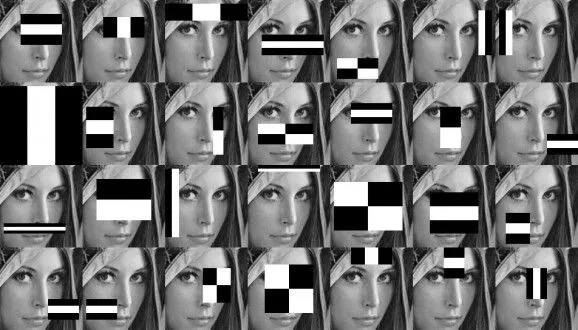
In this project, we'll combine Haar Cascades for face detection and face recognition using the face_recognition library. The system will recognize known individuals and trigger a response if an unknown face is detected.
For more information on Haar Cascades, check the following free resources:
By incorporating features such as real-time object detection, live video streaming, automated alerts, and door-locking mechanisms, this project provides a comprehensive solution for modern security needs. The detailed implementation steps and modular design make it a great resource for learning and extending into advanced AI-powered applications.
The MK-2 version of CamVisioTech moves beyond conventional surveillance by leveraging Edge AI for on-device processing. Unlike earlier iterations, it focuses on executing models locally, enhancing privacy, reliability, and efficiency, even in low-bandwidth environments.
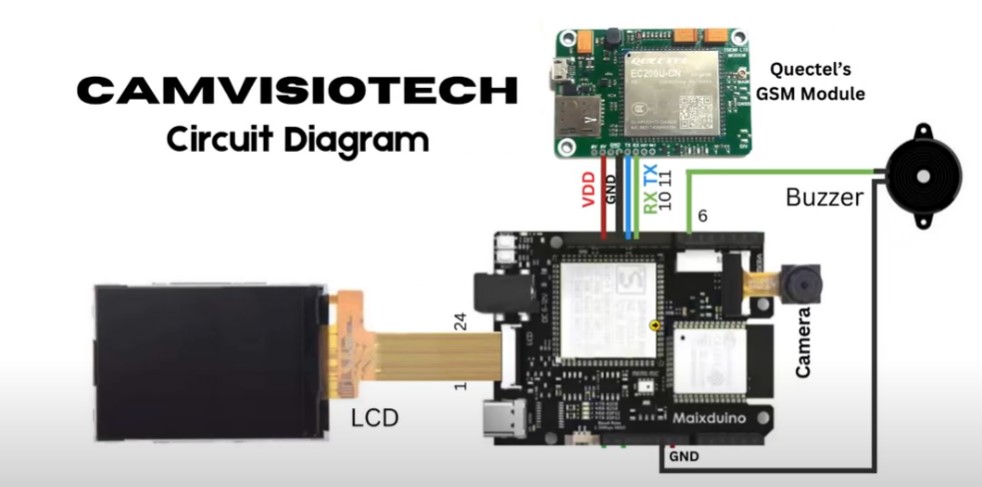
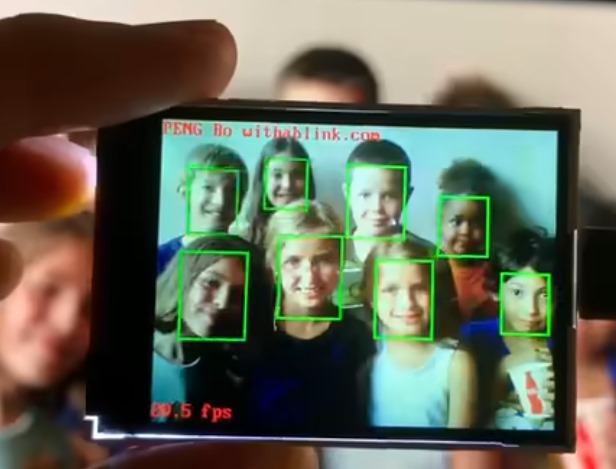
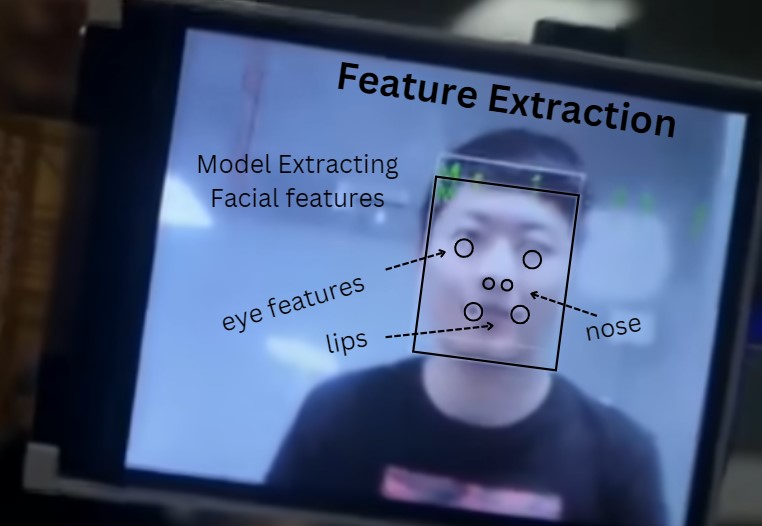
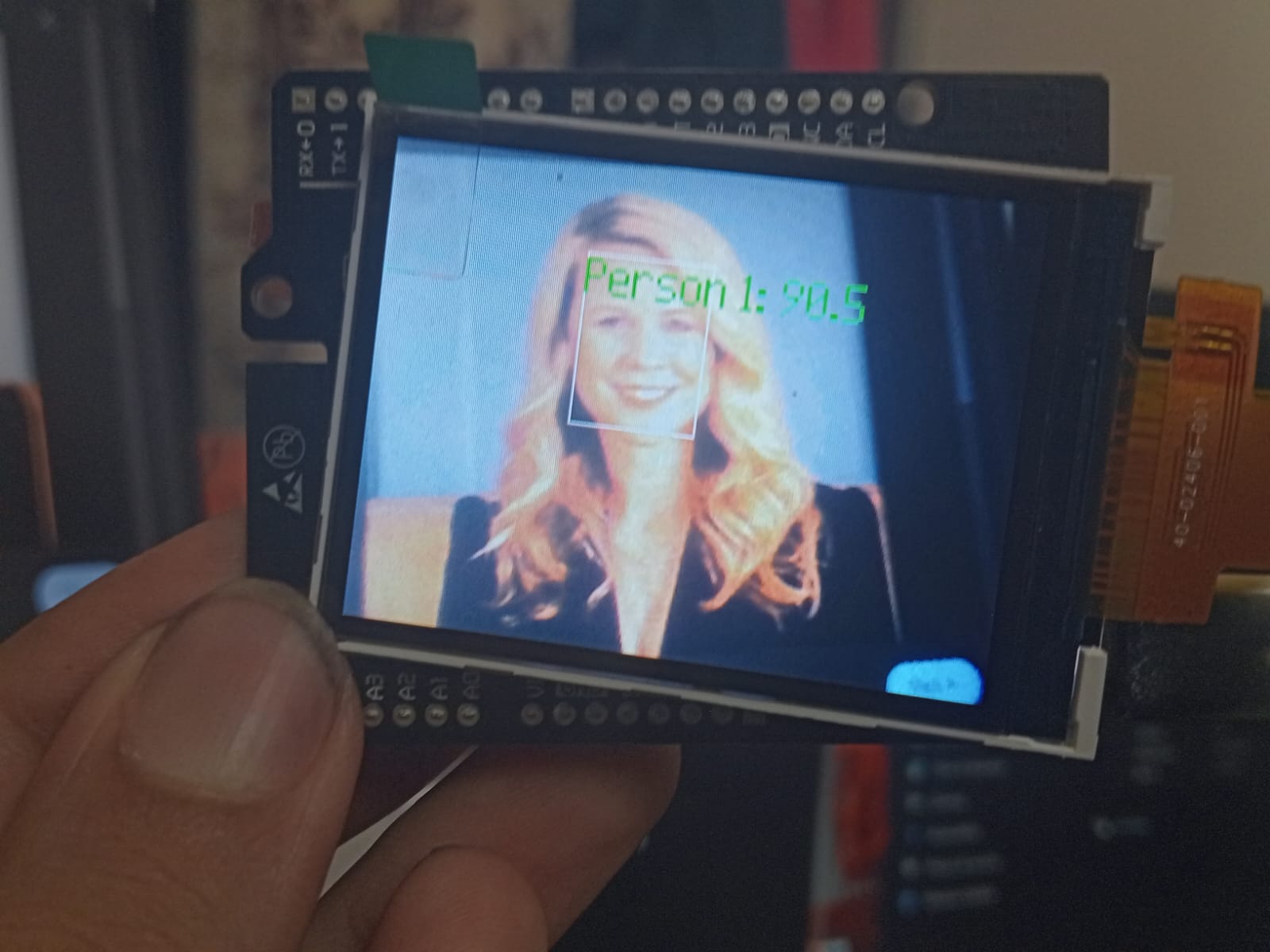
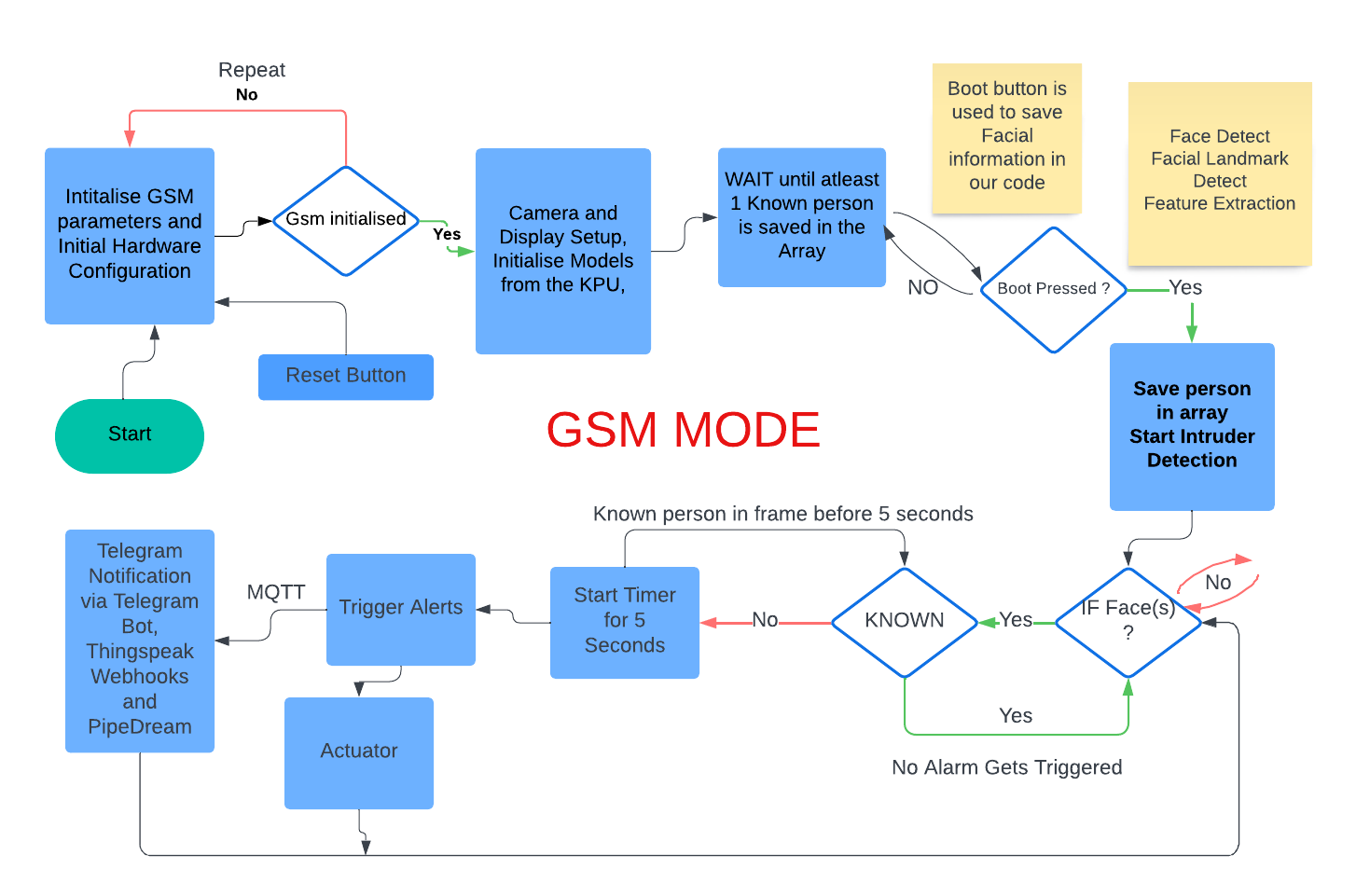
The Maixduino Kit, which includes an AI-capable microcontroller and camera, functions as the primary processing unit. It utilizes three core .smodel files trained via MaixHub.com—a model for Face(s) Detection, a model for Face Landmark Detection, and Feature Extraction. These models process and identify known faces, storing features as recognized persons (e.g., "Person 1," "Person 2") in arrays for rapid matching. The setup allows for the simultaneous recognition of multiple faces, enabling quick identification of individuals stored in the system.
When an unrecognized person (not in the known faces array) is detected, the system categorizes them as an intruder. It triggers an immediate response, such as sounding a buzzer or activating an LED indicator. The system is also capable of relay control which also allows integration with other actuators, such as door locks, providing instant, real-time physical security.
For reliable notifications, the system can use either Wi-Fi or GSM connectivity to send alerts, ensuring communication in areas with variable internet access. Integrating with third-party messaging apps, like Telegram. This multifaceted communication ensures that users are informed wherever they are, making the system suitable for both urban and remote applications.
The Maixduino Kit, which includes an AI-capable microcontroller and camera, functions as the primary processing unit. It utilizes three core .smodel files trained via MaixHub.com—a model for Face(s) Detection, a model for Face Landmark Detection, and Feature Extraction. These models process and identify known faces, storing features as recognized persons (e.g., "Person 1," "Person 2") in arrays for rapid matching. The setup allows for the simultaneous recognition of multiple faces, enabling quick identification of individuals stored in the system.