Abstract
This comprehensive tutorial demonstrates the development of a full-stack web application for American Sign Language (ASL) fingerspelling recognition. The system combines computer vision, machine learning, and modern web technologies to create an accessible platform that translates sign language gestures into text and speech. Using FastAPI for the backend, MediaPipe.js for real-time landmark detection, and ElevenLabs for text-to-speech synthesis, this application provides both file-based and live webcam recognition capabilities.
American Sign Language serves as the primary means of communication for over 500,000 people in North America. However, the communication barrier between deaf/hard-of-hearing individuals and hearing individuals remains significant. Recent advances in computer vision and machine learning have opened new possibilities for automated sign language recognition systems.
This tutorial presents a practical implementation of an ASL fingerspelling recognition system that bridges this communication gap. The application supports two input modalities: Parquet files containing pre-extracted landmark data and real-time webcam input for live recognition. The system then converts recognized text to speech, enabling seamless communication between sign language users and hearing individuals.
The application follows a modern client-server architecture:
The system requires the following components:
Python Dependencies:
pip install fastapi "uvicorn[standard]" python-multipart tensorflow numpy pandas pyarrow elevenlabs python-dotenv
Pre-trained Model Assets:
model.tflite: TensorFlow Lite model for ASL recognitioncharacter_to_prediction_index.json: Character-to-index mappinginference_args.json: Model feature column specificationsAPI Services:
The recommended project structure follows modern web application conventions:
asl_fastapi_app/
├── .env                                # Environment variables (API keys)
├── main.py                             # FastAPI application server
├── model.tflite                        # Trained ML model
├── character_to_prediction_index.json  # Character mappings
├── inference_args.json                 # Feature specifications
└── static/
    ├── index.html                      # Client-side interface
    ├── style.css                       # Styling and UI components
    └── script.js                       # Frontend logic and MediaPipe integration
The backend server handles multiple responsibilities including file processing, machine learning inference, and text-to-speech generation. The implementation follows RESTful API principles with clear separation of concerns.
Core Configuration:
from fastapi import FastAPI, File, UploadFile, HTTPException
from fastapi.responses import HTMLResponse
from fastapi.staticfiles import StaticFiles
import tensorflow as tf
import numpy as np
import pandas as pd

# Model constants from training notebook
LPOSE = [13, 15, 17, 19, 21]
RPOSE = [14, 16, 18, 20, 22]
POSE = LPOSE + RPOSE
FRAME_LEN = 128
Model Initialization:
The system loads the pre-trained TensorFlow Lite model and associated metadata during startup:
# Load auxiliary files
with open("character_to_prediction_index.json", "r") as f:
    char_to_num_orig = json.load(f)

# Initialize special tokens
pad_token, start_token, end_token = 'P', '<', '>'
char_to_num = char_to_num_orig.copy()
# Token index assignment logic...

# Load TFLite model
interpreter = tf.lite.Interpreter(model_path="model.tflite")
prediction_fn = interpreter.get_signature_runner("serving_default")
File Upload Processing (/predict_parquet):
This endpoint accepts Parquet files containing pre-extracted landmark data:
@app.post("/predict_parquet")
async def predict_parquet_endpoint(file: UploadFile = File(...)):
    # Validate file type
    if not file.filename.endswith('.parquet'):
        raise HTTPException(status_code=400, detail="Invalid file type")

    # Process Parquet data
    contents = await file.read()
    parquet_file = io.BytesIO(contents)
    df = pd.read_parquet(parquet_file)

    # Validate required columns
    if not all(col in df.columns for col in FEATURE_COLUMNS):
        missing_cols = [col for col in FEATURE_COLUMNS if col not in df.columns]
        raise HTTPException(status_code=400, detail=f"Missing columns: {missing_cols}")

    # Perform inference
    landmark_data = df[FEATURE_COLUMNS].values.astype(np.float32)
    output = prediction_fn(inputs=landmark_data)

    # Decode predictions
    prediction_logits = output['outputs']
    predicted_indices = np.argmax(prediction_logits, axis=1)
    prediction_str = "".join([num_to_char.get(int(idx), "") for idx in predicted_indices])

    # Generate speech
    audio_base64 = await generate_speech_audio(prediction_str)

    return {"prediction": prediction_str, "audio_base64": audio_base64}
Live Data Processing (/predict_live_data):
This endpoint processes real-time landmark data from the webcam:
class LandmarkFrame(BaseModel):
    landmarks: List[float]

class LiveDataInput(BaseModel):
    frames: List[LandmarkFrame]

@app.post("/predict_live_data")
async def predict_live_data_endpoint(live_data: LiveDataInput):
    # Extract landmark arrays
    frames_data = [frame.landmarks for frame in live_data.frames]
    landmark_data_np = np.array(frames_data, dtype=np.float32)

    # Validate data shape
    if landmark_data_np.shape[1] != len(FEATURE_COLUMNS):
        raise ValueError("Incorrect landmark data shape")

    # Perform inference and return results
    # ... (similar to parquet endpoint)
The system integrates with ElevenLabs API for high-quality speech synthesis:
from elevenlabs.client import ElevenLabs

async def generate_speech_audio(text_to_speak: str):
    if not elevenlabs_client or not text_to_speak.strip():
        return None

    try:
        audio_stream = elevenlabs_client.text_to_speech.convert(
            text=text_to_speak,
            voice_id="JBFqnCBsd6RMkjVDRZzb",
            model_id="eleven_multilingual_v2",
            output_format="mp3_44100_128",
        )

        # Collect stream into bytes
        audio_bytes_list = [chunk for chunk in audio_stream if chunk]
        audio_bytes = b"".join(audio_bytes_list)

        # Encode as base64 for JSON transmission
        return base64.b64encode(audio_bytes).decode('utf-8')
    except Exception as e:
        print(f"TTS Error: {e}")
        return None
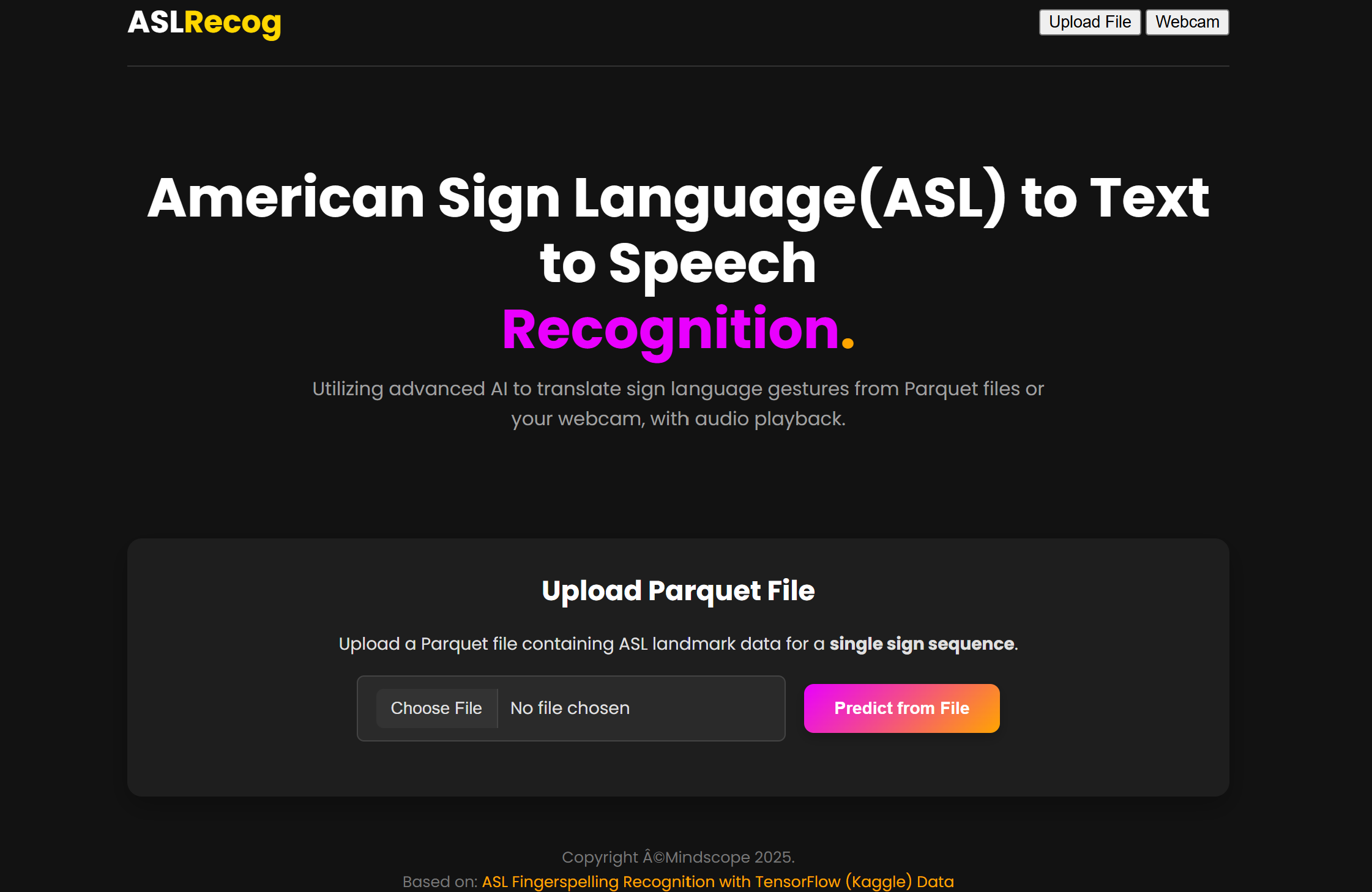
The frontend employs a modern, accessible design inspired by contemporary web applications. The interface features a dark theme with high contrast elements for better visibility and user experience.
HTML Structure:
<div class="main-container">
    <header>
        <div class="logo">ASL<span class="logo-accent">Recog</span></div>
        <nav>
            <button id="uploadModeBtnNav" class="nav-link active">Upload File</button>
            <button id="webcamModeBtnNav" class="nav-link">Webcam</button>
        </nav>
    </header>

    <div class="hero-section">
        <h1>ASL Fingerspelling<br><span class="agency-pink">Recognition</span></h1>
        <p class="hero-subtitle">
            Advanced AI-powered sign language translation with audio playback
        </p>
    </div>

    <!-- Mode-specific content sections -->
</div>
CSS Styling:
The styling system uses CSS Grid and Flexbox for responsive layout, with custom properties for consistent theming:
:root {
    --primary-bg: #121212;
    --secondary-bg: #1E1E1E;
    --text-primary: #E0E0E0;
    --accent-pink: #E900FF;
    --accent-orange: #FFA500;
}

.main-container {
    max-width: 900px;
    margin: 20px auto;
    padding: 20px;
    background-color: var(--primary-bg);
    color: var(--text-primary);
}
The application leverages MediaPipe.js for real-time hand and pose landmark detection:
Initialization:
// Initialize MediaPipe components
hands = new Hands({
    locateFile: (file) => `https://cdn.jsdelivr.net/npm/@mediapipe/hands/${file}`
});

hands.setOptions({
    maxNumHands: 2,
    modelComplexity: 1,
    minDetectionConfidence: 0.5,
    minTrackingConfidence: 0.5
});

pose = new Pose({
    locateFile: (file) => `https://cdn.jsdelivr.net/npm/@mediapipe/pose/${file}`
});
Landmark Processing:
function onResults(results) {
    const frameLandmarks = new Array(TOTAL_FEATURES).fill(NaN);

    // Process pose landmarks
    if (results.poseLandmarks) {
        POSE_LANDMARK_INDICES.forEach((poseIdx, i) => {
            if (results.poseLandmarks[poseIdx]) {
                frameLandmarks[offset + i] = results.poseLandmarks[poseIdx].x;
                // Store y and z coordinates...
            }
        });
    }

    // Process hand landmarks
    if (results.multiHandLandmarks) {
        results.multiHandLandmarks.forEach((landmarks, handIndex) => {
            const classification = results.multiHandedness[handIndex];
            const isRightHand = classification.label === 'Right';
            // Process individual landmarks...
        });
    }

    // Store frame for batch processing
    if (isCapturing) {
        landmarkFrames.push({ landmarks: frameLandmarks });
    }
}
The system implements a sophisticated capture mechanism for live webcam input:
const CAPTURE_DURATION_MS = 3000;
const CAPTURE_FPS = 20;

async function captureAndPredict() {
    isCapturing = true;
    landmarkFrames = [];

    setTimeout(async () => {
        isCapturing = false;

        if (landmarkFrames.length > 0) {
            const validFrames = landmarkFrames.filter(
                frame => frame.landmarks.length === TOTAL_FEATURES
            );

            const payload = { frames: validFrames };
            await performPrediction(payload, '/predict_live_data');
        }
    }, CAPTURE_DURATION_MS);
}
The recognition system utilizes a TensorFlow Lite model optimized for mobile and web deployment. The model architecture processes sequential landmark data through:
The system extracts 543 features per frame:
# Feature extraction configuration
LPOSE_INDICES = [13, 15, 17, 19, 21]  # Left arm pose points
RPOSE_INDICES = [14, 16, 18, 20, 22]  # Right arm pose points
NUM_HAND_LANDMARKS = 21
TOTAL_FEATURES = (NUM_HAND_LANDMARKS * 2 + len(POSE_INDICES)) * 3
The prediction process follows these steps:
MediaPipe Processing:
Memory Management:
// Efficient landmark storage
const landmarkFrames = [];
const MAX_FRAMES = CAPTURE_DURATION_MS / 1000 * CAPTURE_FPS;

// Clear previous data before new capture
function resetCapture() {
    landmarkFrames.length = 0; // Efficient array clearing
    isCapturing = false;
}
Model Loading:
API Response Optimization:
# Efficient JSON serialization
return {
    "prediction": prediction_str,
    "audio_base64": audio_base64 if audio_base64 else None
}
File Upload Validation:
# Comprehensive file validation
if not file.filename.endswith('.parquet'):
    raise HTTPException(status_code=400, detail="Invalid file type")

# Column validation
if not all(col in df.columns for col in FEATURE_COLUMNS):
    missing_cols = [col for col in FEATURE_COLUMNS if col not in df.columns]
    raise HTTPException(status_code=400, detail=f"Missing columns: {missing_cols}")
Real-time Data Validation:
// Client-side validation
const validFrames = landmarkFrames.filter(frame => {
    return frame.landmarks.length === TOTAL_FEATURES &&
           !frame.landmarks.every(val => isNaN(val));
});

if (validFrames.length === 0) {
    throw new Error("No valid landmark data captured");
}
The system implements comprehensive error handling across all components:
Backend Error Responses:
try:
    # Model inference
    output = prediction_fn(inputs=landmark_data)
except Exception as e:
    raise HTTPException(
        status_code=500,
        detail=f"Model inference failed: {str(e)}"
    )
Frontend Error Display:
// User-friendly error messages
function displayError(message) {
    errorMessage.textContent = `Error: ${message}`;
    statusMessage.textContent = 'Operation failed.';
    resetUI();
}
Environment Setup:
# Create project directory
mkdir asl_fastapi_app && cd asl_fastapi_app

# Install dependencies
pip install -r requirements.txt

# Set up environment variables
echo "ELEVENLABS_API_KEY=your_api_key_here" > .env

# Run development server
uvicorn main:app --reload --host 0.0.0.0 --port 8000
Security:
Performance:
Scalability:
Model Enhancements:
User Experience:
Enhanced Accessibility:
This tutorial has demonstrated the complete development process for an ASL fingerspelling recognition web application. The system successfully combines modern web technologies, computer vision, and machine learning to create an accessible communication tool.
The application's modular architecture allows for easy maintenance and feature expansion, while the comprehensive error handling ensures robust operation across various user scenarios. The integration of text-to-speech functionality significantly enhances the system's practical value for real-world communication scenarios.
Future development should focus on expanding recognition capabilities beyond fingerspelling to include common ASL phrases and gestures, ultimately creating a more comprehensive sign language translation platform.
This implementation serves as a foundation for more advanced sign language recognition systems and demonstrates the potential of web-based AI applications in bridging communication barriers.
References
Source Code Availability
Complete source code and documentation are available Here, including setup instructions, deployment guides, and example datasets for testing and development.