



⬅️ Previous - Agentic AI Use Cases
➡️ Next - Agents vs Workflows
In the previous lessons, you learned what agentic AI is: systems that can plan, reason, use tools, and adapt to accomplish goals. You explored their core components—LLMs, tools, and memory—and saw how they show up in real systems like research assistants, coding agents, and customer support bots.
Now comes the practical question: How do you actually build these systems?
This lesson is your map of the agentic AI ecosystem. We’ll look at the tools and frameworks that turn those concepts into working applications—from low-level API calls to orchestration frameworks, from LLM providers to vector databases, and from testing to monitoring.
This isn’t a catalog. It’s a navigation guide. By the end, you’ll know which categories of tools solve which problems, how they fit together, and how to make architectural choices that won’t come back to bite you later.
So far, you’ve seen that agentic AI systems combine two things:
You’ve also seen what these systems look like in practice: agents that search the web, write and debug code, retrieve internal knowledge, and take action on a user’s behalf.
The missing piece is tooling.
Once you start building, you quickly run into a crowded and fast-moving landscape. There are dozens of frameworks, SDKs, platforms, and services—each operating at different levels of abstraction and making different tradeoffs.
Should you build directly on provider APIs or use a framework? Which orchestration tools give you flexibility versus speed? When does it make sense to use managed services instead of running things yourself?
That’s where this lesson comes in.
We won’t dive into implementation details yet—that’s what the rest of the program is for. Instead, we’ll step back and organize the ecosystem into clear categories, focusing on what each category is for and what to consider when choosing tools within it.
The goal isn’t to memorize names. It’s to build a mental map that helps you navigate the ecosystem confidently—even as the tools themselves continue to evolve.
Let’s break it down.
Before we dive in, here's a helpful mental model.
The tools in the agentic AI ecosystem fall into two tiers:
Core categories are the building blocks. These are essential for constructing agentic systems: orchestration frameworks, LLM providers, tools, and memory layers. You can't build a functional agent without addressing each of these.
Supporting categories are what you need to deploy and maintain systems in the real world: evaluation frameworks, testing and safety tools, observability platforms. You can build without these initially, but you can't ship to production responsibly without them.
We'll start with the core categories—focusing most deeply on orchestration, since that's where your biggest architectural decisions happen—then move through the supporting tools that round out your development workflow.
This is where it all begins: deciding how to actually build and control your agentic system.
Orchestration is the logic that coordinates your LLM, tools, and memory into a coherent workflow. It's the code that decides when to call the LLM, when to use a tool, when to retrieve from memory, and how to handle the results.
The interesting part? You can build this orchestration at radically different levels of abstraction.
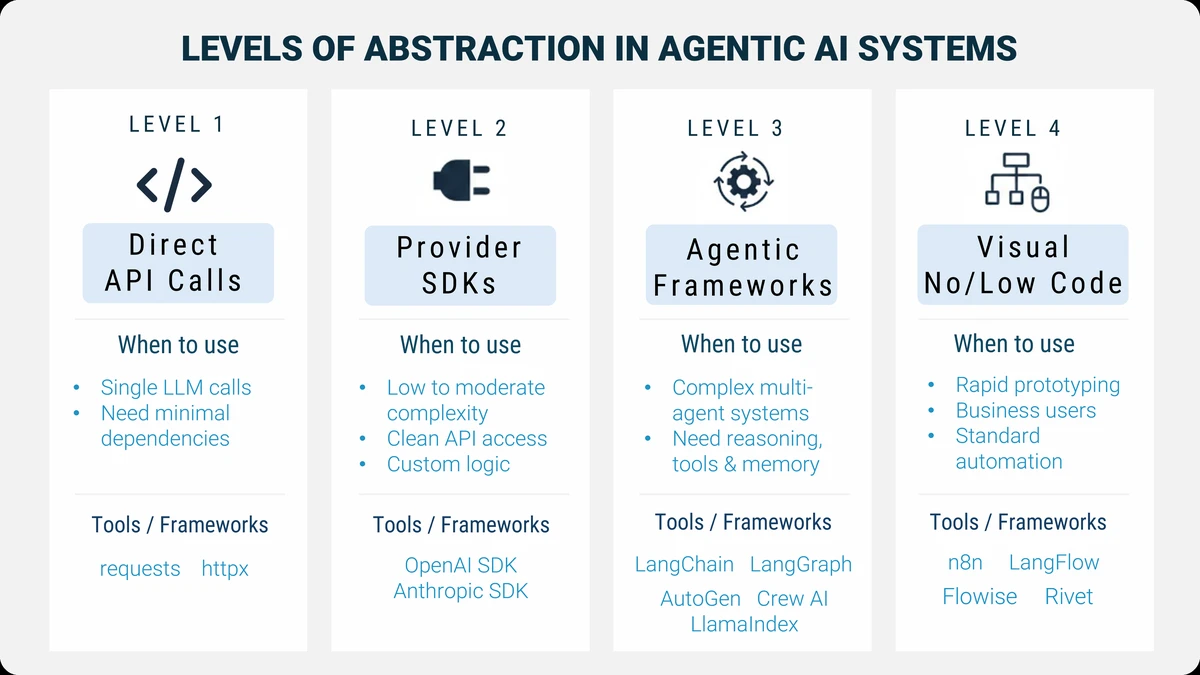
At the lowest level, you're making raw HTTP requests and writing every bit of control logic yourself. At the highest level, you're dragging boxes in a visual interface and letting the platform handle the details.
Neither is inherently better. The right choice depends on what you're building, who's building it, and what constraints you're working under.
Let's walk through the spectrum.
Start at the absolute foundation: calling LLM APIs directly using libraries like requests or httpx.
Here's what this looks like:
import requests

response = requests.post(
    "https://api.openai.com/v1/chat/completions",
    headers={"Authorization": f"Bearer {api_key}"},
    json={
        "model": "gpt-4",
        "messages": [{"role": "user", "content": "What's the weather in Paris?"}]
    }
)

result = response.json()
print(result['choices'][0]['message']['content'])
Simple, right? You send a request, get a response, done.
What you get: Complete control. Zero dependencies beyond an HTTP client. You decide exactly how requests are structured, how responses are parsed, and what happens next.
What you build: Everything. Orchestration logic? You write it. State management across turns? You implement it. Tool integration? You code the entire flow. Error handling, retries, logging? All yours.
When to use this
This approach shines in two common scenarios:
Very simple use cases
If your entire task is something like “send a prompt, get a response, return it to the user,” higher-level agentic frameworks are unnecessary overhead. A single API call is often clearer, faster to implement, and easier to reason about.
Lightweight integrations where dependencies matter
Sometimes you’re integrating LLM functionality into an existing open-source library, CLI tool, or backend service—and you want to keep the dependency footprint small. Agentic frameworks can pull in a large dependency tree. In those cases, a direct API call keeps things lean and avoids unnecessary bloat.
This level is also valuable for learning. Working directly with the API helps you understand what higher-level tools are abstracting away.
The tradeoff
This approach doesn’t scale well. As soon as you need conversation memory, branching logic, tool calling, retries, or multi-step reasoning, you’ll start re-implementing patterns that orchestration frameworks already solved. That’s usually the signal to move up the abstraction ladder.
One level up: using official SDKs from LLM providers like OpenAI, Anthropic, or Google.
from openai import OpenAI

client = OpenAI(api_key=api_key)

response = client.chat.completions.create(
    model="gpt-4",
    messages=[{"role": "user", "content": "What's the weather in Paris?"}]
)

print(response.choices[0].message.content)
What you get: A cleaner interface with type safety, helper methods, and better error handling. SDKs handle authentication, request formatting, and response parsing. You work with Python objects, not raw JSON.
What you still build: All the orchestration. If you want your agent to maintain conversation history, decide when to use tools, or manage multi-turn workflows, you're writing that logic from scratch.
When to use this: When you're building custom solutions that don't fit standard framework patterns, when you need provider-specific features, or when you want more control than frameworks offer but don't want to deal with raw HTTP.
The pattern: This is common for production systems where teams have specific orchestration needs. You get a clean API without framework overhead, but you own the complexity of state, flow control, and integration.
This is where most production agentic systems are built: using frameworks designed specifically for LLM orchestration.
These frameworks handle the hard parts of agentic systems for you—state management, tool integration, memory, retries, and debugging—while still giving you the flexibility to define custom behavior.
Examples include LangChain, LangGraph, LlamaIndex, AutoGen, Pydantic AI, OpenAI Agents SDK, and CrewAI.
from langgraph.graph import StateGraph, END

def should_continue(state):
    return "search" if "weather" in state["messages"][-1].content else END

workflow = StateGraph()
workflow.add_node("agent", call_llm)
workflow.add_node("search", search_tool)
workflow.add_conditional_edges("agent", should_continue)
workflow.add_edge("search", "agent")

app = workflow.compile()
If this code feels unfamiliar or intimidating, that’s completely normal.
Frameworks like LangGraph operate at a fairly low level of abstraction and come with a real learning curve. In this program, you don’t need to understand this code in detail. We won’t be diving into LangGraph implementation here.
LangGraph and similar frameworks are covered in depth in the Mastering AI Agents program. The example is included here simply to give you a sense of what “code-first orchestration” looks like — and why these tools are powerful, but also more technical.
For now, focus on the idea: orchestration frameworks give structure to complex agent behavior. You’ll learn to work at a higher, more approachable level in this program.
What you get
Built-in orchestration patterns, managed state, simplified tool usage, and better visibility into how your agent behaves. These frameworks give structure to systems that would otherwise become tangled scripts.
What you build
Your domain logic: what the agent should do, which tools it can use, how decisions are made, and how outputs are interpreted. The framework handles how execution flows; you define what flows through it.
When to use this
Whenever your system goes beyond a single prompt-response loop. If you need multi-step reasoning, memory, branching logic, or tool usage, orchestration frameworks quickly pay for themselves.
Although agentic frameworks listed above under Level 3 live in the same category, they don’t all feel the same to work with.
The biggest difference isn’t capability — it’s how much abstraction they introduce, and how opinionated they are about how agents should be built.
Some frameworks emphasize fine-grained control:
Others raise the abstraction level by being more opinionated:
At the highest level of abstraction are tools that replace code with visual workflows.
Platforms like n8n, Rivet, Langflow, Flowise, Vellum, and Chatbase let you assemble agent-like systems by connecting blocks—search, summarize, retrieve, send email—using a drag-and-drop interface.
Imagine wiring together a web search block, a summarization block, and a notification block. The platform handles execution, retries, and integrations behind the scenes.
What you get
Very fast iteration, visual clarity, easy demos, and accessibility for non-developers.
What you lose
Fine-grained control, deep customization, and flexibility once workflows become highly dynamic or stateful.
When to use this
Prototypes, internal tools, well-scoped automation, or situations where business users need to own the logic. These tools shine when speed and accessibility matter more than architectural control.
Example use case
A customer support bot with standard escalation paths. You define the flow visually, connect it to a knowledge base, and deploy. For straightforward scenarios, this can work extremely well.
So how do you decide?
Here's a decision framework based on five key factors:
Project complexity: A simple one-shot "generate response from prompt" task? Provider SDK or even raw calls might suffice. Multi-agent system with branching logic and memory? You want a framework.
Team skills: Python experts comfortable with state machines? Use LangGraph. Business analysts who need to own the logic? Consider a GUI tool.
Time and budget: Need an MVP in a week? High abstraction or no-code gets you there. Building for long-term production with evolving requirements? Invest in framework-level control.
Customization needs: Does your use case fit standard patterns (RAG Q&A, multi-agent research)? Frameworks handle this well. Do you have unique orchestration requirements that don't map cleanly to existing abstractions? You might need to drop down a level.
Long-term maintainability: Who will maintain this in six months? Will the system scale? Can new team members understand it? Higher abstraction can mean less code to maintain—but also less flexibility when requirements change.
There's no universal right answer. Many production systems actually use multiple levels: a framework for core orchestration, custom provider SDK calls for specific integrations, and maybe a GUI tool for internal admin workflows.
The key is matching the abstraction to the problem.
Watch this short video to clarify how to approach framework choices in Agentic AI, whether you're building a quick personal project or laying the foundation for long-term enterprise code.
You’ll explore how personal projects benefit from speed and flexibility, while company decisions demand maturity, support, and long-term thinking. Featuring real examples from industry and startup experience.
Your orchestration framework ultimately calls a language model.
But which model should you use — and how do you access it?
At a high level, the LLM landscape splits into two paths:
proprietary API services and open-weight models.
Understanding the difference is one of the most important architectural decisions you’ll make.
Proprietary providers offer fully managed models behind an API. You send requests, they handle training, scaling, optimization, and infrastructure. Pricing is typically usage-based.
Well-known examples include:
These models tend to lead on generalized capability and ease of use. You can start building immediately without worrying about GPUs, deployment, or model maintenance.
The tradeoff is control. You’re bound by the provider’s pricing, latency, data policies, and model availability. In many cases, your ability to fine-tune the model is limited or tightly constrained.
There’s also a data privacy consideration. Using proprietary APIs typically means sending your data outside your infrastructure to the provider’s servers. For many applications this is acceptable, but in regulated industries with strict data residency or privacy requirements, this can be a non-starter unless additional safeguards or enterprise agreements are in place.
If deep customization, full control over fine-tuning, or strict data privacy is a requirement, this is often where open-weight models become the better option.
Open-weight models make their parameters publicly available. You can run them yourself, fine-tune them, or deploy them on infrastructure you control.
Popular open-weight model families include:
These models are the foundation of much of the open agentic AI ecosystem.
Open-weight models don’t exist in isolation — they’re typically accessed through platforms that handle distribution and inference.
The most important is Hugging Face, which acts as the central hub for:
You’ll also encounter platforms like:
These platforms let you choose where you want to sit on the spectrum between convenience and control.
Choosing between proprietary and open-weight models usually comes down to a few recurring considerations:
Speed to get started
Proprietary APIs are fastest. Open models require more setup.
Cost at scale
APIs are simple but can become expensive. Self-hosting open models has upfront infrastructure costs but more predictable long-term pricing.
Privacy and control
Open-weight models give you full control over data and deployment — critical in regulated or sensitive environments.
Flexibility
Open models can be fine-tuned, swapped, or moved across providers without rewriting your system.
A common real-world pattern is to start with proprietary APIs while prototyping, then evaluate open-weight models once requirements around cost, privacy, or customization become clearer.
Throughout this program, you’ll see both approaches. The goal isn’t to pick a side — it’s to understand the tradeoffs well enough to make an informed choice for your system.
Agents aren't useful in isolation. They become powerful when they can use tools—search the web, query databases, call APIs, read files, run code.
There are three main categories here.
Search tools like Tavily, Serper, and DuckDuckGo give your agent internet access. Instead of being limited to training data, it can find current information, recent news, or domain-specific details from the web.
# Using Tavily for web search
from tavily import TavilyClient

tavily = TavilyClient(api_key=api_key)
results = tavily.search("latest developments in quantum computing")
Model Context Protocol (MCP) is a standardized way to connect tools to LLMs. Think of it like HTTP for AI tools—a common interface that any framework can use. Instead of writing custom integration code for every tool, you implement MCP once and it works everywhere.
Why this matters: MCP is becoming the standard. As more tools support it, your agents can plug into a growing ecosystem without custom code. It's early, but it's the direction the field is heading.
Custom tools are anything you build yourself—wrappers around your company's API, Python functions that process data, integrations with internal systems. Every framework makes it easy to define custom tools; the pattern is usually "give it a name, description, and function to call."
When choosing tools: Use existing ones when available—it's faster and they're battle-tested. Build custom tools when you need domain-specific functionality. Prefer MCP-compatible tools for future-proofing.
Agents need memory—not just the conversation history from the current session, but access to vast knowledge bases they can search semantically.
This is where vector databases come in. They store embeddings (numerical representations of text) and let your agent retrieve relevant information based on meaning, not just keyword matching.
Your options fall into three categories:
Managed cloud services like Pinecone and Weaviate handle everything. You send data, they index it, you query. Scaling, backups, optimization—all managed.
Self-hosted solutions like ChromaDB, FAISS, and Qdrant run on your infrastructure. More setup, more control.
PostgreSQL-based solutions like PGVector add vector search to your existing Postgres database. If you already run Postgres, this can be the simplest path.
How do you choose? Four key considerations:
Cost: Managed services charge per query and storage. Predictable, but can get expensive at scale. Self-hosted means infrastructure costs (servers, storage, maintenance) but lower per-query costs once you're big enough.
Privacy: Managed services mean your data leaves your infrastructure. For regulated industries (healthcare, finance) or sensitive content, self-hosting keeps everything internal.
Scalability: Managed services auto-scale. They're built to handle billions of vectors without you thinking about it. Self-hosted means you manage capacity, tune performance, and plan for growth.
Latency: Managed services add network overhead. Self-hosted can be faster if configured well—your database is local. But managed services have optimized infrastructure that might outperform a basic self-hosted setup.
We'll dive much deeper into vector databases and RAG systems later in the program. For now, understand that this layer is essential for agents that need to reference large knowledge bases.
The tools we've covered so far—orchestration, LLMs, tools, memory—are what you need to build agents.
The next set of tools is what you need to ship and maintain them in production.
Let's move through these more quickly. They're essential, but you don't need to master them on day one.
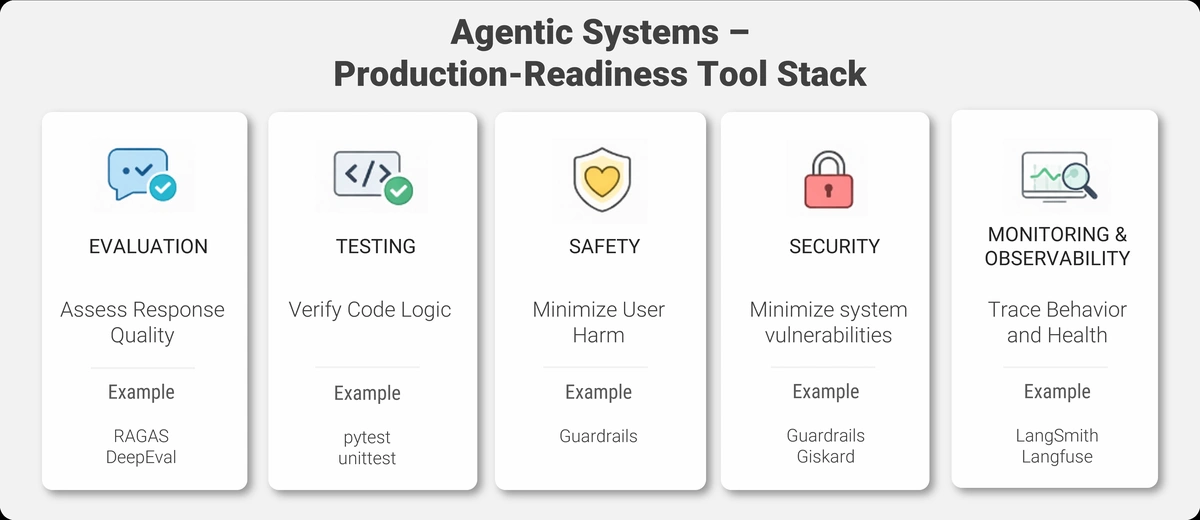
The next set of categories—evaluation, testing/safety, and observability—sit on the “make it reliable and production-grade” side of agentic AI.
These topics become increasingly important as systems grow in complexity and move closer to real users and real data.
In this Essentials program, we focus on where these pieces fit and why they matter, rather than hands-on implementation. Practical workflows for evaluation are covered next in Mastering AI Agents, and production-grade testing/safety/observability are covered in Agentic AI In Production.
For now, the goal is awareness: knowing which problems exist, and which categories of tools are designed to solve them.
Agentic systems aren't deterministic. The same input might yield different outputs. You can't just write traditional unit tests and call it done.
Evaluation frameworks like RAGAS and DeepEval help you measure quality, not just functionality.
RAGAS specializes in RAG systems. It measures things like faithfulness (does the answer match the source documents?), relevance (does the answer address the question?), and context precision (did we retrieve the right chunks?).
DeepEval is more general-purpose. You define custom metrics, compose evaluation pipelines, and build automated quality checks.
Why this matters: You need to know if changes improve or degrade your agent's performance. Evaluation lets you iterate confidently.
Traditional software testing catches bugs in code logic. But agentic systems have LLM-specific failure modes: hallucinations, prompt injections, biased outputs, data leakage.
You need a different testing stack.
pytest remains your foundation for standard unit and integration tests. It handles the code logic—does this function return the right value? Does this API call succeed?
Guardrails adds runtime safety validation. It enforces constraints on LLM outputs—format validation, content filtering, length limits. If the LLM tries to output something unsafe or incorrectly formatted, Guardrails catches it.
Giskard specializes in AI-specific security scanning. It detects vulnerabilities like prompt injection risks, data leakage, and bias in your models.
A practical approach: Use pytest for code. Add Guardrails for output validation. Run Giskard scans before deployment.
Safety and security are topics we'll return to extensively. They're not optional for production systems.
When your agent misbehaves in production, how do you figure out why?
You need visibility into what it's doing—and that requires tools from two different worlds.
AI-native observability platforms like LangSmith and Portkey are built for debugging agent behavior. They trace every step of your workflow, log every LLM call, show you the prompts and responses, and let you replay execution paths. When users report weird behavior, you can see exactly what the agent was thinking.
Traditional monitoring tools like Prometheus and Grafana track system health: CPU usage, memory, request latency, error rates. Essential for keeping your infrastructure running.
You need both. LangSmith tells you why the agent gave a bad answer. Prometheus tells you why the service went down.
During development, start with AI-native tools—they'll help you debug faster. In production, add traditional monitoring for infrastructure health. As your system matures, build dashboards that combine both views.
That’s the ecosystem.
You now have a mental map: orchestration frameworks at different abstraction levels, LLM providers with different tradeoffs, tools for extending agent capabilities, vector databases for memory, and supporting platforms for evaluation, testing, and monitoring.
Here’s the key takeaway: you don’t need to master all of this at once.
In practice, you’ll almost always be working at one of two levels:
Which one you choose depends on the nature of your project. Simple integrations or lightweight use cases often fit naturally at the SDK level. As soon as you need multi-step reasoning, memory, or tool usage, frameworks start to make sense.
If you’re unsure where to begin, pick the simplest approach that lets you make progress. Don’t overthink it. You can always move up the abstraction ladder later — and many real systems mix levels when needed.
Start small. Build something that works. Add complexity only when the problem demands it.
The rest of this ecosystem — evaluation, testing, observability — becomes important as your system matures. You don’t need everything on day one, but being aware of these categories early will save you time down the road.
Finally, remember that the tool landscape will keep changing. New frameworks will appear, existing ones will evolve, and standards like MCP will gain adoption. What stays stable are the categories and tradeoffs.
Master those, and you’ll be able to navigate confidently — regardless of which tools are popular next year.
You've now seen the landscape of tools and frameworks that make agentic AI practical.
In the next lesson, we'll tackle a critical strategic decision: Agents vs Workflows.
You'll learn when you actually need the full flexibility of an autonomous agent—and when a more deterministic workflow is smarter, simpler, and more reliable.
Not every problem needs agent-level autonomy. The next lesson will help you choose the right level of intelligence for your use case—and avoid over-engineering solutions that could be solved with simpler approaches.
Let's keep building your foundation.
⬅️ Previous - Agentic AI Use Cases
➡️ Next - Agents vs Workflows
