



Together-Agents is a set of Web AI Agents, currently it only consist of the webcrawler data analysis AI Agent and PPT Generator. It leverages Puppeteer for web scraping and together-ai free AI API's for scraped data analysis. The project is designed to support multiple routes providing a window to the web AI Agents.
Webcrawler can crawl to any url, extract data, and perform analysis on the collected information. The web crawler is mildly optimized, using puppeteer-extra plugins, random-useragents, simulating human behaviour and real browser and using open source available proxies to vist any site.
The web crawler leverages Puppeteer, a powerful headless browser automation tool, to navigate and extract data from web pages. The process involves several key steps and optimizations to ensure efficient and effective data extraction. Below is a detailed explanation of how the web crawler works, including the use of Puppeteer optimizations and the analysis of HTML content in chunks.
%%{init: {'theme':'base', 'themeVariables': {'background': '#ffffff', 'primaryColor': '#6baed6', 'edgeLabelBackground':'#ffffff', 'nodeBorder':'#005f87', 'clusterBkg':'#eaf2f8', 'secondaryColor':'#9ecae1'}}}%%

graph TD;
    A[Initialization] -->|Setup Puppeteer| B[Crawling a Link]
    B -->|Navigate to Page| C[Extracting HTML Content]
    C -->|Split into Chunks| D[Analyzing Chunks]
    D -->|Send to AI Model| E[Merging Results]
    E -->|Combine JSON Responses| F[Returning Final Data]

    subgraph Puppeteer Optimizations
        G1[Stealth Plugin] -->|Bypass Bot Detection| C
        G2[Random User-Agent] -->|Prevent Detection| C
        G3[Proxy Rotation] -->|Avoid IP Blocking| B
        G4[Request Interception] -->|Skip Unnecessary Resources| C
        G5[Human-Like Behavior] -->|Simulate Mouse & Scroll| B
        G6[Browser Verification Bypass] -->|Modify Navigator Properties| B
    end

    C -->|Chunk Processing| H[Processing Chunks Sequentially]
    H -->|Send to AI Model| D
    D -->|AI JSON Response| I[Sanitizing & Parsing JSON]
    I -->|Clean Data| E

    style A fill:#b3e5fc,stroke:#005f87,stroke-width:2px,color:#005f87;
    style B fill:#81d4fa,stroke:#005f87,stroke-width:2px,color:#005f87;
    style C fill:#4fc3f7,stroke:#005f87,stroke-width:2px,color:#005f87;
    style D fill:#29b6f6,stroke:#005f87,stroke-width:2px,color:#005f87;
    style E fill:#03a9f4,stroke:#005f87,stroke-width:2px,color:#ffffff;
    style F fill:#0288d1,stroke:#005f87,stroke-width:2px,color:#ffffff;
    style G1,G2,G3,G4,G5,G6 fill:#e1f5fe,stroke:#005f87,stroke-width:1px,color:#005f87;
    style H fill:#80deea,stroke:#005f87,stroke-width:2px,color:#005f87;
    style I fill:#26c6da,stroke:#005f87,stroke-width:2px,color:#ffffff;
Stealth Plugin:
puppeteer-extra-plugin-stealth is used to make Puppeteer less detectable by websites. This plugin helps in bypassing common anti-bot mechanisms.Random User-Agent:
random-useragent library is used to generate random user-agent strings, making it harder for websites to detect automated requests.Proxy Rotation:
fetchProxyList function and the launchBrowserWithProxy method.Request Interception:
Human-Like Behavior:
emulateHumanBehavior method introduces random mouse movements, scrolls, and clicks to mimic human behavior, further reducing the likelihood of being detected as a bot.Browser Verification Bypass:
bypassVerification method overrides various navigator properties to mimic a real browser, including webdriver, chrome, plugins, languages, platform, hardwareConcurrency, deviceMemory, userAgent, vendor, maxTouchPoints, connection, productSub, appVersion, product, appCodeName, and appName.The analysis.js file contains functions to process and analyze the HTML content extracted by Puppeteer. The key steps involved are:
Chunking HTML Content:
chunkContent function splits the HTML content into manageable chunks. This is necessary because the AI model used for analysis has a token limit, and splitting the content into smaller parts ensures that each part can be processed individually.Processing Chunks Sequentially:
analyze function processes each chunk sequentially. It sends each chunk to the AI model for analysis and collects the JSON responses.Merging JSON Responses:
mergeJsonObjects function merges the JSON responses from each chunk into a single JSON object. This ensures that the final output is a comprehensive representation of the extracted data.Sanitizing and Parsing JSON:
sanitizeAndParseJson function sanitizes the JSON responses from the AI model and parses them into JavaScript objects. This ensures that the data is in a usable format.Initialization:
PuppeteerService class is initialized with various settings, including proxy rotation, request interception, and human-like behavior emulation.Crawling a Link:
crawl method navigates to the specified link using Puppeteer. It handles retries with different proxies if the initial attempt fails.Extracting HTML Content:
crawl method extracts the HTML content of the page and splits it into chunks using the chunkContent function from analysis.js.Analyzing Chunks:
analyze function from analysis.js. The AI model extracts relevant information from each chunk and returns a JSON response.Merging Results:
mergeJsonObjects function from analysis.js.Returning Results:
The web crawler leverages Puppeteer to navigate web pages and extract HTML content. It uses various optimizations to avoid detection and improve performance. The extracted HTML content is split into chunks and analyzed using an AI model to extract relevant data. The results from each chunk are merged into a single JSON object, providing a comprehensive representation of the extracted data.
This approach ensures that the web crawler can efficiently and effectively extract data from web pages, even those with complex structures and anti-bot mechanisms.
Start the application:
npm start
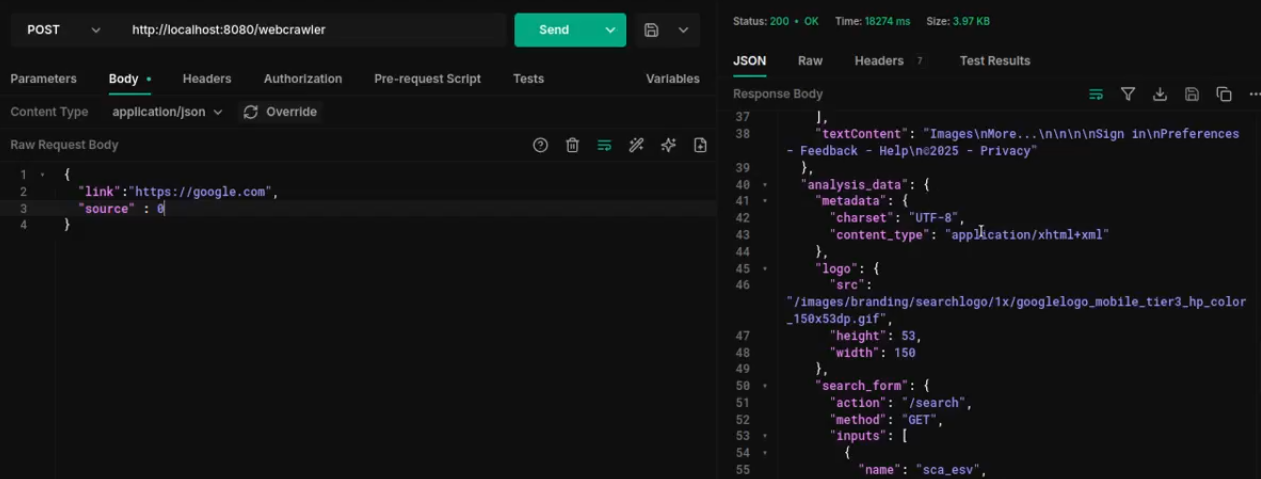
The application will start at port 8080. You can do a post request to the /webcrawler route with the following payload.
{
  "link":"https://example.com",
  "source" : 0, // 0 for Meta Llama 3.3 Turbo Instruct , 1 for DeepSeek R1
  "prompt": "Please extract the following data:"
}
The ppt_generator module is a powerful tool for generating PowerPoint presentations using AI models. It leverages the together-ai library for AI-driven content generation and the PptxTemplateEngine for creating presentation slides.
The ppt_generator module uses AI models to generate the structure and content of PowerPoint presentations. The process involves several key steps:
graph TD;
    A[Start] --> B[Initialize PPTGenerator];
    B --> C[Generate Schema];
    C -->|AI Model| D[Schema JSON Output];
    D --> E[Generate Slides];
    E -->|AI Model| F[Slide JSON Output];
    F --> G{Does Slide Need Image?};
    G -- Yes --> H[Generate Image];
    H -->|AI Model| I[Image Path Output];
    G -- No --> J[Skip Image Generation];
    I --> K[Assemble Presentation];
    J --> K;
    K -->|Using PptxTemplateEngine| L[Final PPTX Output];
    L --> M[Save PPT to Public Directory];
    M --> N[End];

    subgraph AI Process
        C
        E
        H
    end
Initialization:
PPTGenerator class is initialized with various settings, including the AI client, models, and system prompts.Generating Schema:
generateSchema method sends a prompt to the AI model to generate the overall structure of the presentation, including the number of slides and their types.Generating Slides:
generateSlide method generates the content for each slide based on the schema. It sends the slide title and description to the AI model, which returns a JSON object representing the slide's layout and content.Generating Images:
generateImage method generates images based on text prompts using the AI model. It returns the path to the generated image.Assembling the Presentation:
generatePresentation method assembles the slides into a final PowerPoint presentation using the PptxTemplateEngine. It handles the layout and formatting of each slide based on the JSON content generated by the AI model.Initialization:
PPTGenerator class is initialized with the AI client, models, and system prompts. It also sets up the template engine with the specified color scheme.Generating Schema:
generateSchema method sends a prompt to the AI model to generate the presentation schema. It returns a JSON object representing the structure of the presentation.Generating Slides:
generateSlide method generates the content for each slide based on the schema. It sends the slide title and description to the AI model, which returns a JSON object representing the slide's layout and content.Generating Images:
generateImage method generates images based on text prompts using the AI model. It returns the path to the generated image.Assembling the Presentation:
generatePresentation method assembles the slides into a final PowerPoint presentation using the PptxTemplateEngine. It handles the layout and formatting of each slide based on the JSON content generated by the AI model.The AI process involves several steps to generate the content for each slide:
Schema Generation:
Slide Generation:
Image Generation:
Presentation Assembly:
PptxTemplateEngine assembles the slides into a final PowerPoint presentation. It handles the layout and formatting of each slide based on the JSON content generated by the AI model.The ppt_generator module leverages AI models to generate PowerPoint presentations. It uses the together-ai library for AI-driven content generation and the PptxTemplateEngine for creating presentation slides. The module handles the initialization, schema generation, slide generation, image generation, and assembly of the final presentation.
This approach ensures that the ppt_generator module can efficiently and effectively generate PowerPoint presentations with AI-driven content.
Start the application:
npm start
The application will start at port 8080. You can do a post request to the /generate/ppt route with the following payload.
{
  "prompt": "Your presentation prompt"
}
public directory.Clone the repository:
git clone https://github.com/yourusername/together-agents.git
cd together-agents
Install the dependencies:
npm install
Set up environment variables:
Create a .env file in the root directory and add the necessary environment variables. For example:
API_KEY=TOGETHER_AI_API_KEY
The project uses the following dependencies:
dotenv: ^16.4.7express: ^4.21.2puppeteer: ^24.1.1puppeteer-extra: ^3.3.6puppeteer-extra-plugin-stealth: ^2.11.2random-useragent: ^0.5.0sqlite3: ^5.1.7 -> For future use cases 😀together-ai: ^0.13.0pptxgenjs: ^3.1.0Contributions are welcome! Please follow these steps: